How to bind phrase in CS2
Author: Hawk Live LLC
Last updated:
Effective communication is the path to a team's success in CS2. Messages in the game can be made unique, conveying additional meanings.
CS2 success can be achieved through effective communication. At the same time, it is possible to make messages in games unique and give them extra sense. As long as you don't consider any individual players’ skill level or proficiency per se, team cooperation is the most crucial part of playing this game. There are times when delivering information to your team allows gaining several precious seconds or even an entire match.
From this guide, you will learn how to quickly and effectively bind the necessary phrases in Counter-Strike 2.
Why Binding Phrases in CS2 Matters
Even if you have a microphone, the desire to speak, and the time, it's still better to consider binds for phrases.
You can quickly convey important information to your team and also distract the opponent, applying psychological pressure. Moreover, a simple button press is a more mechanical gesture than engaging in voice communication or having a conversation with another person.
Do not worry about those uttered words and whether anyone heard you speaking them. Also, forget that your teammates will be disturbed by your speech. In certain situations, a brief silent phrase in the bottom-left corner of the screen may be more beneficial for your team than nervous voice mixed with half-heard teammate’s shout trying to determine where the bomb was planted. This way, you are able to focus on playing while enabling your teammates do the same. Btw, there also exists general chat in game.
How to Bind a Phrase for Team Chat in CS2
Phrases should reflect your gaming experience. If no round passes without your smoke grenade or Molotov cocktail, consider keys that alert your teammates to this responsibility. If you often lose in the beginning but sometimes make a comeback, bind encouraging text to your team.
Activate the console in the game by pressing the tilde key (~).
If the console is not active, refer to our comprehensive guide on activation to ensure the console window is functional.
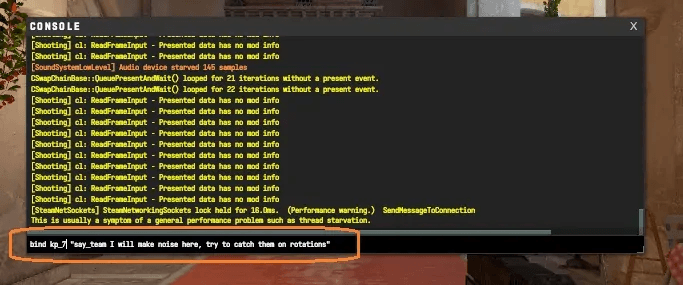
Enter or copy the following text: ' bind [ KEY ] "say_team [ MESSAGE ]" and replace KEY and MESSAGE with the desired key and text, respectively; then press Enter.
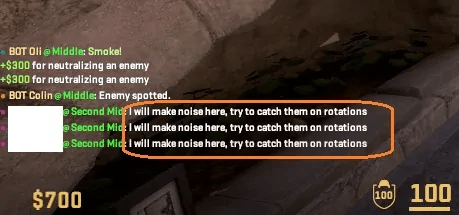
To confirm, check the message in any game mode by pressing the selected key.
How to Bind a Phrase for General Chat
To bind a phrase visible to everyone in the general chat, use the same command as before but without the word "team", i.e., bind [ KEY ] "say [ MESSAGE ]".
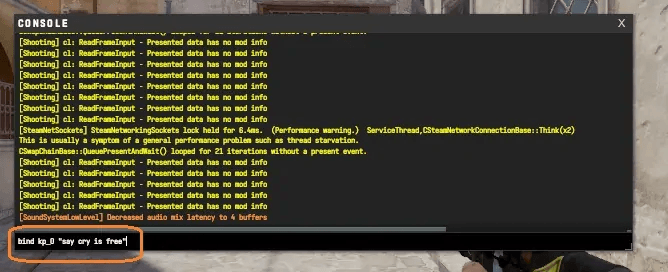
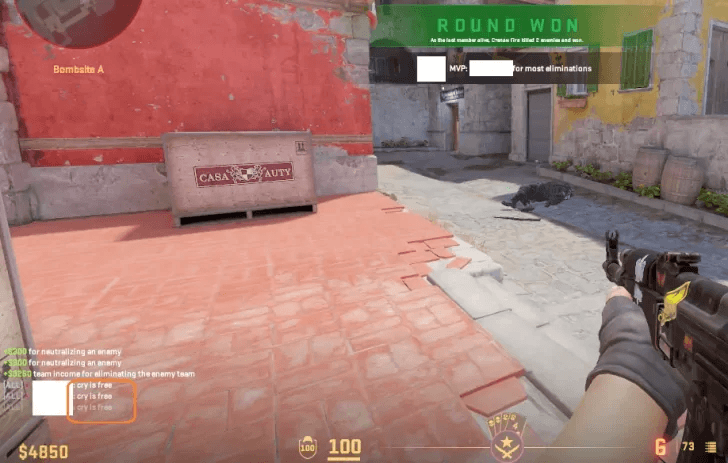
Upon pressing the bound key, the message will be displayed on the screen.
How to Disable Binds for Phrases in CS2
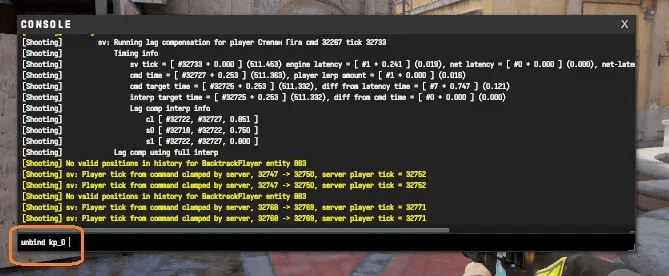
Players can reassign or delete binds for phrases. To remove any bind, access the console again.
Enter unbind [ KEY ] into the console. Unfortunately, each key must be removed individually by entering the command for each.
Useful Binds and Phrases for Chat in CS2
Now let's explore which phrases to bind to which keys. While there's no universal recipe, players are advised to bind keys they don't commonly use.
Some players prefer trolling, jokes, and spam to distract opponents. In our table, we'll showcase useful messages and corresponding keys that players can customize to their liking. The suggested messages can easily be modified by inserting personal text in place of ours.
Key | Phrase |
Num Lock | |
/ | bind kp_slash "say free shout" |
* | bind kp_multiply "turn off cheats" |
- | bind kp_minus "say lucky shot" |
7 | bind kp_7 "say_team don't shoot, let's stab him" |
8 | bind kp_8 "say_team come back, they're all here" |
9 | bind kp_9 "say_team need help, they're rushing" |
+ | bind kp_plus say_team Bomb planted! |
4 | bind kp_4 "say_team I'm going first, follow me and cover me" |
5 | bind kp_5 "say_team low health, checking behind" |
6 | bind kp_6 "say_team let's save" |
1 | bind kp_1 "say_team Wait for me!" |
2 | bind kp_2 "say_team on the bomb" |
3 | bind kp_3 "say_team Eco round" |
Enter | bind kp_enter "say_team Recon B!" |
0 | bind kp_0 "say_team Force buy!" |
, | bind kp_del "say_team fall back!" |
It's worth noting that excessive messaging in team chat can lead to being disconnected or kicked from the channel. Therefore, the emphasis should be on important messages that can benefit the team, rather than inappropriate humor. Within reasonable limits, general chat can be used for jokes and spam to intimidate opponents. Players should refrain from using profanity and offensive expressions, as Valve may ban accounts for such behavior.