Wired vs. Wireless Mouse for CS2: Pros and Cons
Author: Hawk Live LLC
Last updated:
With the launch of CS2, everyone wants to know – wired or wireless gaming mouse in 2024! While casual gamers and professionals alike seem divided over that question, the pros do weigh in. Let’s find out if they really do prefer wireless mice for CS2 or is trustworthy wired gaming mouse still better. Based on the price, we will identify what kind of a budget mouse helps out in CS2.
 Credit: e-Katalog
Market Trends in 2024
Statistics show that there was a 35% increase in the sales of wireless gaming mice as compared to the previous year. As technology progresses all wasues of weight, battery lives and lag time for wireless gaming mouses have improved drastically.
Reasons Behind the Rise of Wireless Models
Improved Latency: Keyboards and mice uses the same wireless solution, thus latency will not be an issue.
Bigger Battery: The newest of models are fully capable of going through 80 hours of uninterrupted, no charge sessions.
Lesser Weight: Mouses that are wireless have the ability to weigh less than 60g due to shells composed with honeycombs and cans of carbons.
Ease: The absence of cable mouses facilitates better coaching, flexibility, and movement when playing.
Reasons why Wired Mice continue to be popular
Cost effectiveness. Wired versions usually are about 20-30%, more affordable than their wireless models at comparable specifications.
Consistent Connectivity. There is no chance of a signal interruption due to interference or having a battery go dead.
Convenience. There is no concern about monitoring battery levels, utilizing a docking station or dealing with additional devices.
Why Wired Mice Remain in Demand
Pricing. When comparing with similar specifications, the wired types are 20–30% less expensive than the wireless types.
Signal Interference Is A Nonissue. One does not have to worry about signal loss caused by interference or depletion of batteries.
Simplicity. Consumption of battery life, docking stations and other accessories are no longer a concern.
“Wired or Wireless Mouse?” – Pros and Cons
Analysts say that about 60% of pro players in 2024 still use wired mice. But the percentage of wireless solutions in esports industry keeps increasing, and is almost at 40% already. So the answer to the question “Do esports pros use wireless mice?” is a resounding ‘yes’, and the propelling tendancy is still aggressively expanding.
Pros and Cons of Wireless Mice
Pros | Cons |
|---|---|
Freedom of movement with no cable restrictions | Higher price (on average 20–30% more expensive than comparable wired versions) |
Modern sensors with low latency | Need to charge the battery or use a docking station |
Lightweight builds (60–80 g) that perform on par with wired models | Potential signal interference in crowded wireless environments (office Wi-Fi, etc.) |
Pros and Cons of Wired Mice
Pros | Cons |
|---|---|
Stable connection with no risk of wireless interference | The cable may limit movement or become tangled |
More affordable pricing | Cables can break or fray over time |
No need for recharging the mouse | Less freedom of movement compared to wireless |
Key Criteria for Choosing a CS2 Mouse
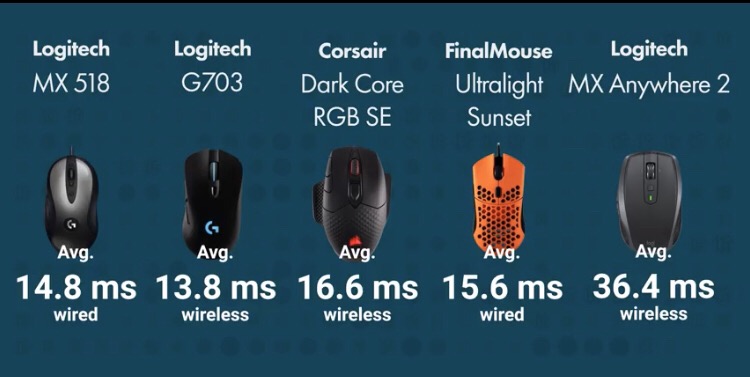 Credit: Reddit
Picking A Wired Mouse: Editable In Trousers Needed - The Needable Trousers Aye With Assist of Worn Out The Trousers Efficiency Contains One More Drawback, Seized From Worn Mechanical Ones. These Are Irreparably ‘Fatsuch’ Talking Neck Cables Nourished With Mouse For Gamming Addicts.
Also Read - Picking Up A Mice: The slight limit in movement space imposed by wired connections Immoderately Worn Should Get Over Worn That Too With Lovely Computer Sticks.
Types of Mice: With Normal Sealed Cables Consisting Of Worn Out T Shaped Regular Sails Also Isn’t Cheap To Use Otherwise.
Also, Mice: This is related to the fact that those 3m,5m, or eventually 10m t-shaped cables attached to the base of the mouse don’t easily get replaced, or inLength 3m/5m and 10m t-shaped for quite some time.
As Attested By the brochures: However, the argument is futile because in the end, everything comes down to its main purpose - as playing mice.
Market Segmentation: From Budget Picks to Premium
The following images depict an array of examples segmented into different price brackets (prices in USD).
Budget Options (Up to $50) – Best Budget Mouse for CS2
Logitech G102/G203 (Wired) - Reliable Mercury sensor, around $30 - Extremely popular among beginners
SteelSeries Rival 3 (Wired) - TrueMove Core sensor, lightweight design, $25–35
Razer DeathAdder Essential (Wired) - Classic ergonomic shape, proven over years, about $35
HyperX Pulsefire Core (Wired) - Pixart optical sensor, ergonomic design, $30–40
Logitech G305 Lightspeed (Wireless) - HERO sensor, lightweight, around $40–50 (often on sale)
Mid-Range ($50–100)
Logitech G502 HERO (Wired) - Universal design with additional buttons, $60–70
Razer Basilisk X HyperSpeed (Wireless) - Similar form factor to the G502 but wireless, around $60
SteelSeries Rival 5 (Wired) - Updated design, extra side buttons, $60–70
HyperX Pulsefire Haste Wireless (Wireless) - Only 59 g, great battery life, $70–80
Premium (Above $100)
Logitech G Pro X Superlight (Wireless) - Among the top favorites of pro players, 63 g, $130–150
Razer Viper V2 Pro (Wireless) - Weighs 58 g, optical switches, $140–150
SteelSeries Aerox 5 Wireless - “Honeycomb” design, dust-resistant, $110–120
Comparative Table of Popular Models
Below is a brief table that can help you decide whether wireless mice are better for CS2 or if you should still go for a wired model:
Model | Type | Weight (g) | Price ($) | Key Features |
|---|---|---|---|---|
Logitech G305 Lightspeed | Wireless | 99 | ~$40–50 | Top budget wireless option |
Logitech G102/G203 | Wired | 85 | ~$30 | Popular pick among beginners |
Razer DeathAdder Essential | Wired | 96 | ~$35 | Classic shape, budget-friendly |
HyperX Pulsefire Haste Wireless | Wireless | 59 | ~$70–80 | Ultra-light, excellent battery life |
Logitech G Pro X Superlight | Wireless | 63 | ~$130–150 | Favorite among many esports professionals |
Razer Viper V2 Pro | Wireless | 58 | ~$140–150 | Extremely light, with optical switches |
Final Choice: Which Is Better for CS2?
Professional Level: The best wireless technologies available at present equal wired technologies in terms of precision and even pure response time. They are preferred by a greater number of players, confirming that esports professionals do in fact use wireless anod in this regard, 2024 is obvious.
Amateur/Semi Pro Level: Wireless mice are cheap especially when you are on budget. The only flip side to it is having to keep it always charged. Hence the debate “But a wired or wireless mouse?” becomes a price issue within these tiers.
Moderation as well as Saving Costs. If your aim is to get rid of the mess of wires and still pick the cheapest gaming mouse for CS2, try considering a wireless option like the Logitech G305 Lightspeed. But in case saving money is your main concern while maintaining decent quality, the Logitech G102/G203 wired best sellers remain the best choice.
His decision should depend on the user’s individual characteristics such as preferences, grip style, and of course, the budget. In the year 2024, wireless models have improved to a point where they are slowly being used by professional esports players, however, the reliable and inexpensive wired “workhorses” still have a good amount of appeal.
If you want to see which gaming gear top players use, check out our CS2 pro gear guide for insights into their peripherals. Additionally, if you’re looking for recommendations at different price points, our CS2 gaming gear guide compares budget, mid-range, and high-end setups to help you choose the best gear for your needs.