Settings and configurations of top players for professional play in CS2
Author: Hawk Live LLC
Last updated:
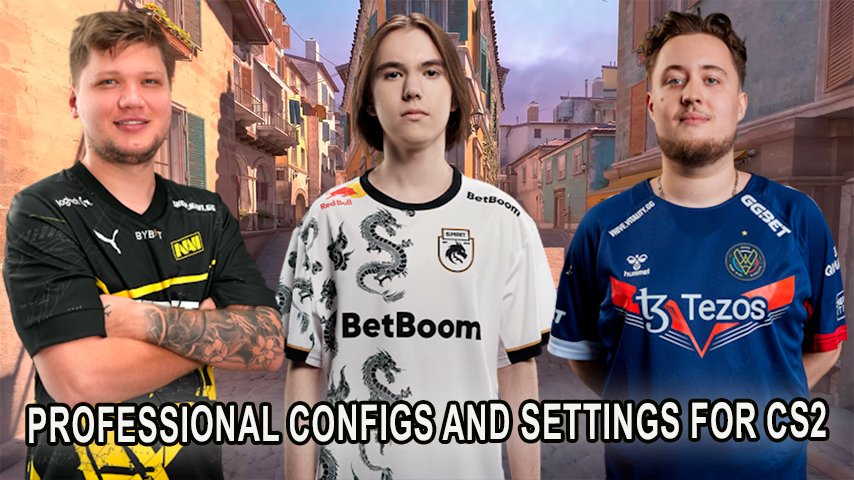
When it comes to competing and getting success in the game known as Counter-Strike 2 (CS2), game settings appear to be a huge concern for the professionals. Every single element, to even video settings and mouse sensitivity, can alter the result of matches. This is the reason why so many casual gamers try to mimic the settings of their favorite esports athletes to better their own gameplay.
How to Install Professional Settings in CS2?
If you want to play using professional settings you can do so either through in-game menu or through console commands. Let us follow how to do that:
Bring up the console: This can be done by turning it on in settings and then pressing the “~” key.
Enter the settings: Simply utilize the commands below for a given player that we have provided. These commands have mouse sensitivity, video settings, viewmodel and much more.
Import the crosshairs: In-game crosshairs settings can be where crosshair code can be entered to use the crosshairs that the pros use, or alternatively, the command can be used in the console.
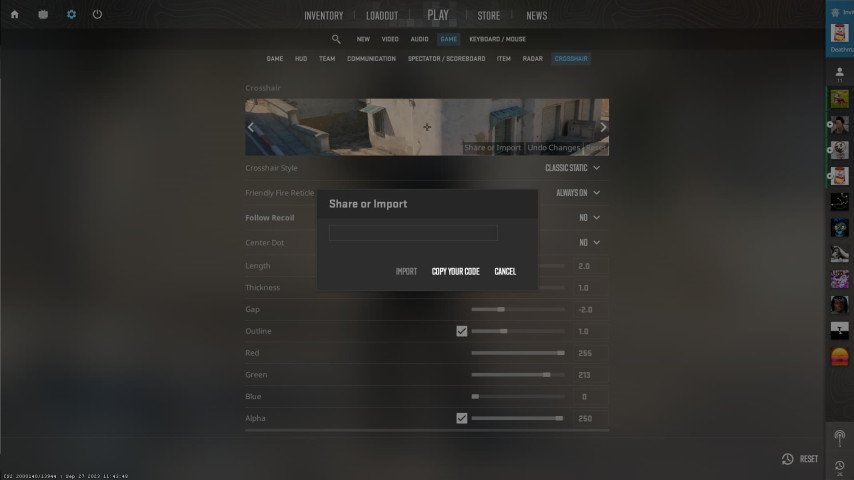 Credit: Esports.gg
Key Parameters and Settings
While preparing and changing CS2 control settings the important broad aspects around this are,
Mouse Settings: This feature includes, but not limited to, controlling movements through DPI, sensitivity, and polling rate.
Video settings: This feature includes, but not limited to, ensuring a high frame rate and a clear image is adjusting resolution, aspect ratio, and refresh rate.
Crosshair: As every professional player wants to be perfectly accurate and hit the target, each player modifies his crosshair to achieve maximum accuracy level.
Viewmodel settings: These correlate more with the player’s weapon alignment and positioning which increases the players’ overall vision ability.
Let’s proceed to the settings and achievements of the three CS2 professionals DONK, s1mple and ZywOo in detail.
DONK’s Settings in CS2

Credit: HLTV.org
DONK is one of the best players and has shown consistent form representing Team Spirit at the highest level. He made a name for himself in the first youth-level tournaments for being su aggressive. At the age of seventeen, DONK was already gaining attention for his impressive performances around the world. DONK's sharp reflexes and movement are what occupy the majority of the gameplay. He has been widely discussed as one of the most exciting young prospects in CS2.
DONK’s Achievements:
Winners of many tournaments in the youth age group
Increased interest and popularity in the game of CS2 amongst young fans of DONK
DONK's Mouse Settings:
DPI: Eight Hundred
Sensitivity: One point two five
Hz: One thousand
Zoom Sensitivity: One point zero zero
Windows Sensitivity: Six
DONK’s Video Settings:
Resolution:1280 x 960
Aspect Ratio: 4:3
Scaling Mode: Used the stretched one
Display Mode: Full screen
Brightness:109%
Refresh Rate: 240Hz
DONK’s Crosshair Code: CSGO-jQx5T-f7moo-kwd7v-om3hc-RMQNN
His settings are indeed suitable as they promote quick decision making in aggressive plays which make more sense to faster players.
s1mple’s Settings in CS2

Credit: HLTV.org
We have seen very few players in the sports world reach the level of greatness as of s1mple, it doesn’t matter which team he plays for, in this case it’s Falcons, he has always shown to be the best player out there. More than once has s1mple been awarded the title of being the best player in the global stage and there is a reason why he is known as the global legend, given that he is an extraordinary sniper that can use the AWP and has great consistency in his shots.
Looks like Stockholm has great places as s1mple visited their capital for the first PGL Major event held there in the year of 2021 and even came out on top as the Champion.
Also a fun fact s1mple seems to collect awards as he has one of the highest records of collecting HLTV awards stating that he is the best player of the year multiple times.
That’s also not all, he has been able to win several other international championships that include ESL and BLAST.
Now coming down to one of the most important parts S1mple's Mouse Settings:
His DPI is set to 400 with a Sensitivity of 3.09, he has a Hz set up of 1000, he likes keeping his zoom sensitivity to 1:1 and his windows sensitivity is set to 6.
S1mple's Video Settings:
To all the gamers out there, reach out to your friends and let them know about the new resolution setting as s1mple uses a resolution of 1280 x 690 with a perfect aspect ratio of 4:3, to make things better, he makes use of stretched scaling mode with a several options to pick from for the display mode with fullscreen feeling the best.
And of course, s1mple makes sure to keep his brightness setting at a 100% with a refresh rate of 360 Hz. s1mple’s Crosshair Code is a little complex to ‘CSGO-yVYbF-szZxZ-2QuNz-4YHEE-jeK5O’
Now many of you wonder what s1mple’s set up and cross hair is suited for, well for high paced action with the AWP as his cross hair allows him to get the quickest shots in. Would I recommend it? Yes I would, if you are a competitive player who is focused on getting quick precise kills.
ZywOo’s Settings in CS2

Credit: HLTV.org
ZywOo is a key player for Team Vitality, one of the strongest eSports teams hailing from France, and is also regarded as one of the best players in the world, having received HLTV’s award for Best Player of the Year on three occasions. ZywOo, unlike s1mple, performs more of a hybrid role as he combines rifling and sniping in a very effective manner.
ZywOo's Achievements :
IEM Rio Major 2023 Winner
Three-time 'Player of the Year' winner by HLTV
Regular participant in major tournaments and world championships
ZywOo's Mouse Settings :
DPI : 400
Sensitivity : 2.00
Hz: 1000
Zoom Sensitivity: 0.80
Windows Sensitivity: 6
ZywOo's Video Settings :
Resolution: 1280×960
Ratio : 4:3
Scaling mode : Stretched
Display mode: Full screen.
Brightness: 110%
Refresh Rate: 240 Hz
ZywOo’s Crosshair Code: cl_crosshair_drawoutline 0; cl_crosshairalpha 200;
Moreover, ZywOo's settings are a blend of smoothness and precision which makes them very suitable for players who wish to have consistent stable performance regardless of the mode.
Comparison Table of Settings
Player | DPI | Mouse Sensitivity | Resolution | Refresh Rate (Hz) | Aspect Ratio |
|---|---|---|---|---|---|
DONK | 800 | 1.25 | 1280×960 | 240 | 4:3 |
s1mple | 400 | 3.09 | 1280×960 | 360 | 4:3 |
ZywOo | 400 | 2.00 | 1280×960 | 240 | 4:3 |
The settings for professional CS 2 players is what they developed throughout their years. It is one thing to follow their configurations but again, the same standards do not apply to all players since everyone has their situational preferences.