How to Save a Crosshair in CS2: Complete Guide
Author: Hawk Live LLC
Last updated:
In Counter-Strike 2, the crosshair plays a crucial role in the overall performance of the players. A player can either base their crosshair settings on that of a professional player or come up with their own. This article will detail the processes of how to save a crosshair in CS2 according to the different crosshair codes including how crosshair codes can simplify things for the end-user in relation to general game customization.
How to Save a Crosshair in CS2?
It is possible to save and share settings of the crosshair site used with a teammate or with a friend. So, here are the steps on how you can save the crosshair you developed for your game and won the tournament:
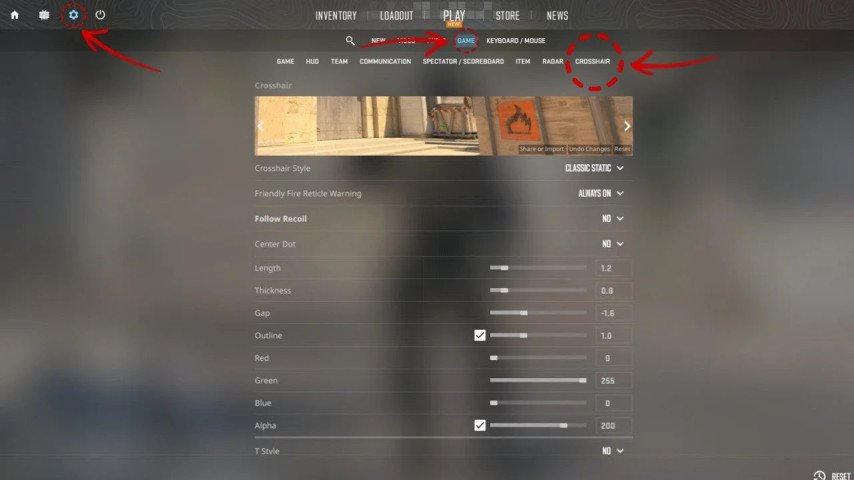
By using certain commands: Start CS2 as already stated and once the home screen opens get into settings by clicking ‘Esc’ and then clicking ‘Set Up’, then, head out under ‘Game’ or ‘Crosshair’ option depending on the settings installed on your device.
Save and share crosshairs with ease: Select your desired crosshair style, color, thickness and the rest and then once done, alter the settings more to suit your preferences even further by editing it in the console of the game by entering some commands that you feel necessary in order to achieve a greater outcome.
 Credit: Valve Corporation
To save a Crosshair Profile, clicking on the ‘Save’ option within the Crosshair Setting will save custom related changes and will stroke the system to remember all the crosshair profiles thus making it easier to swap crosshairs as per the situation during the game. You can do this as many times as you wish.
Exporting Crosshair Codes: Once Crosshair codes systems are saved, players are able to create a specific code that can be shared with other users. Such crosshair codes are short alphanumeric characters that are used to encapsulate all of your crosshair settings.
CS2 Crosshair Codes
CS2 crosshair codes in my opinion is a better option when it comes down to sharing or importing crosshair setting. here is how you can go about them.
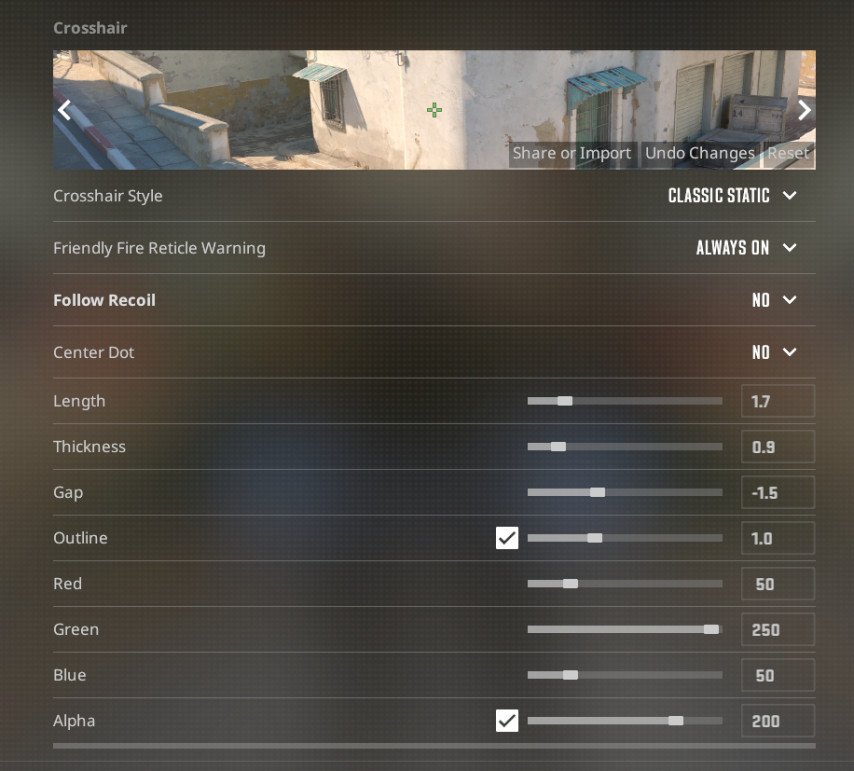
Making a Crosshair Code - In the Crosshair settings a Crosshair code can be generated, by clicking the ‘Share’ button, the game automatically creates a code to crosshair to make it unique. Copy this code if you wish to share it with your friends or teammates.
 Credit: Valve Corporation
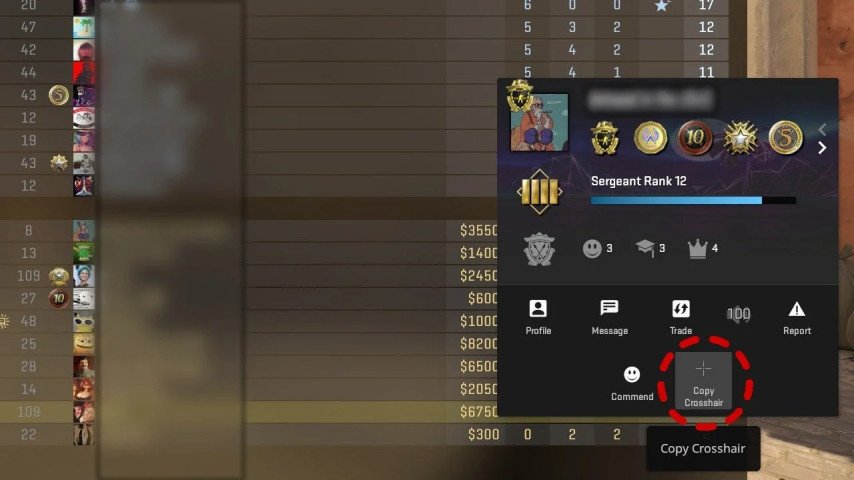
Crosshair Code Usage without Deletion: The process of adding a Crosshair Code for an existing code is very easy and straightforward. In the Crosshair Settings menu, select ‘Import’, and you may paste the code you have been given. By doing this, all the new crosshair settings will immediately become active, allowing you to change crosshair settings without further manual modifications and just go straight into testing and using them.
 Credit: Valve Corporation
Pro Player Crosshair Codes: For opponents of a certain professional player who never get the chance to meet him during a game can have access to a part of his in-game setup through the crosshair codes that he shares with others. Here are a few popular examples:
s1mple: CS2-X1MP-LEGO-1234 - This crosshair is compact allowing more aggressive AWPing for players who require it.
ZywOo: CS2-ZYWO-OACE-5678 - ZywOo aims to optimize his crosshair to be universal where it works equally well with most rifles.
Niko: CS2-NIKO-HEAD-9101 - Use this crosshair to make tighter headshot focused AWP shots that require a still position.
All these codes can be used in CS2, meaning you can straight away use the crosshair configurations which some of the greatest players around the world use.
Tips for Crosshair Customization
Make use of Pro Crosshairs: Many players professionally playing CS2 publicly post crosshair codes on the internet. Such crosshair settings would be a perfect fit to utilize as they would make you more comfortable and precise in the game.
Choose your Favorite Crosshair and Save it: Because for a different kind of play style, different crosshair configurations are best, it is a good idea to store several crosshair profiles. A specific instance when more than one crosshair is necessary is when aiming with a rifle and shotgun which require a smaller crosshair when aiming and vice versa.
Conclusion
With the same ease as chewing bubble gum, crosshair customization in CS2 will be yet another basic technique in the kit of a player. And whenever you wish to adjust the way you play in less than a minute, crosshair settings codes were created for that very reason. It is completely up to you whether to use a pro's crosshair or create a completely new one.