How to Change Crosshair in Valorant
Author: Hawk Live LLC
Last updated:
Sight in Valorant is a key element that affects a player's shooting accuracy, reducing misses and improving overall combat effectiveness. Properly adjusting the crosshair in Valorant can significantly increase the player's comfort level and accuracy, providing them with an advantage in battles on the map.
Valorant Crosshair Settings
Crosshair customization provides gamers with complete freedom to choose parameters that suit their preferences. This guide will help you understand how to optimize your crosshair.
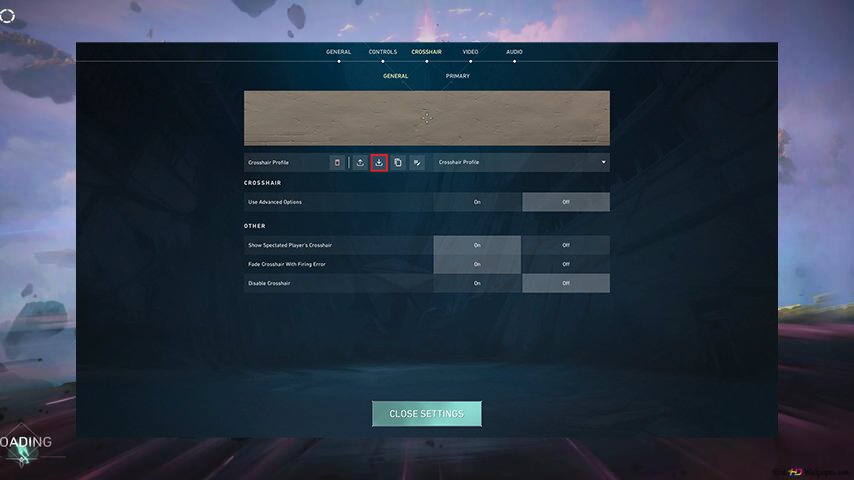 How to Change Crosshair in Valorant?
Open the Settings menu in the game: Press the Esc key and select Settings.
Go to the Display section: Here you will find various crosshair parameters.
Adjust crosshair parameters: Change the color, shape, thickness, and size of the crosshair according to your preferences.
Test crosshair settings: Spend some time in the game to ensure that the new crosshair meets your expectations.
Valorant Crosshair Database
Crosshair Name | About Crosshair | Options | Picture |
|---|---|---|---|
Outlined Dot | A dot with a thin outline for better visibility | Color: Green Outline: 1/1 Central Dot: 1/3 Inner Lines: Disabled Outer Lines: Disabled Dot |
|
Dot | A minimalist dot popular among professional players | Color: Green Outline: Disabled Central Dot: 1/4 Outer Lines: None Inner Lines: Disabled |
|
Neat Crosshair | A simple and neat crosshair with a white color | Color: White Outline: Disabled (a semi-transparent thin outline can be added for better visibility) Central Dot: Disabled Inner Lines: 1/3/3/2, movement and shooting errors disabled Outer Lines: Disabled |
|
Classic | A classic crosshair for most FPS shooters. Green in color, medium-sized without a dot in the middle. | Color: Green Outline: Disabled Central Dot: Disabled Inner Line Options: 1/6/2/3 Movement and Shooting Errors: Disabled Outer Line: None, all parameters disabled |
|
Thin, Red | A minimalist and tidy red crosshair | Red Outline: Disabled Central Dot: None Inner Lines: 1/8/0.5, movement and shooting error display disabled Outer Lines: Disabled |
|


Why is the Crosshair Important in Valorant?
Increased accuracy: Crosshair customization helps make your shooting more precise, reducing the chances of missing shots.
Adaptation to play style: The freedom to customize the crosshair allows you to adapt it to your own gaming style and preferences.
Enhanced comfort: A comfortable crosshair ensures a pleasant and productive gaming experience.
Additionally, if you’re looking to copy a crosshair from another player or explore the best crosshairs used by professionals, check out our guides on copying crosshairs and the best crosshair settings in Valorant.