How to Change Server in CS2 and Reduce Ping
Author: Hawk Live LLC
Last updated:
On the Steam Platform, Counter-Strike 2 (CS2) stays one of the outstanding games that has millions of users around the globe. Due to consistently updating their content and increasing their server resources, Valve continues to back up the community but there are some issues which exchanges the idea of changing servers for some gamers.
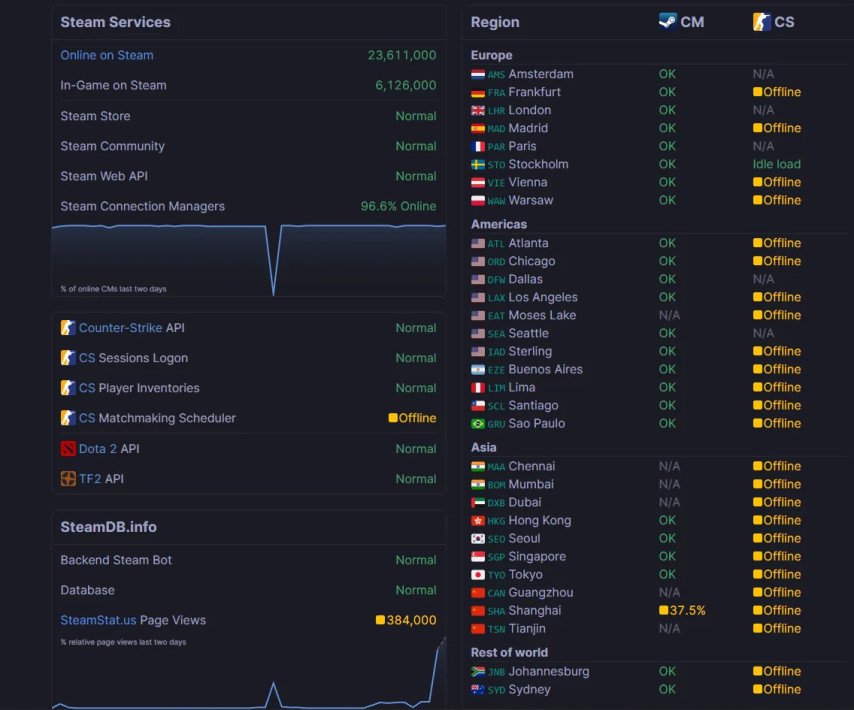 Credit: SteamDB
Why Change Servers in CS2?
There is a reason or two as to why players want to switch servers:
Higher Game Latency: Lag, high ping, or any kind of network problems can be caused due to overloaded or distant servers.
Playing with Friends Who’re from Other Countries: If your friends are located in a different region, it becomes possible to play together when the servers are changed without expending too much time as well.
Gain Access to Special Content: There are some things such as special events or certain types of content which at quite a few times isn’t present in your area that custom servers can provide.
How to Change Servers in CS2
Although good news, CS2 more specifically doesn’t let players pick out a specific region or server to play on, you can however slightly increase your chances of connecting to certain servers by moving your maximum possible ping.
In the game's setting valve has included a list of nearby official data servers. By changing the maximum ping allowed you might expand the geographical reach of the available servers and thus increase the chances of connecting to server from another area.
Steps:
Open Game Settings: Click on the gear icon in the main menu.
Game Menu: The most important settings related to the game play can be found here.
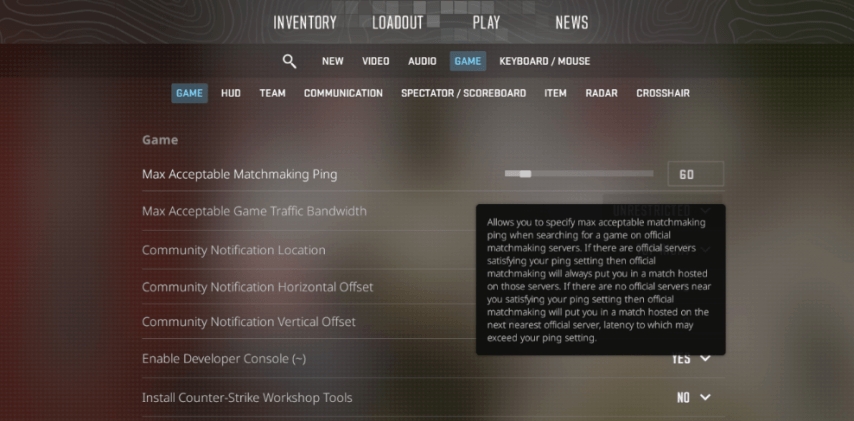 Credit: Valve Corporation
Locate the, Max Acceptable Matchmaking Ping option: The following controls the matchmaking selection.
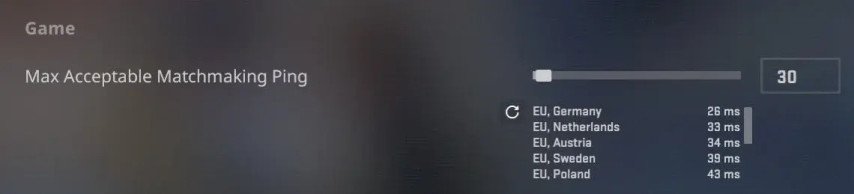 Credit: Valve Corporation
Increase the Ping Value: Move the slider to the right to raise the maximum acceptable ping.
One thing you should keep in mind though is that changing the maximum ping to an elevated amount would allow a connection to servers that are necessarily further away from your own and hence cause a noticeable decrease in your latency but on the other hand this would also allow you to play games with your friends that are in other regions or find servers that are not full.
A ping update was issued with the last update:
There Are Now Nearby Data Centers Listed: Players can view available servers and their locations, now.
Ping Measurement Bugs Should Be Eliminated: Maximally pings that were wrongly calculated making use of some regions have been fixed.
Server info expanded: Information on the server has started to be shown during the waiting phase before accepting a game when a high latency server is being used to try and find a match.
Different Agents, Gloves, Stickers and Other Aspects of the Game Were Updated: There are some various fixes and improvements that have been made in updates.
Reasons for Server Switching
Lower Lag and Waiting Periods: It can be beneficial to the quality of your game depending on the specific conflict of whether you connect on a more populated server or one that is the least busy.
Play with Players from Several Geographical Regions: You can play with players from different culture and geographical areas.
New Modes and Maps Ready to be Used: Some servers have different modes and maps comparing to standard servers.
What should one do to make the most out of the gaming experience?
Pinging Settings Should Be Revisited From Time To Time : This allows you to choose the perfect server for that specific session.
Keep Yourself in the Loop: The network environment is being perfected by Valve so there might be new settings in the future.
Look at the Server Info closely: Be sure that the ping and the location of the server are ok for you before joining the match.
Conclusion
Even though CS2 has no direct procedure of selecting a server, by going through the settings of the game one can adjust the balancing in order to improve the experience of gaming. As you change net settings interchangeably or simultaneously try to be on the lookout for implications such as increased ping or change in connection trends and quality.




![No[o]ne spoke about the PARIVISION roster](https://hawk.live/storage/images/posts/noone-named-idol-dota-2-pro-scene-23820.jpg)