CS2 Server Status: Know When Counter-Strike 2 Servers Are Down and How to Check
Author: Hawk Live LLC
Last updated:
One of the most played games by Valve globally is Counter-Strike 2 (CS2) which has a huge fan base and millions of active users and viewers every day. But there are times when the servers are unavailable for some time. In this case, being aware of the CSGO 2 server status and having a certain understanding of the reasons as to why there might be downtimes is particularly important when planning for a gaming session.
Main Reasons Why CS2 Servers Might Be Unavailable
 Credit: tradeit.gg
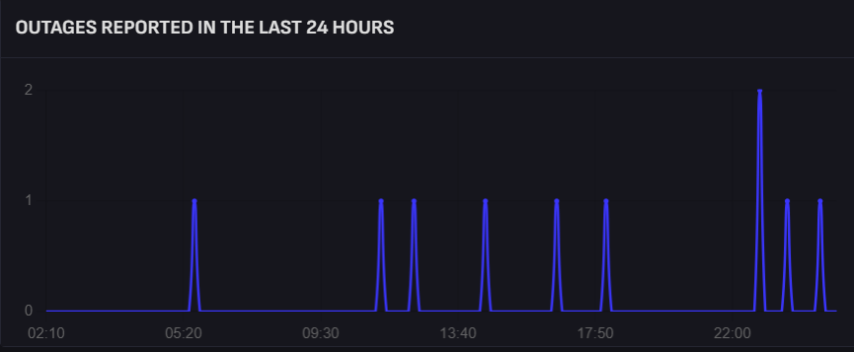
An important factor that is worth remembering is that CS2 is a regularly updated game, so it's only natural to assume that there will be server downtime's as a result of updates. On Clock: 11 PM GMT (PST: 4:00 AM ) updates usually take between five and ten minutes, so players don’t really even notice them, except in the case where they get in some pvp action. Generally, update day is Tuesday since the developers usually have other activities beginning that day and want to avoid conflicts.
Besides the planned maintenance, users of CS2 may also be affected by other issues some of which may include:
Connectivity failures from CS2’s server
Issues arising from local internet service providers
Security measures for instance, safeguarding CS2 from DDoS attacks
How to Check the CS2 Server Status
Credit: SteamDB
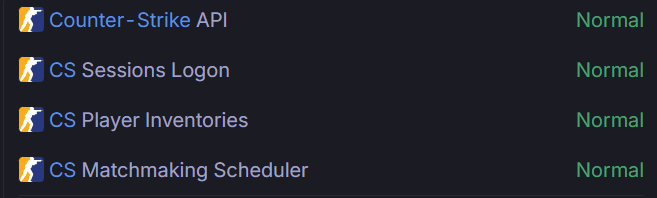
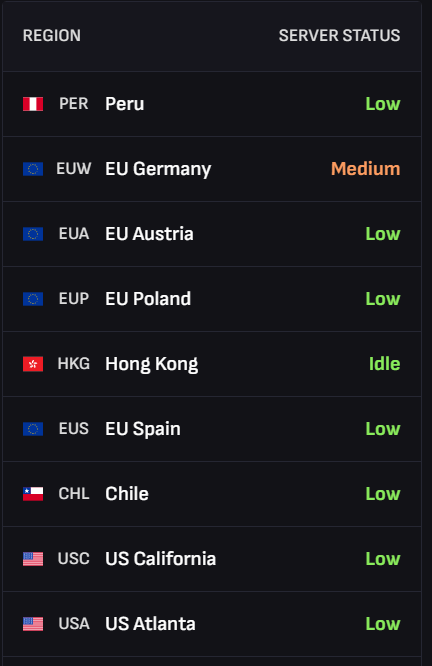
When experiencing some connectivity problems in the game, the first thing CS2 users do is to verify if their servers are under maintenance. As of the current time, CS2 users can use one of the three methods to ascertain whether their servers have been malfunctioning.
Down Detector. This is a popular usage throughout online services, to monitor the status of websites and gaming services including CS2. This recalls those services that provide screencast and other info with respect to the history of connectivity problems and which areas have chances of experiencing connectivity problems.
Steamstat.us. Another such site is stan.us. This site provides vital information on various games that can be found on Steam. The site allows you to find out the status of the CS2 servers, how many players have their inventories active and even let you know if there are any problems with hot swapping.
Official Twitter of Counter Strike. A lot of people use Twitter to stay up to date with plans and maintenance schedules of various applications. If the failure was expected, there is a high chance that the development team has announced maintenance schedule in advance. In the case of serious prolonged connectivity issues, notifications with more detailed information will be posted there,
Credit: SteamDB
Additional Steps to Solve Connection Issues
If you want help with connection issues and so the previous resources confirm the servers are working alright then the issue is always at the client’s end. In such cases the following steps may assist, in resolving the issue:
First, restart the application like a game — this is the most simple and effective solution.
Then step by step guide on how to validate the game cache on steam:
Open up your Steam Library and select CS2.
Right-click on the game and select 'Properties.'
Select the 'Installed Files' tab and click on 'Verify integrity of game files.'
The system will automatically replace the corruptive parts in case, there is problem with the files.
Next, restart your PC, wiping off all the glitches or temporary technical failings is done effectively with this option.
Now, resetting the connection might be useful in such cases, wherein there is a delay in the network or consistency issues are faced by the user.
Impact of CS2 Server Downtime on Players’ Inventory
Inventory access as well as functions concerning trading are also sometimes prohibited during server downtimes. In most cases this does not alter the safety of the inventory ,nor does it necessitate any action from the user. But, it is better to reschedule the exchange of items during the period when the servers are working because such move allows one to avoid delays and making mistakes.
What to Do if the CS2 Servers Are Stable but the Problem Persists
Before addressing the CS2 server issue in this section, we would like to point out some inaccuracies about the use of the term CS2 in discussions of FPS. The term CS2 by others is Interpreted incorrectly and causes problems throughout the gaming community. Before that, yes, the Steam server status posted on the official webpage may be working and reliable but it is advisable not to use it as a measuring stick for global server status.
CS2 Server Status FAQs
What happened when CS2 is not responding? Missing or corrupted game files and even server maintenance are some reasons that can lead to a malfunction. Check Integrity of Files or wait for the scheduled maintenance to be completed.
Are CS2 players able to connect to the game if servers are offline? Of course, users can go for offline mode with bots or create a private game with their mates when they feel like that.
Where can I track the CS2 maintenance schedule? Official Press accounts on social networking applications and their official pages on the steam assist you with Server Maintenance Notifications. Generally, once weekly on Tuesdays is the day that there is maintenance.
In this manner, server status for CS2 can easily be retrieved and monitored at the ease of these tools. Understanding these factors allows players to reduce their inactive time and deal with any arising issues faster.