Master These CS2 Binds and Boost Gameplay to Pro Levels
Author: Hawk Live LLC
Last updated:
Counter-Strike 2 (CS 2) is such a game that sometimes even the minutest of details and tactics have the potential to change the overall outcome of the game. One of the options is to use binds. These key settings that are programmable allow playing different settings at better speeds which are bound to improve your overall game play. This guide explains what binds are, how to use them, and which binds, if any, will help you level up your gameplay.
What Are Binds in CS2?
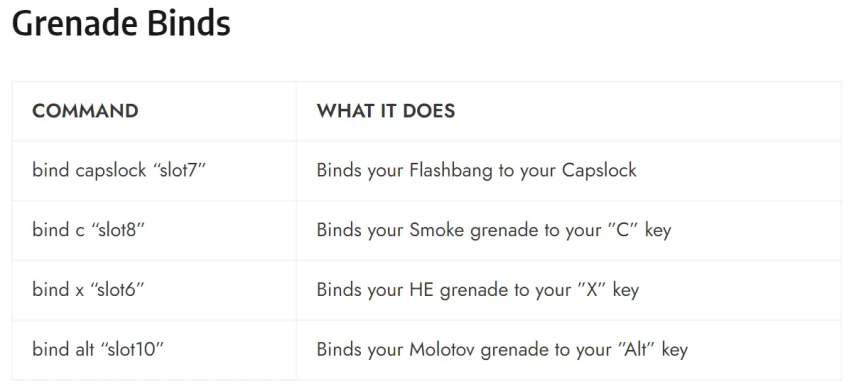
In the most simple of terms, binds are customized key settings which allow players to complete certain operations with minimal keystrokes. Purchasing of weapons within the game, adjusting crosshair settings or speaking with others through voice bind are activities that in my opinion can be done much faster with a bind. In this way turning binds on helps you save time on repetitive activities and improves the speed of your reflexes, allowing you to concentrate on the more strategic part of the game.
 Credit: Bo3.gg
How to Set Up Binds in CS2
To use the binds option in CS 2 works really well just through the console setting inside the game.
Start 1: Go to the Console
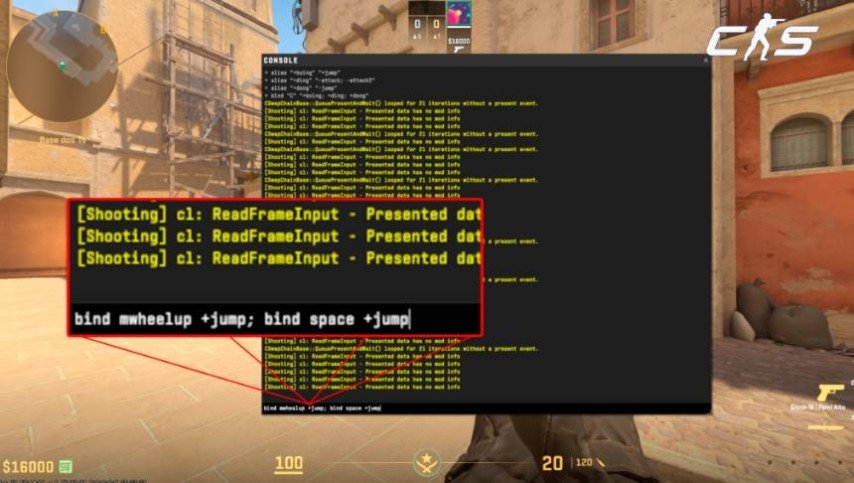
To begin, the first part is to click on the “~” button on the keyboard to access the console. If you have not set the console option, you can do so by going into the settings and then select developer console as on using it.
 Credit: Valve Corporation
There are a few steps you need to perform before you can start using the console. The first and foremost task is to create a bind. To do this, simply launch the console and type the following command:
bind "key" "command"
In this scenario, key refers to the specific key that will be used for the binding, for example, F1 or Mouse4. On the other hand, command clearly refers to what action from the bind will be executed for instance buy a certain weapon.
In the console, if you want the F1 key to allow you to buy an AK-47 or M4A1 you would write this:
bind "F1" "buy ak47; buy m4a1"
With this particular bind, it will be possible to buy either an M4A1 or an AK-47 depending on availability.
Saving Bindings Before you relaunch the game, make sure to save them in the autoexec.cfg file – You will need to save your binds this way to make sure they do not go away once the game is closed down – the autoexec.cfg file can be found in the cfg folder inside your CS2 directory. Put all your changed binds in this file and CS2 will load them on every game launch all by itself.
Best CS2 Binds To Achieve Optimum Performance There are many different examples that serve professional gamers and let them get the most out of binds and overlays. We will provide you with the most common ones used in the industry.
Best CS2 Binds to Improve Your Gameplay
 Credit: Reddit
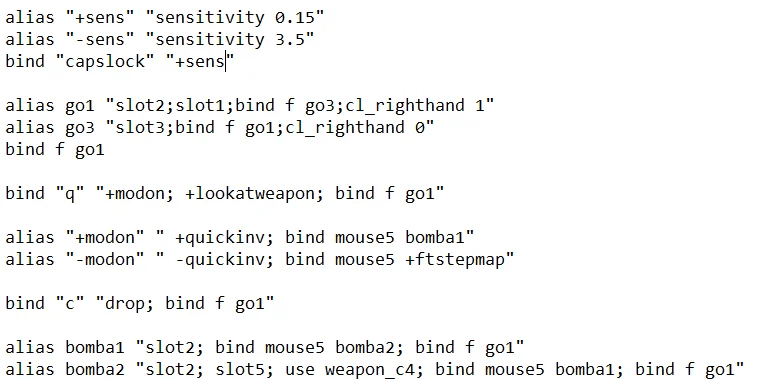
In the heated moments of competitive matches, it is critical to quickly buy weapons and equipment. Let me show you how to bind keys with which you can make purchases in one click of a key.
bind “F2” “buy ak47; buy m4a1” bind “F3” “buy awp”
Crosshair Toggle Binds
There are times when you need to change the size and color of the crosshair easily and quickly. For such situations, the following binds can be Setup.
bind “Mouse4” “cl_crosshairsize 3; cl_crosshaircolor 1” // For a big green crosshair bind “Mouse5” “cl_crosshairsize 2; cl_crosshaircolor 2” // For a smaller red crosshair
Communication Binds
One of the most important aspects of a match can either make or break it, and that is communication. Use these binds to send specific messages to your team quickly in a match.
bind “KP_PLUS” “say_team GG, well played!” bind “KP_MINUS” “say_team In need of backup”
Jump With mouse Wheel
Many binds including the ones that use the mouse wheel for jumping has become a common practice. This makes it easier to control when performing the bunny hopping technique.
bind “mwheeldown” “+jump” bind “mwheelup” “+jump”
FPS Display Bind
In order to have a smooth experience playing CS2 it is important to take note of the frame rate at which the game is being played. To do so use this bind.
bind “F4” “cl_showfps 1”
Mute Players
If you want to mute any of your teammates or opponents then you can use the following commands.
bind “F5” “voice_scale 0” // Disables voice chat bind “F6” “voice_scale 1” // Enables voice chat
Tips for Using Binds in CS2
Always Keep the Keys In Your Comfort Zone: While setting the binds, it is very important to consider the keys that can be easily remembered and accessed.
It is quite acceptable to employ extra mouse buttons or keys such as F1 – F12.
Test and Adjust: Do not hesitate to gyroscopic tackle your binds to resonate with your game’s flow. Keep trying various combinations until you nail the config that goes perfectly your playstyle.
Practice: A good muscle memory is crucial in making binds absolutely useful. Try to practice using your key bindings so that you can use them unconsciously during crucial moments.
Conclusion
Binds in Counter Strike 2 can help facilitate your experience by speeding up your actions and making them fluid and elegant. Given the appropriate configuration, centralised and focused healing becomes possible because instead of wasting mental energy on remembering many menial actions, one can carry out most of them automatically. So, do not wait longer and start to play with binds straight away in order to find out how much better you will become in CS2.