Why Dota 2 is Lagging: Everything You Need to Know
Author: Hawk Live LLC
Last updated:

The problem of Dota 2 lagging has raised many questions in esports. The game is relatively old and associated with low system requirements, but lags still exist. Such problems occur both as players play the game and in its menu, so why Dota 2 lags or what to do if Dota 2 lags on a laptop are some of the queries that may be raised.
Causes of Lags in Dota 2
Lagging can be caused by different factors like hardware/software problems from the player’s side or sometimes from the developer’s side. Many cases of “lagging in the Dota 2 menu” are reported by players because it may have high graphic settings or an unoptimized version of DirectX.
Hardware Issues
One of the reasons behind Dota 2 lag may be due to hardware configuration that does not meet the recommended system requirements for your computer or laptop. As time goes by and new updates come to this game, it is always possible that such patches could affect performance once it is smooth.
Software Issues
Regarding software, viruses, outdated drivers, incorrectly installed drivers and conflicts between programs can be blamed for Dota 2 lags. It is essential to pay specific attention to verifying the integrity of game files through Steam since they could help solve some issues.

Credit: Valve Corporation
Network Issues
Network-related issues must never be ignored. When playing DOTA 2 on a laptop that experiences connectivity challenges arising from an unstable Wi-Fi signal, the outcome may involve data packet loss and delay in transmission, thus resulting in a laggy gaming effect. Consequently, examining internet speed and stability can support one in addressing such matters accordingly.
How to Fix Lags in Dota 2
 Credit: Valve Corporation
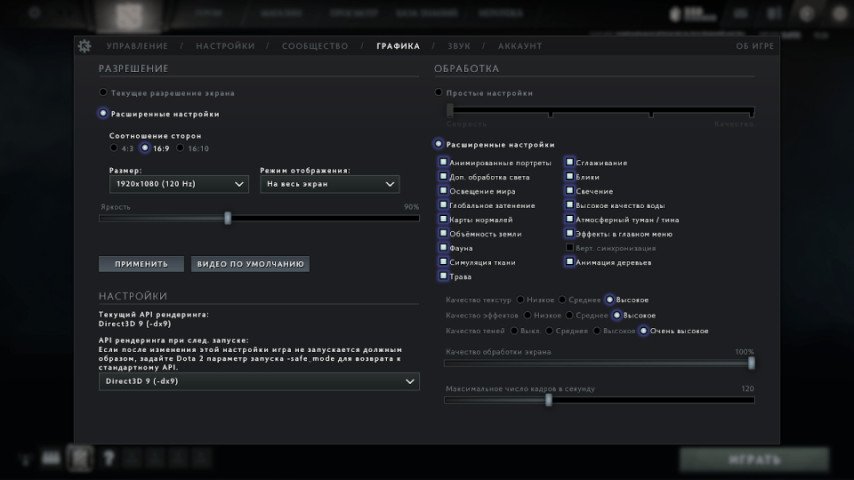
If you happen across Dota 2 lagging, you should start by reducing graphics settings until they reach minimum levels while checking if your PC video card drivers are updated. It is also wise to check the system for viruses and uninstall any unnecessary programs that may slow it down. Reinstalling the game or even the operating system might be beneficial in certain situations.
Conclusion
Performance issues in Dota 2 can ruin the game's enjoyment, but fortunately, they can often be fixed by understanding the main reasons behind them. We hope this article helps you enjoy your favorite game without lags and freezes.