Hardware that will help you become pro: What tech do Dota 2 and CS2 champions use?
Author: Hawk Live LLC
Last updated:
Modern esports demands not only talent and strategy from players but also reliable hardware that can sustain high performance and stability during the most intense gaming scenarios. Hardware plays a crucial role in success, impacting aspects such as frame rate, load speed, and overall game responsiveness. For Dota 2 and Counter-Strike 2 (CS2) players, choosing the right gear can be the difference between victory and defeat.
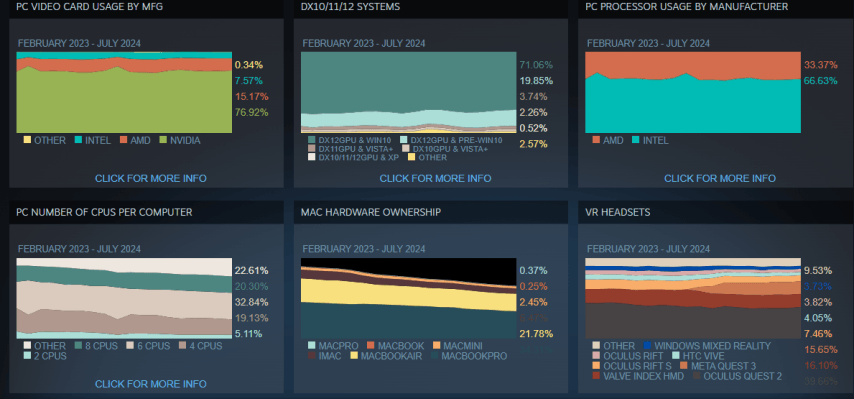 Credit: Valve Corporation
How Hardware Affects Game Performance?
Game performance directly depends on hardware configuration, and this is especially crucial in esports, where every detail can affect the match's outcome.
 Credit: AdobeStock
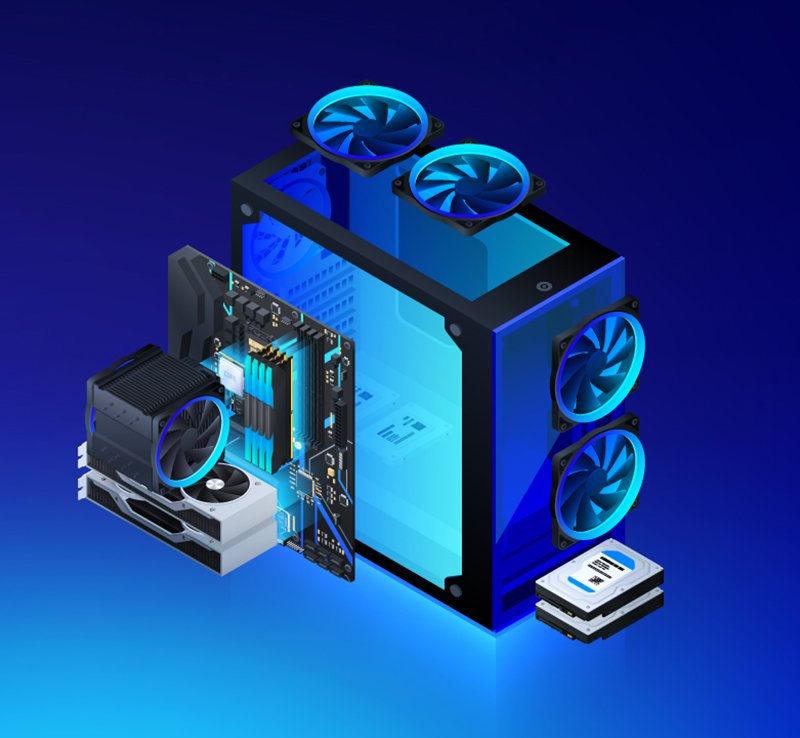
The central processing unit (CPU) and graphics processing unit (GPU) are the two main components that determine a computer's gaming performance. They process game data and graphics, and their power directly impacts the smoothness and stability of gameplay.
CPU: In games like Dota 2 and CS2, data processing speed and multitasking are important, making a processor with multiple cores and high clock speeds essential. CPUs like Intel Core i7 and AMD Ryzen 7 provide high performance with support for multithreading and high clock speeds.
GPU: Graphics cards handle the graphics and visual effects, ensuring high frame rates and image quality. Cards like the NVIDIA GeForce RTX 3070 and AMD Radeon RX 6800 support ray tracing and high resolutions, which is especially important for graphically intensive games.
Impact on Performance:
A high frame rate (FPS) is key to smooth and responsive gameplay, which is particularly crucial in competitive gaming.
Powerful CPUs and GPUs help eliminate lag and delays, which is critical in esports matches.
Random-access memory (RAM) and storage also play a significant role in ensuring overall system performance.
RAM: Sufficient RAM (usually 16-32 GB) allows games to run without lag, especially if other applications are running in the background. More RAM enables faster data processing and task switching.
Storage: NVMe SSDs offer quick game loading and minimize response times. This is particularly important in open-world games or competitive matches where every second counts.
Fast RAM and storage accelerate game loading and reduce response times, enhancing the overall gaming experience. Higher data transfer speeds allow quick switching between applications and handling large data volumes.
For esports athletes, optimal hardware is the key to success. In a highly competitive environment, even small performance gains can provide a significant advantage.
Accuracy and speed: High-performance systems ensure maximum control precision and responsiveness, which is especially vital in games like CS2, where every millisecond can matter.
Stability and reliability: Esports athletes rely on the stability of their systems to avoid crashes and delays during critical moments in the game.
Psychological comfort: Knowing you have the best gear can boost a player's confidence and help them focus on the game.
Hardware optimization and system settings help esports athletes achieve the best results and remain competitive at the highest level.
Dota 2 and Counter-Strike 2 System Requirements
Before diving into specific hardware preferences among players, it's important to understand the basic equipment requirements for Dota 2 and CS2. Both games have specific minimum and recommended system requirements that dictate the hardware needed for stable gameplay.
Dota 2
Requirement | Minimum | Recommended |
|---|---|---|
Operating System | Windows 7 or newer | Windows 10 |
Processor | Dual-core from Intel or AMD at 2.8 GHz | Quad-core from Intel or AMD |
RAM | 4 GB | 8 GB |
Graphics | NVIDIA GeForce 8600/9600GT, ATI/AMD Radeon HD2600/3600 | NVIDIA GeForce GTX 660 or AMD Radeon HD 5670 |
Storage | 15 GB available space | 15 GB available space |
Counter-Strike 2
Requirement | Minimum | Recommended |
|---|---|---|
Operating System | Windows 10 | Windows 10 |
Processor | Intel Core i5-2500K or AMD FX-8350 | Intel Core i7-4790 or AMD Ryzen 5 1600 |
RAM | 8 GB | 16 GB |
Graphics | NVIDIA GeForce GTX 660 or AMD Radeon HD 7950 | NVIDIA GeForce GTX 1060 or AMD Radeon RX 580 |
Storage | 15 GB available space | 15 GB available space |
CS2, like Dota 2, requires powerful hardware to maintain a high level of gameplay, especially in competitive settings. Recommended system requirements ensure better graphics and performance, which is particularly important for professional players. Understanding these requirements helps players and esports athletes make informed decisions about upgrading their equipment to stay competitive and maximize game performance.
What Hardware is Popular Among Dota 2 Players?
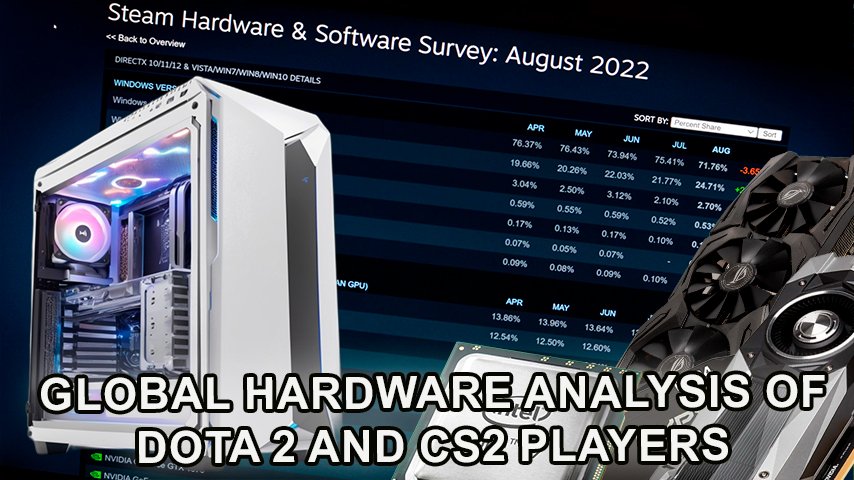
The popularity of hardware among Dota 2 players is often determined by the balance between performance and cost. Many players seek gear that provides maximum performance without significantly impacting their budget. Based on Steam survey data, the most popular components used by Dota 2 players can be identified.
 Credit: ViewSonic Corporation
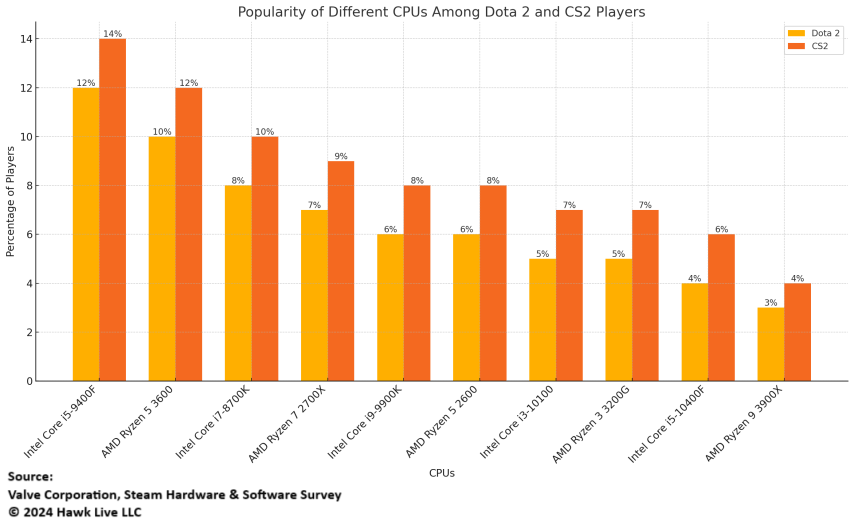
Processors (CPU) play a key role in ensuring smooth gameplay, especially in multiplayer online games like Dota 2. Steam data shows that the most popular processors among Dota 2 players are those that provide high performance at a reasonable price.
Processor | Popularity (%) | Advantages | Price (USD) |
|---|---|---|---|
Intel Core i5-9400F | 12% | Excellent price-to-performance ratio | $150 |
AMD Ryzen 5 3600 | 10% | High multitasking capability and energy efficiency | $200 |
Intel Core i7-8700K | 8% | High clock speed for stable gaming | $350 |
AMD Ryzen 7 2700X | 7% | Multiple cores for parallel processing | $250 |
Intel Core i9-9900K | 6% | High performance for gaming and tasks | $500 |
AMD Ryzen 5 2600 | 6% | Excellent price-to-performance ratio | $180 |
Intel Core i3-10100 | 5% | Budget-friendly with good performance | $120 |
AMD Ryzen 3 3200G | 5% | Integrated graphics for budget builds | $100 |
Intel Core i5-10400F | 4% | Good performance in the mid-range segment | $180 |
AMD Ryzen 9 3900X | 3% | High performance for multitasking | $400 |
The graphics card (GPU) is one of the most important components for ensuring high-quality graphics and smooth gameplay. In Dota 2, where graphics can be quite demanding, choosing the right graphics card is critical.
Graphics Card | Popularity (%) | Advantages | Price (USD) |
|---|---|---|---|
NVIDIA GeForce GTX 1660 Ti | 15% | High performance in Full HD | $280 |
AMD Radeon RX 580 | 12% | Excellent price for 1080p performance | $230 |
NVIDIA GeForce RTX 2060 | 10% | RTX support for enhanced graphics | $350 |
AMD Radeon RX 5700 XT | 9% | Great option for 1440p gaming | $400 |
NVIDIA GeForce GTX 1650 | 8% | Budget option for Full HD | $180 |
AMD Radeon RX 5600 XT | 7% | Good price-to-performance ratio | $300 |
NVIDIA GeForce RTX 2070 | 6% | High performance with RTX support | $450 |
AMD Radeon RX 5500 XT | 5% | Affordable option for medium settings | $200 |
NVIDIA GeForce GTX 1050 Ti | 5% | Popular card for budget builds | $150 |
NVIDIA GeForce RTX 2080 Super | 3% | High performance for 4K gaming | $700 |
These GPUs provide an excellent balance between price and performance, allowing players to enjoy the game with high graphics settings without lags and delays.
RAM affects game load speed and smoothness. For Dota 2, the optimal configuration is 8-16 GB of RAM, which provides the necessary bandwidth for seamless game operation. Most players prefer 16 GB RAM configurations, as this allows them to run multiple applications simultaneously without loss of performance.
Choosing the right storage device can significantly reduce game load times and increase the system's overall responsiveness. Dota 2 players most often choose solid-state drives (SSDs) because of their speed and reliability.
SSDs significantly reduce load times and make gameplay smoother, while HDDs are still used for storing large amounts of data at an affordable price.
Storage Device | Popularity (%) | Advantages | Price (USD) |
|---|---|---|---|
Samsung 860 EVO SSD | 20% | High read and write speeds | $100 |
WD Blue 1TB HDD | 15% | Reliable and economical storage option | $50 |
Crucial MX500 SSD | 14% | Excellent performance at an affordable price | $90 |
Seagate Barracuda 2TB HDD | 12% | Large storage capacity at a reasonable price | $60 |
Kingston A2000 NVMe SSD | 10% | High speed at an affordable price | $80 |
WD Black SN750 NVMe SSD | 8% | Excellent performance for gaming | $120 |
Toshiba P300 1TB HDD | 6% | Affordable solution for basic storage | $45 |
Intel 660p NVMe SSD | 5% | Good price-to-performance ratio | $110 |
Samsung 970 EVO Plus SSD | 5% | High performance and reliability | $150 |
ADATA SU800 SSD | 5% | Affordable option with good performance | $70 |
In recent years, there has been a trend toward more powerful hardware among Dota 2 players. With technological advancements and lower component prices, more players aim to upgrade their systems to higher-performance configurations.
One noticeable pattern is the growing popularity of mid-range components that offer a good balance between performance and cost. This allows Dota 2 players to enjoy games with high graphics settings without breaking the bank.
Hardware upgrades are also linked to the growth of the esports scene, where even small performance improvements can significantly impact game results. As a result, players increasingly choose components that can provide a competitive edge.
What Hardware is Popular Among CS2 Players?
Counter-Strike 2 (CS2) is one of the world's most popular games, and players strive to gain an edge using efficient hardware. Since CS2 demands quick response and high frame rates, selecting the right components is critical to success. Based on Steam survey data, we can highlight the most popular components used by CS2 players.
In CS2, speed and precision are key elements of successful gameplay. Players seek hardware that not only fits their budgets but also provides stability and performance in the game's most intense moments. This often means choosing components that deliver the best results in demanding competitive conditions.
Popular CPU Among CS2 Players
CPU is the main component impacting overall system performance and frame rates. For CS2, players choose processors that can handle many simultaneous tasks and offer high processing speeds.
Processor | Popularity (%) | Advantages | Price (USD) |
|---|---|---|---|
Intel Core i7-9700K | 14% | High performance for competitive gaming | $400 |
AMD Ryzen 5 3600X | 12% | Excellent multitasking capability and energy efficiency | $220 |
Intel Core i9-9900K | 10% | Powerful performance for gaming and work | $500 |
AMD Ryzen 7 3700X | 9% | Multiple cores and high performance | $300 |
Intel Core i5-9600K | 8% | Good price-to-performance ratio | $250 |
AMD Ryzen 5 2600 | 8% | Affordable with good performance | $180 |
Intel Core i3-10100 | 7% | Budget-friendly option for medium settings | $120 |
AMD Ryzen 3 3100 | 7% | Integrated graphics and good price | $100 |
Intel Core i5-10400 | 6% | Mid-range performance | $200 |
AMD Ryzen 9 3950X | 4% | High performance for multitasking | $700 |
These processors are popular for their ability to handle complex tasks and maintain high frame rates in games where every frame counts.
Popular Graphics Cards Among CS2 Players
The graphics card (GPU) plays a key role in ensuring smooth graphics and quick game response. In CS2, where every moment counts, choosing the right GPU can make a big difference.
Graphics Card | Popularity (%) | Advantages | Price (USD) |
|---|---|---|---|
NVIDIA GeForce GTX 1660 Super | 16% | High performance in Full HD | $300 |
AMD Radeon RX 5700 | 13% | Excellent price-to-performance ratio | $350 |
NVIDIA GeForce RTX 2070 Super | 11% | RTX support and high performance | $500 |
AMD Radeon RX 5600 XT | 10% | Good performance for 1080p | $300 |
NVIDIA GeForce GTX 1060 | 9% | Popular card for medium settings | $250 |
AMD Radeon RX 580 | 8% | Affordable option for Full HD | $230 |
NVIDIA GeForce RTX 2080 Ti | 7% | High performance for 4K gaming | $1,000 |
AMD Radeon RX 5500 XT | 6% | Affordable card for medium settings | $200 |
NVIDIA GeForce RTX 3060 | 6% | New architecture and improved performance | $400 |
NVIDIA GeForce GTX 1050 Ti | 4% | Popular card for budget builds | $150 |
These graphics cards provide CS2 players with the ability to maintain high graphics settings, which is especially important in a competitive environment.
Use of RAM
RAM is critical to ensuring fast loading and smooth operation of CS2. Most players prefer 16 GB RAM configurations, which allows the game to run without delays, even if other applications are running in the background.
Data Storage Solutions
Choosing the right storage device can significantly reduce load times and improve the overall gaming experience. CS2 players most often choose SSDs to install the game and use HDDs to store large amounts of data.
Storage Device | Popularity (%) | Advantages | Price (USD) |
|---|---|---|---|
Samsung 970 EVO SSD | 18% | High read and write speeds | $150 |
WD Black 1TB HDD | 14% | Reliable and durable for data storage | $60 |
Crucial P1 NVMe SSD | 13% | Excellent performance and price | $100 |
Seagate FireCuda 2TB SSHD | 12% | Fast reading with hybrid storage | $120 |
Kingston A2000 NVMe SSD | 11% | High speed at an affordable price | $80 |
WD Blue 1TB HDD | 9% | Affordable option for data storage | $50 |
Intel 660p NVMe SSD | 8% | Good performance at a moderate price | $110 |
Seagate Barracuda 2TB HDD | 7% | Large capacity and reliability | $60 |
Samsung 860 EVO SSD | 5% | High performance and reliability | $100 |
Toshiba X300 4TB HDD | 3% | Excellent volume for storing large data | $100 |
SSDs significantly reduce load times, while HDDs are used to store large amounts of data without sacrificing budget.
Comparative Analysis
Comparing hardware preferences between Dota 2 and CS2 players shows that while both groups of players seek high performance, their choices often depend on the specific requirements of each game.
CPU: CS2 players tend to choose more powerful processors to ensure high processing speed and response, which is important in first-person shooters. Dota 2 players can manage with less powerful options, as the game is less demanding on the CPU.
Graphics Cards: In CS2, players often choose cards with RTX support to take advantage of ray tracing, while in Dota 2, this is less important, and the emphasis is on stability and performance.
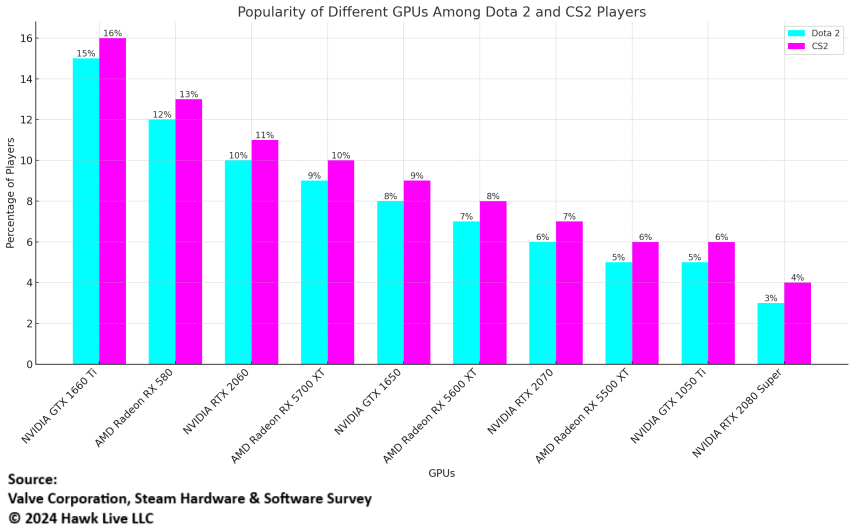
Storage Devices: In both games, preference is given to SSDs to speed up loading, but in CS2, faster NVMe SSDs are often used for additional speed and responsiveness.
These differences reflect the unique needs of each game and help players choose hardware that best matches their playing style and budget.
What Hardware Does Esports Players Choose?
Esports players require maximum performance from their computers to remain competitive in their disciplines. This is especially important for games like Dota 2 and CS2, where the slightest delay or drop in frame rate can affect the outcome of a match. In this section, we will look at what hardware is typically used in professional tournaments and how esports athletes choose their configurations.
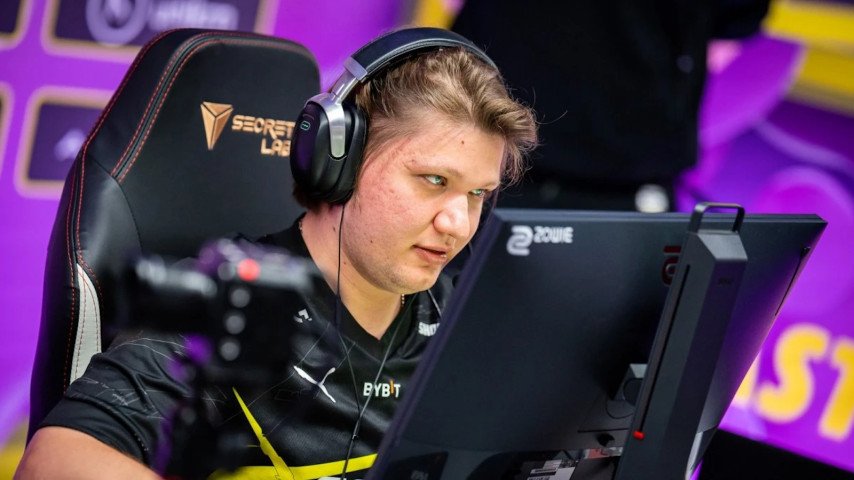 Credit: DotEsports.com
At major Dota 2 and CS2 tournaments, organizers provide standard gaming computers to ensure equal conditions for all participants. However, rules can vary from tournament to tournament, and sometimes players are allowed to bring their peripherals for comfort.
Processors: High-performance processors, such as Intel Core i9 or AMD Ryzen 9, are often used.
Graphics Cards: Top models such as NVIDIA GeForce RTX 3080 or AMD Radeon RX 6900 XT, which support high resolution and frame rate, are typically used.
RAM: 16-32 GB RAM is used to ensure smooth game operation and multitasking support.
Storage: NVMe SSDs are used for quick access to data and minimize load times.
Organizers choose these specifications to avoid any technical problems and provide players with optimal conditions for playing.
Many esports athletes prefer to use their peripherals, such as keyboards, mice, and headphones, even if standard gaming devices are provided. This is due to the habit and comfort they feel when using their equipment. Players often customize their peripherals to achieve maximum efficiency and comfort in the game.
In Dota 2, where strategic thinking and quick reactions play a key role, esports athletes choose hardware that provides stable performance and minimal delays.
Average Hardware Among Esports Athletes in Dota 2:
Processors: Intel Core i7-12700K or AMD Ryzen 7 5800X, which provide high performance and stability in multitasking environments.
Graphics Cards: NVIDIA GeForce RTX 3070 or AMD Radeon RX 6800, which support high frame rates and allow you to enjoy detailed graphics.
RAM: 16-32 GB DDR4, which provides the necessary bandwidth for seamless game operation and background tasks.
Storage: NVMe SSDs such as Samsung 970 EVO Plus for quick access to data and minimize load delays.
For esports athletes in CS2, maximum performance and responsiveness are important, especially in competitive matches, where every millisecond counts.
Average Hardware Among Esports Athletes in CS2:
Processors: Intel Core i9-12900K or AMD Ryzen 9 5900X, which provide high performance and handle the most demanding tasks.
Graphics Cards: NVIDIA GeForce RTX 3080 or AMD Radeon RX 6900 XT, which support the highest quality graphics and allow players to notice the smallest details in the game.
RAM: 32 GB DDR4, providing fast access to data and multitasking support.
Storage: NVMe SSDs such as WD Black SN750 for fast loading and minimizing delays in the game.
Esports athletes not only choose the best components but also optimize their systems for maximum performance. This includes:
Fine-Tuning BIOS: Overclocking processors and memory to increase performance.
Updating Drivers: Constantly updating drivers for graphics cards and other components to use the latest optimizations and fixes.
OS Settings: Disabling unnecessary services and processes in the operating system to reduce resource load.
Cooling: Using efficient cooling systems to maintain low temperatures and component stability.
System optimization allows esports athletes to maximize their hardware capabilities and ensure stability and reliability in critical situations.
Popular Gaming Peripherals Among Dota 2 and CS2 Players
Gaming peripherals are an integral part of the equipment that can significantly affect the gaming experience and performance. In Dota 2 and CS2, where reaction speed and accuracy play a key role, choosing the right peripherals can become a competitive advantage.
Monitors
Monitors are an important element of a gaming setup, and their choice is based on parameters such as refresh rate, resolution, and screen size. Players strive to choose monitors that provide image clarity and minimal delay.
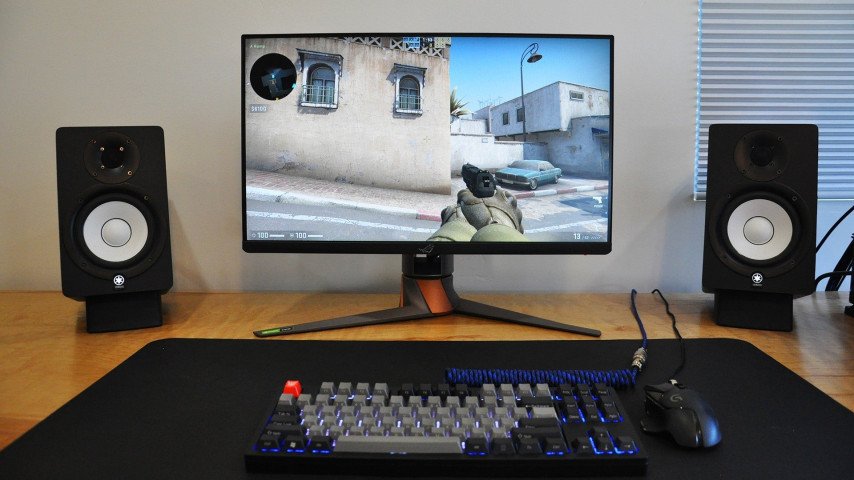 Credit: IGN
Popular Monitors Among Dota 2 and CS2 Players:
ASUS ROG Swift PG259QN: 360 Hz refresh rate, Full HD resolution - ideal for esports athletes due to the high refresh rate.
Acer Predator X27: 4K resolution, 144 Hz refresh rate - HDR support for excellent graphics.
Dell Alienware AW2521H: 360 Hz refresh rate, G-Sync - great for competitive gaming.
LG UltraGear 27GN950: 4K resolution, 144 Hz refresh rate - high resolution for detail.
BenQ ZOWIE XL2546K: 240 Hz refresh rate, DyAc+ technology for improved motion clarity.
Samsung Odyssey G7: Curved screen, 240 Hz refresh rate - full immersion in the gameplay.
ViewSonic Elite XG270QG: 165 Hz refresh rate, QHD resolution - balanced solution for esports athletes.
MSI Optix MAG274QRF-QD: QHD resolution, 165 Hz refresh rate - excellent color reproduction.
AOC Agon AG273QZ: 240 Hz refresh rate, QHD resolution - fast response and high clarity.
Gigabyte Aorus FI27Q-X: 240 Hz refresh rate, QHD resolution - support for FreeSync and G-Sync.
A high refresh rate and low response time allow players to better see fast movements on the screen and react with minimal delay, which is critical in competitive games.
Keyboards
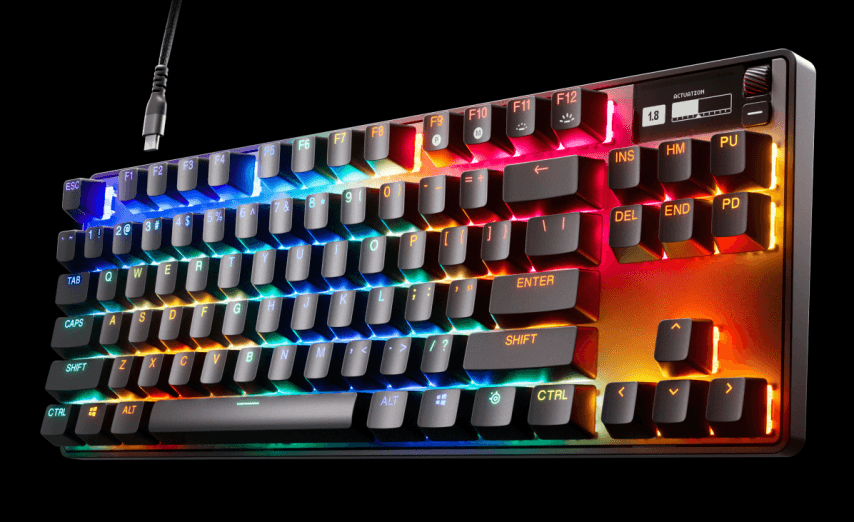 Credit: Steelseies.com
Keyboards play an important role in the comfort and efficiency of the gaming process. Many players prefer mechanical keyboards because of their responsiveness and durability.
Popular Keyboards Among Players:
SteelSeries Apex Pro: Adjustable key actuation, RGB backlighting - provides customization and responsiveness.
Razer BlackWidow V3: Mechanical switches, RGB backlighting - a popular choice due to reliability.
Corsair K95 RGB Platinum XT: Cherry MX mechanical switches, macro support - convenient for customization.
Logitech G Pro X: Detachable switches, compact design - ideal for esports athletes.
HyperX Alloy FPS Pro: Compact and reliable, mechanical switches - convenient for transportation.
Ducky One 2 Mini: Compact size, mechanical switches - great for limited space.
Roccat Vulcan 121 Aimo: Optical-mechanical switches, unique design - aesthetics and performance.
Cooler Master MK730: Compact size, Cherry MX mechanical switches - convenient for esports athletes.
ASUS ROG Strix Scope: Wide Ctrl key, RGB backlighting - designed for shooters.
Razer Huntsman Tournament Edition: Optical switches and high actuation speed are ideal for competitive games.
Mechanical keyboards offer improved tactile feedback, allowing players to react faster and more accurately to in-game actions.
Gaming Mouses
The mouse is a tool that directly affects the player's accuracy and response speed. In shooters like CS2, choosing the right mouse can be a decisive factor in the game.
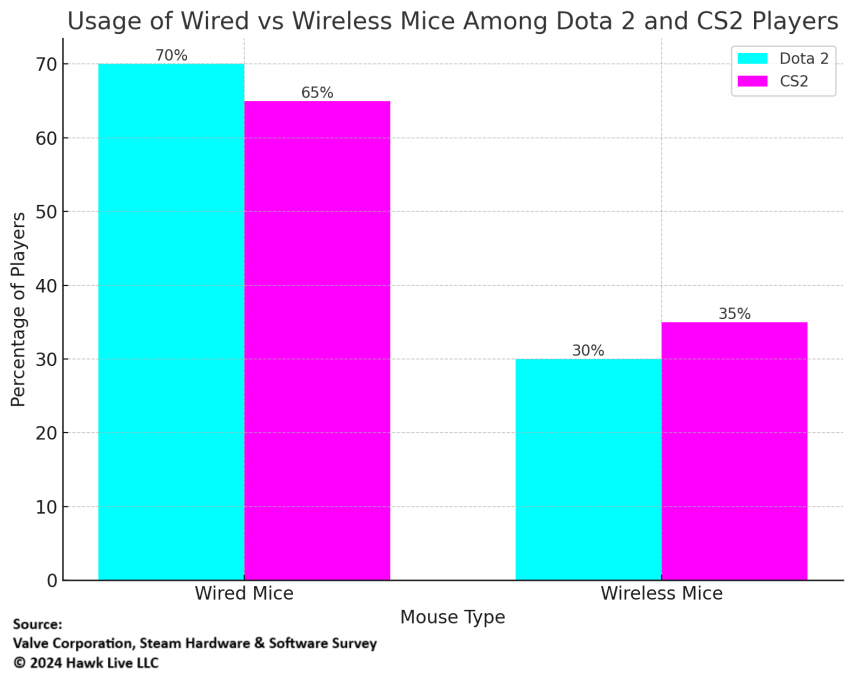
Popular Mice Among Players:
Logitech G Pro Wireless: Lightweight, wireless - ideal for esports athletes.
Razer DeathAdder V2: Ergonomic design, high-precision sensor - popular for comfort.
SteelSeries Rival 600: Adjustable weight, dual sensor - for precise control.
Zowie EC2: Simple design, high build quality - popular among professionals.
Glorious Model O: Lightweight, unique design with RGB backlighting - comfortable for long sessions.
Corsair Sabre RGB Pro: Lightweight, high polling rate - ideal for competitive games.
Finalmouse Ultralight 2: Minimal weight, high precision - popular among esports athletes.
Razer Viper Ultimate: High-precision sensor, lightweight - for quick reactions.
Logitech G502 Hero: Adjustable weight, numerous buttons - versatile and functional.
ASUS ROG Gladius II: Ergonomic design, replaceable switches - comfort and reliability.
Ergonomic design and high-precision sensors allow players to achieve maximum control accuracy, which is especially important in competitive games.
Headphones
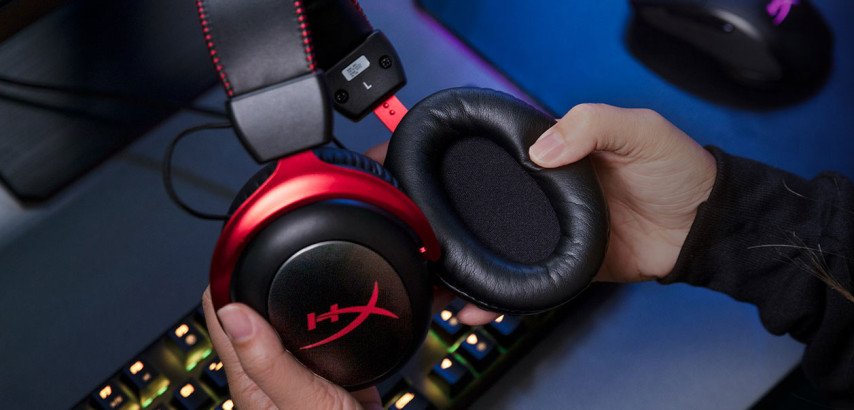
High-quality sound helps players better navigate the gaming environment and quickly react to events.
 Credit: Overclockers
Popular Headphones Among Players:
HyperX Cloud II: Comfort and excellent sound quality - popular among esports athletes.
SteelSeries Arctis Pro: High sound quality, comfortable to wear - for long gaming sessions.
Logitech G Pro X: Detachable microphone, excellent sound environment - popular among professionals.
Razer Kraken Tournament Edition: Durability and good sound quality - a great choice for gaming.
Corsair Virtuoso RGB Wireless: Wireless, high sound quality - convenience and freedom of movement.
Sennheiser GSP 600: High build quality and sound - popular among professionals.
Audio-Technica ATH-G1: Excellent sound quality and microphone - for demanding players.
Beyerdynamic DT 990 Pro: Open design, excellent sound quality - popular among audiophiles.
ASTRO Gaming A50: Wireless, comfortable, high sound quality - for maximum immersion.
Turtle Beach Elite Atlas: Robust design, excellent sound quality - ideal for esports athletes.
Choosing high-quality headphones allows players to accurately hear all the sounds in the game, from footsteps to gunshots, which can be a deciding factor in competitive matches.
How many Players Use Consoles and Laptops?
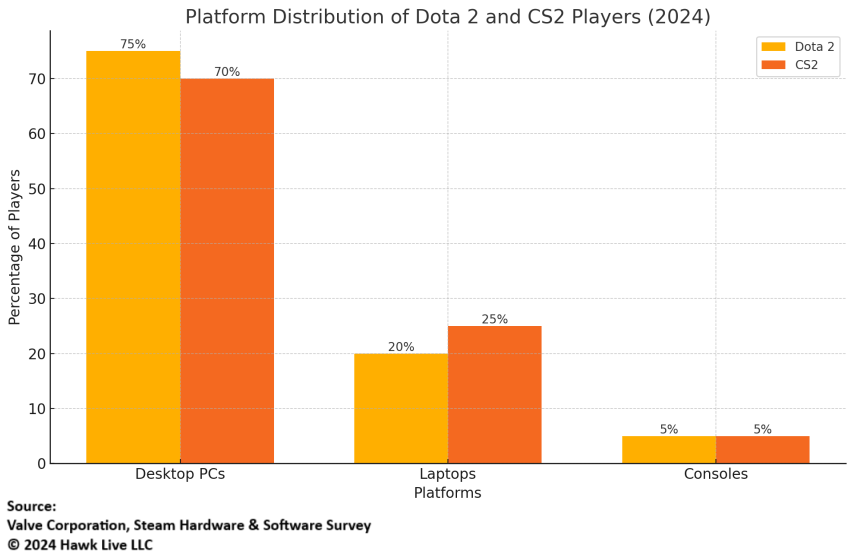
Players in Dota 2 and CS2 predominantly use desktop PCs for gaming, but laptops and consoles have also found their place among gamers. Laptops and consoles are limited compared to desktop PCs, especially in performance and upgradeability.
Advantages of Laptop Gaming
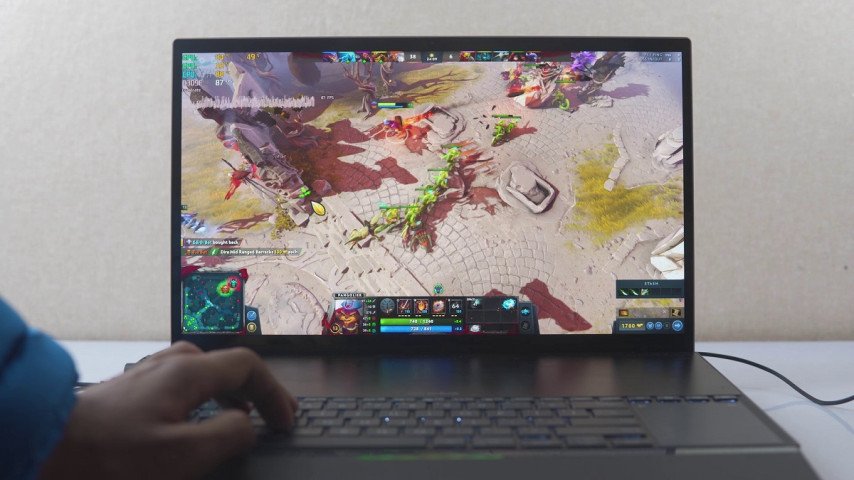
With the advancement of technology, gaming laptops have become capable of competing with desktop PCs, providing players with mobility and high performance. Many gamers choose laptops for their compactness and convenience, especially if they have to travel frequently or participate in competitions.
 Credits: Notik.ru
Percentage of Laptop Use Among Dota 2 and CS2 Players:
About 20% of Dota 2 players use gaming laptops, such as MSI, ASUS ROG, and Acer Predator, which provide enough power for comfortable gaming.
In CS2, the share of laptop users is about 15% since shooters require higher performance, and many players prefer desktop solutions to minimize delays.
Laptops provide players with the freedom to move and the ability to play anywhere with access to electricity and the internet.
Advantages of Laptops: Mobility, compactness, the ability to play anywhere.
Limitations of Laptops: Limited upgradeability, cooling issues under heavy load.
Use of Consoles
Although Dota 2 and CS2 are primarily PC-oriented, some players still prefer to use consoles for gaming due to their availability and ease of use. However, the share of players using consoles for these games remains insignificant.
Less than 5% of Dota 2 and CS2 players play on consoles like Xbox and PlayStation via streaming services or using cloud technologies.
Consoles provide players with the ability to play on a large TV screen and enjoy the game without the need for complex equipment setup.
Advantages of Consoles: Availability, ease of use, ability to play on a large screen.
Limitations of Consoles: Limited performance, lack of flexibility in settings.
Players who choose laptops and consoles should consider these factors and understand that achieving the best results in competitive games may require higher-level equipment.
Conclusion
In modern esports, where the stakes are high and the competition is tough, choosing the right hardware can be the key to success. Dota 2 and CS2 players, both amateurs, and professionals are constantly looking for ways to improve their systems to gain a competitive edge.
 Credit: ViewSonic Corporation
Ultimately, choosing hardware is an individual decision that depends on the player's needs and budget. However, understanding how different components affect performance allows players to make more informed decisions and get the most enjoyment out of the game.
Discover more about the latest developments in competitive gaming by browsing our other research. Stay informed on how esports continues to shape modern entertainment.