How to find out how much money have i spent on Valorant
Author: Hawk Live LLC
Last updated:

In Valorant, virtual items called cosmetic weapon skins can stir emotions. While enjoying the game, it's easy to lose track of how much you spend on these features. To stay informed about your spending, it is important to have a clear view of how much you spend on cosmetics in the game.
How can I Check My VALORANT Purchase History?
To find out the amount spent on skins in Valorant, you can use the purchase history feature provided by Riot Games.

Step 1: Access the currency purchase history support page provided by Riot Games in your web browser.
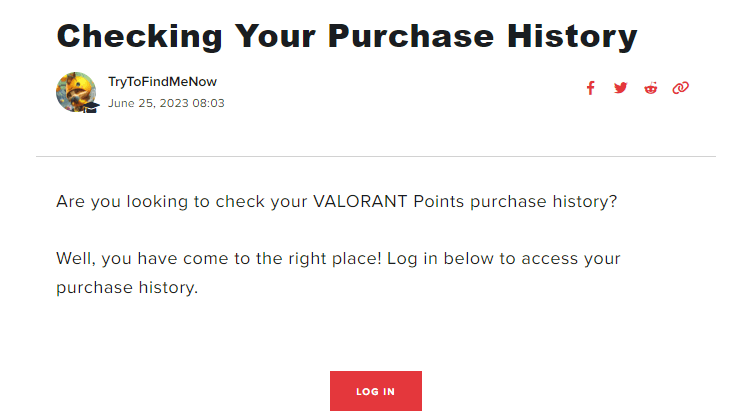
Step 2: Log in to your Riot account using your account details and access your account information for the Valorant game.

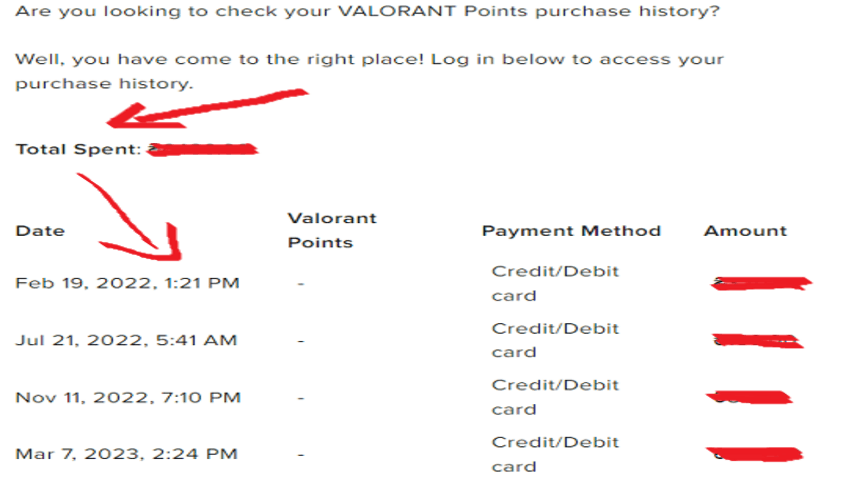
Step 3: Select the 'Get Purchase History' button to see a detailed list of all currencies purchased in Valorant. Here you will see information about the date and time of purchase, the payment method used, the amount purchased in your home currency and the exact amount of Valorant currency obtained in each transaction.

Step 4: At the top of the list you will see a summary of the amounts you have spent on Valorant. Note that this purchase history does not include items purchased directly from the store, such as individual skins, weapon skin packs or battle passes. It does, however, give a clear picture of your overall spending in the game.
 By having a clear picture of your finances in Valorant, you can more consciously manage your in-game spending, control your spending and track your budget, allowing you to maintain financial discipline and enjoy the game more.
If you're curious about how much time you've spent in Valorant, we’ve got you covered. Follow our guides to track your playtime and spending history to stay informed and manage your in-game experience wisely.