Pre-Match Matchmaker analytics Dota 2: how to find out about your teammates in advance and cancel the match
Author: Hawk Live LLC
Last updated:

Valve implemented a new feature in Dota 2 in patch 7.35d - Pre-Match Matchmaker analytics, allowing players to decline matches that do not suit them. This will allow users to avoid matches that they do not like based on analysis of teammates or opponents.
The developers of Dota 2 explained the specifics of the new feature on the official game website.
How to activate the new matchmaking feature in patch 7.35d
To activate the new feature, you need to be or become a subscriber of Dota Plus, which costs $3.99 per month. This feature is currently unavailable to regular users, at least until the next Dota 2 update.
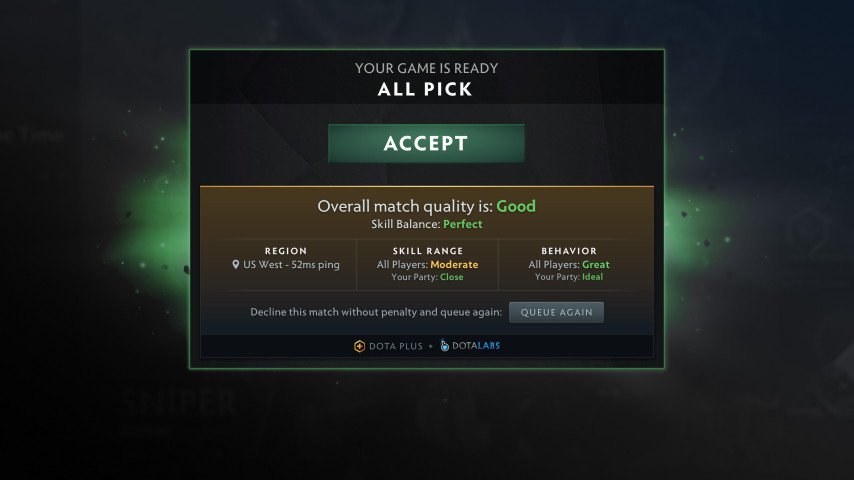
How to activate Pre-Match Matchmaker analytics:
Launch Dota 2.
Go to the game settings and open the Dota Labs tab.
Click on the Pre-Match Matchmaker analytics activation.
Confirm the settings.

After that, the feature will work continuously until the user decides to deactivate it manually in the settings. Now, before starting a game, players will receive information about other match participants, including their behavior and skill level. All this will be evaluated on a simple scale that explains the situation with teammates and opponents.
How to cancel a match in Dota 2 without penalties
In addition to useful analytics, the new feature provides even more opportunities for Dota 2 subscribers, namely to cancel a match without penalties and start searching for another one. If regular users receive a 20-minute penalty for canceling matchmaking, Dota Plus subscribers can do it immediately without penalties. To do this, simply click the "Queue Again" button.
However, Valve warned that Pre-Match Matchmaker analytics is an experimental feature. This means that it may undergo changes or be removed from the game altogether, depending on the feedback from the Dota 2 community.
It is worth noting that earlier Valve introduced another important feature by updating the hero banning mechanic. Now, to do this, simply select the banned heroes in the main menu, and matchmaking will automatically ban one of these heroes in the next match.