How to Convert Deadlock Sensitivity for Seamless Gameplay in Top FPS Games
Author: Hawk Live LLC
Last updated:
Every gamer knows how challenging it is to switch between different FPS games, let alone focus on standardizing sensitivity settings, right? Deadlock, a competitive shooter comes with its own sensitivity mechanics, and speaking of sensitivity, this article shall help players convert their Deadlock sensitivity while playing Valorant and CS 2, utilizing a deadlock sensitivity converter.
 Credit: 1v9.gg
What is a Deadlock Sensitivity Converter?
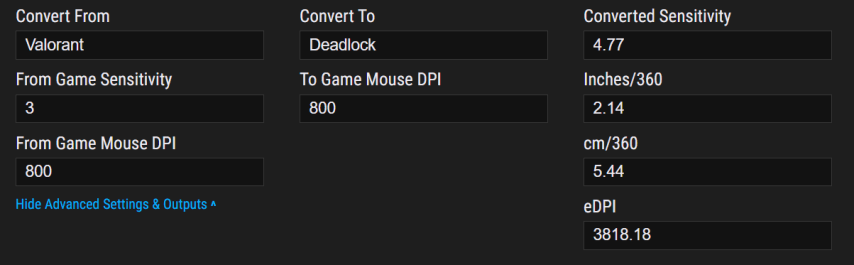
As the name suggests, a deadlock sensitivity converter is a device that allows a player to replicate the in-game mouse settings across multiple FPS sites. With the help of the converter users are able to bring over their precise aim when they play different games such as Deadlock, Valorant csgo, etc. This is a change that is paramount for a number of players who have muscle memory based aim.
 Credit: GameSensConverter
The converter takes a player’s deadlock sensitivity and converts it on the basis of the target game’s sensitivity scale. The idea is to allow the player to turn the in-game aim smoothly and as naturally as possible. One of the main goals of the process is to get our muscle memory correct at it’s most important setting ‘effective sensitivity’. This is the setting whereby moving the mouse the same distance in both games produces an exact rotation in the game.
How to Convert Deadlock Sensitivity to Other Games
Step-by-Step Guide
Choose a Sensitivity Converter Aiming.Pro or sensitivity calculators are freely accessible online that give an estimate of how much sensitivity in another game, such as CS, a player needs to use who played Deadlock Sensitivity beforehand.
Fill In Deadlock Sensitivity After choosing an appropriate and working converter, input your current deadlock sensitivity. Based on this value, the tool will provide the sensitivity you will require while gaming whether it is Valorant, CS2 or any other game.
Select The Game to Target Choose the game you want the tool to adjust to from the popup menu of the tool. This makes sure that the versatility of different targeting mechanics with respect to the game has been addressed by the converter.
DPI Settings Whereas, if you have varying DPI settings for different games, make sure you fill in both Deadlock DPI as well as the DPI for the target game. This makes it possible for the converter to calculate a correct eDPI making the sensitivity consistent throughout.
Getting Your Converted Sensitivity Now that all the fields have been completed, the converter will now do all the magic for you by giving the required sensitivity that you need for your game. Moreover, some converters calculate and provide extra outputs for example cm/360 or inches/360 so that the users are better able to comprehend the distance they will need to move their mouse to rotate 360 degrees in each game.
Example Conversion: Deadlock to Valorant
To get your valorant sensitivity from deadlock use the following formula below:
Valorant Sensitivity = Deadlock Sensitivity × 0.629.
For instance, if your deadlock sensitivity is 2, you will multiply this value with 0.629, thus implying, the result will be 1.258 which is the Valorant sensitivity setting.
Example Conversion: Deadlock to CS2
For the CS2 players, the conversion seems to be random but works similarly. They don’t have their own settings, here is the formula to convert deadlock to CS2 sensitivity for you:
CS2 Sensitivity = Deadlock Sensitivity × 0.7. Clarifying that when your deadlock sensitivity is 2, the CS2 setting will be around 1.4.
Recommended Sensitivity Settings for Deadlock and Other Games
As competitive players often do, there are times when they will have to adjust their sensitivity settings for certain games. For persons who play Deadlock and other competitive FPS games such as valorant and C2 it is crucial to know what the ideal or approximate range of sensitivity settings is so as to assist them in targeting.
There are certain deadlock sensitivity settings that we recommend for the correct management of your mouse:
DPI 400: 0.65 to 2.60
DPI 800: 0.32 to 1.30
DPI 1600: 0.16 to 0.65
DPI 3200: 0.08 to 0.32
On the other hand, if we talk about games like CS2 the recommended sensitivity settings are:
DPI 400: 1.30 to 5.20
DPI 800: 0.65 to 2.60
DPI 1600: 0.32 to 1.30
DPI 3200: 0.16 to 0.65
Conclusion
When moving from deadlock to valorant or any other game it becomes much easier if you have an online sensitivity converter. This definitely helps in smooth transitioning from game to game. Having the right tools enables players to consistently maintain their target aim and even performance levels across several games. Whether it’s working it out yourself or using the calculation to work out your sensitivity settings, it is critical for winning in competitive environments with more than one title game.
If you want to go deep and get even more accurate results you can enter in your mouse dpi settings and use external outputs like “cm/360 and edpi”. Dominating in deadlock and any other game easy to do when you have the right settings.
Transferring your sensitivity between FPS games is key to maintaining accuracy and consistency. If you’re switching from Deadlock to CS2 or Valorant, our guide explains how to convert your settings for a seamless experience. But if you're looking to adjust your sensitivity when moving from CS2 to Valorant, or Valorant to The Finals, check out our detailed conversion guides (CS2 to Valorant, Valorant to The Finals) to optimize your aim across different competitive shooters.