How many GB is CS2: how much space the game takes up on PC
Author: Hawk Live LLC
Last updated:

CS2 is essentially the same as CS:GO, but in a new wrapper, and they significantly differ in the engine, models, animations, and many other aspects. This means that the game's file size has also changed. Despite the official page in Steam stating an impressive figure of 85GB of free space, this does not quite correspond to reality.
How many gigabytes does CS2 weigh?
Despite the system requirements, Valve's shooter is much smaller than 80GB. While CS:GO took up around 20GB on the hard drive, CS 2 now requires significantly more and weighs just over 43GB. It's worth noting that this includes the latest updates and patches, so the game's file size has increased significantly compared to the initial version.

How much space will CS2 require?
It's worth mentioning that despite the game's size being 43GB, this does not mean that 45GB will be enough for CS2 to run correctly. The system needs free space for creating temporary files and stable application performance. Therefore, if there is less than 15GB of free space on the hard drive, significant FPS drops may be felt, the game will start to lag, or even crashes may occur.
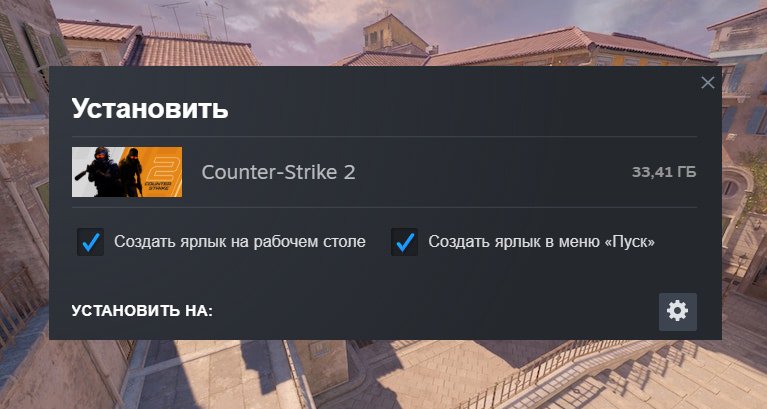
As indicated in the CS2 system requirements, the optimal scenario is to have 85GB of free space on the hard drive at the time of installation. This means that the game needs about 30-40GB for optimal operation on the PC.
Tips for CS2 Installation and Optimization
It's better to install CS2 on the system drive, where there is more than 20GB of free space, ideally 40GB.
It's preferable to use an SSD rather than an HDD. With this option, the game's performance will significantly improve, and map loading will take only a few seconds.
Don't forget to clean up the disk. The point is that temporary files from the internet can accumulate on it, taking up free space. It may seem like no new games have been installed, but if the performance of CS2 has dropped, it may be due to the 'clutter' in the downloads folder on your PC.