It has become known how a player can check if they have been placed in the smurf pool
Author: Hawk Live LLC
Last updated:

Console in Dota 2 can help any player to verify if their account has been put into smurf pool during matchmaking.
Dota 2 streamer and caster known as Aren “VeRsuta” Zurabyan advised this method.
His explanation of the process consisted of creating a special lobby then view the console tab. It also came with a screenshot to illustrate things better.
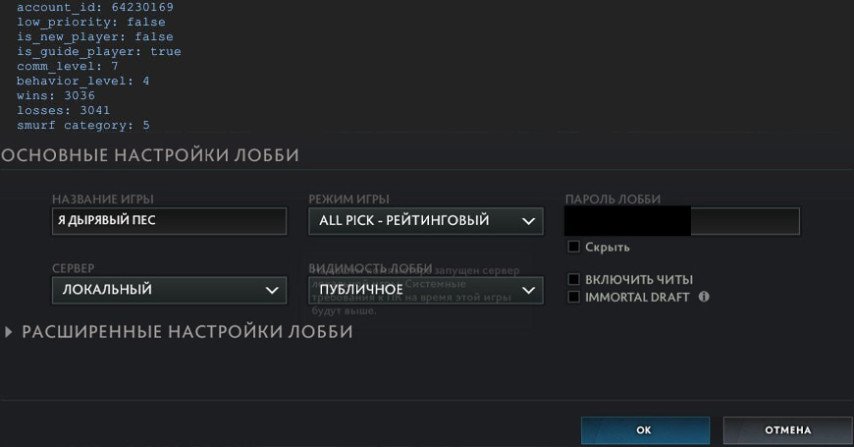
How to check your account in Dota 2:
Enter the game and create a lobby with the settings indicated in VeRsuta's screenshot.
Do not start the game, but instead, open the console. By default, this is the "~" key, but it can be changed in the game settings.
In the opened window, find the line "smurf_category". If the number next to it is between 1 and 5, the account is fine. If the number is 6 or higher, the account is likely placed in the smurf pool.
It should be noted that Smurf Pool is a secret matchmaking system of DOTA 2, placing a player’s account to some separate rating if he/she has constantly shown an unusually high win rate for his/her rank. Then such players will face real veterans of multiplayer games, as well as other highly ranked accounts belonging to famous people who play under various nicknames (smurfs). It becomes quite difficult for them to win those matches.
Previously Dmitry “Korb3n” Belov claimed that DotA 2 has hidden mechanisms that control players’ MMRs (Match Making Rates)