Play Dota 2 Now! A Simple Guide to Game's System Requirements!
Author: Hawk Live LLC
Last updated:
Welcome to the world of Dota 2! For people who are veteran gamers or those with inquisitive minds about esports, this is the right place. We will be delving into one of the most important aspects of gaming here: system requirements. These requirements are what you have to understand if you want an uninterrupted gaming experience.
Dota 2: An Overview
Dota 2 (Defense Of The Ancients) is an online multiplayer game developed and published by Valve Corporation. It functions as a stand-alone sequel, which was created from Defense of the Ancients (DotA), a mod developed by community members for Blizzard Entertainment's Warcraft III: Reign of Chaos. Each side defends their base on the map while attempting to destroy the enemy’s. Players independently control a “hero”. All heroes have different styles of play and unique abilities.
Why System Requirements Matter
System requirements refer to the software and hardware necessary for effective running of a game on your PC. Meeting these allows you to enjoy games without interruptions, lags or any other annoying factors that may dampen your gaming experience. It saves you from slow load times, poor graphics, or even crashes. In Dota 2 where everything happens at lightning speed, meeting these specifications can determine whether you win or lose.
Windows System Requirements for Dota 2
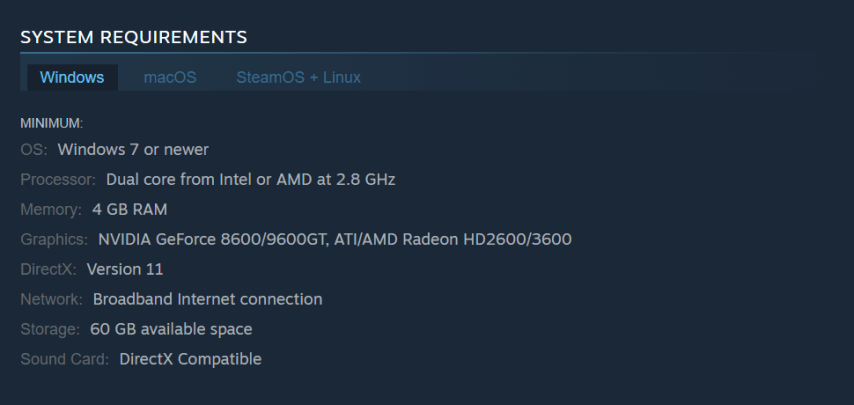
For Windows users, here are the minimum requirements:
Operating System: Windows 7 or newer
Processor: Dual-core from Intel or AMD at 2.8 GHz
Memory: 4 GB RAM
Graphics: NVIDIA GeForce 8600/9600GT, ATI/AMD Radeon HD2600/3600
DirectX: Version 11
Network: Broadband Internet connection
Storage: 15-60 GB available space
Sound Card: DirectX Compatible
These are just the minimum requirements, and while they will allow you to run the game, you might not get the best performance. If you want to experience Dota 2 in all its glory, upgrading your system to match the recommended requirements might be a good idea.
macOS System Requirements for Dota 2
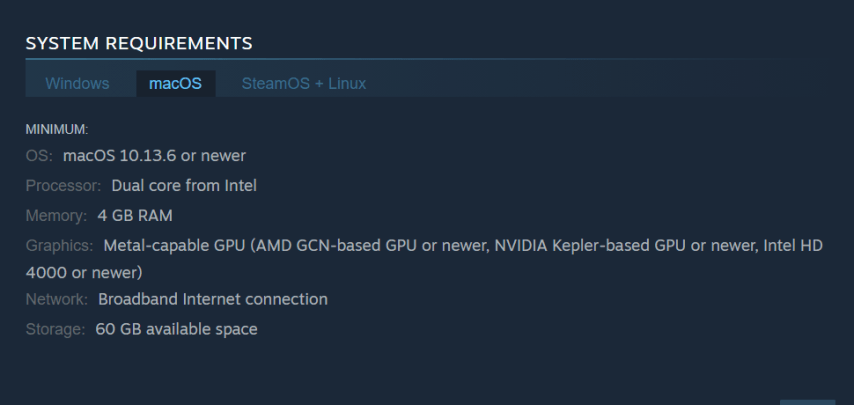
For those of you on macOS, don't worry, Dota 2 has you covered. Here are the minimum system requirements for Dota 2 on macOS:
Operating System: macOS 10.13.6 or newer
Processor: Dual-core from Intel
Memory: 4 GB RAM
Graphics: Metal-capable GPU (AMD GCN-based GPU or newer, NVIDIA Kepler-based GPU or newer, Intel HD 4000 or newer)
Network: Broadband Internet connection
Storage: 15-60 GB available space
Again, these are just the minimum requirements. For an optimal experience, a system with higher specifications will provide better performance.
Linux System Requirements for Dota 2
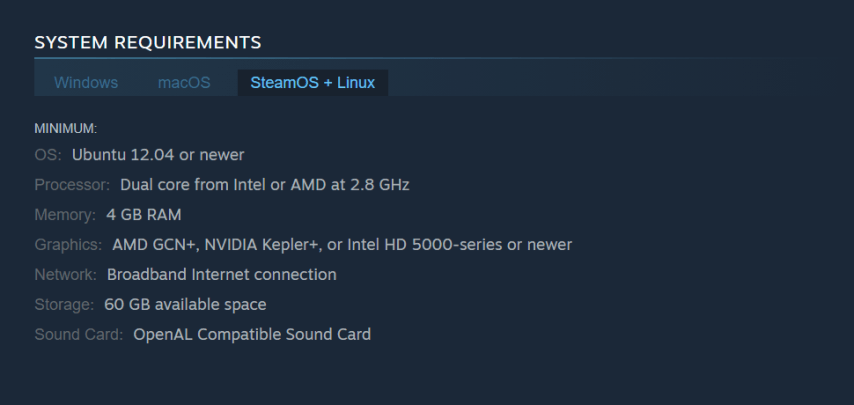
The Linux gaming community is growing every day, and Dota 2 is a part of that. Here are the minimum system requirements for Dota 2 on Linux:
Operating System: Ubuntu 12.04 or newer
Processor: Dual-core from Intel or AMD at 2.8 GHz
Memory: 4 GB RAM
Graphics: AMD GCN+, NVIDIA Kepler+, or Intel HD 5000-series or newer
Network: Broadband Internet connection
Storage: 15-60 GB available space
Sound Card: OpenAL Compatible Sound Card
Like with Windows and macOS, these are the minimum requirements. Upgrading your system will provide a smoother and more enjoyable gaming experience.
Common Questions About Dota 2 System Requirements
In this section we will provide answers to some of the most commonly asked questions about Dota 2’s system requirements.
Can I play Dota 2 on my laptop?
Definitely, the game Dota 2 can be played on a majority of present-day laptops as long as they have minimum system requirements. However, if you are interested in playing competitively or looking for better performance, it may be worthwhile to consider a gaming laptop with higher specs.
How do I check if my system meets the requirements?
There are numerous ways of checking your system specifications. On Windows, this information can be found in the System Information app and Device Manager. On macOS; it can be accessed from About This Mac menu while Linux’s terminal has commands like lscpu, free -m and lshw to say nothing about others.
Can I play Dota 2 if my system doesn't meet the minimum requirements?
Dota 2 is technically capable of running on a computer whose specifications do not meet the minimum requirements; however, this is not advisable. Such a game will work poorly and might frequently crash thereby providing players with an awful gaming experience.
What happens if my system just meets the minimum requirements?
In case your PC only has minimal demands placed by Dota 2 game, then you will enjoy its functionality albeit low-grade graphics quality and low frame rates setting. By upgrading your PC hardware players can achieve high-quality images and increase game flow thus making it more enjoyable.
How can I improve my system to meet the recommended requirements?
To make your computer attain the recommended level of performance, memory size (RAM), processor type and graphic card should be replaced. If using laptops go ahead and buy a gaming laptop or desktop PC that satisfies recommended specifications for playing Dota 2.
Conclusion
Understanding the system needed for Dota 2 sets up an enjoyable seamless play experience. Ensuring that your computer surpasses or meets these standards allows one to engage in play designed specifically for enjoyment. You’re welcome into the world of Dota 2 regardless whether you’re new to it or just an old-timer.