Dota 2 replay guide: game recordings
Author: Hawk Live LLC
Last updated:

In the world of Dota 2, every decision, every move, and every strategy counts. One of the most effective ways to improve your gameplay is by studying replays. Replays allow you to review your matches, analyze your decisions, and learn from your mistakes. They provide a unique perspective that you can't get during the heat of the game.
This guide will walk you through the process of finding, downloading, watching, analyzing, and converting Dota 2 replays, as well as recording your gameplay.
How to Find and Download Dota 2 Replays
The ability to watch replays in Dota 2 is a powerful tool for improving your gameplay. It allows you to revisit your matches, analyze your strategies, and learn from your mistakes. But before you can start watching, you need to know how to find and download these replays. Here's a step-by-step guide on how to do it.
Step 1: Accessing the Watch Tab
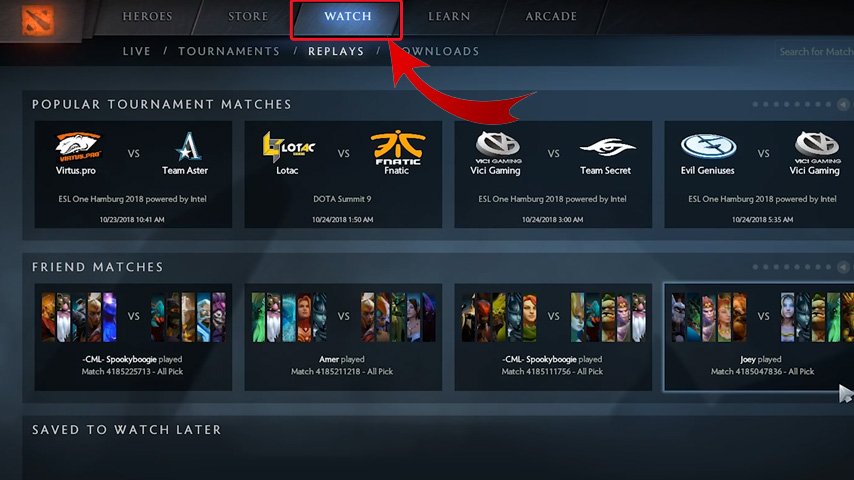
From the main menu of Dota 2, you'll see several options. Click on the 'Watch' tab. This will take you to a page where you can view a variety of games. These include live games, tournament games, and recent games.
Step 2: Navigating to Replays
Once you're in the 'Watch' tab, you'll see several sub-tabs. Click on the 'Replays' sub-tab. This will show you a list of recent games that are available for replay.

Step 3: Using Filters
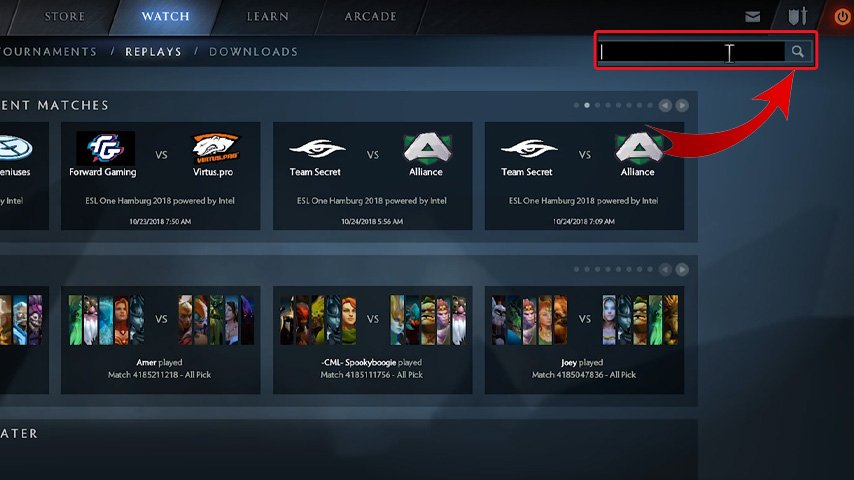
The 'Replays' page has a Search that you can use to find the game you're looking for. You can filter games by Match ID, which is a unique identifier for each game.
Step 4: Downloading the Replay
Once you've found the match you're interested in, click on it. This will take you to a page with details about the match. On this page, you'll see a 'Download Replay' button. Click on this button to start downloading the replay. The download may take a few minutes, depending on the length of the game and your internet speed.
Step 5: Accessing the Downloaded Replay
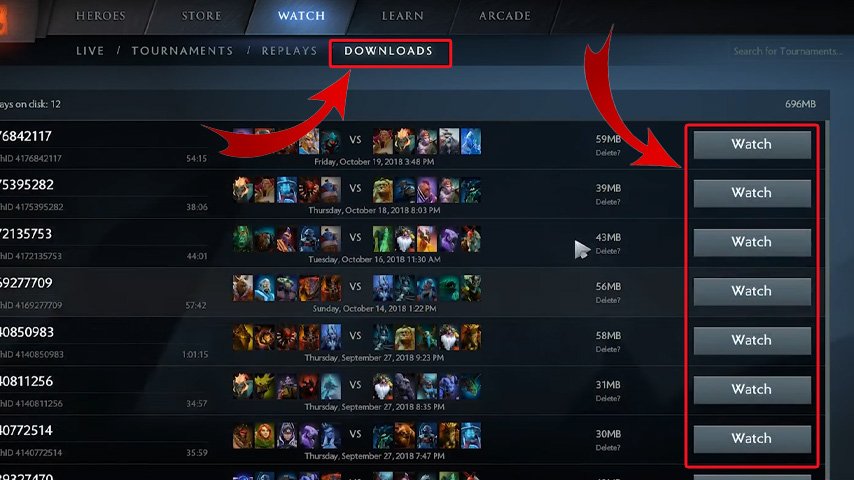
After the download is complete, the 'Download Replay' button will change to a 'Watch Replay' button. Click on this button to start watching the replay. The replay will be played in the Dota 2 client, allowing you to control the camera, speed, and other settings.

Remember, replays are only available for a limited time. Valve typically keeps replays available for about a week, although this can vary. So if you want to review a particular game, make sure to download the replay as soon as possible.
By following these steps, you can easily find and download any Dota 2 replay. Whether you're studying your own games, learning from top players, or just reliving epic moments, replays are an invaluable resource for any Dota 2 player.
How to Save and Store Dota 2 Replays
Once you've downloaded a replay, it's crucial to save and store it properly for future reference. Dota 2 replays are not only a great way to relive your epic victories or narrow defeats, but they're also an invaluable tool for improving your gameplay. Here's a detailed guide on how to save and store your Dota 2 replays.
Step 1: Saving the Replay
After you've downloaded a replay, it's automatically stored in your Dota 2 client for a limited time. However, if you want to keep the replay for longer, you'll need to save it. To do this, go to the 'Last Match' section, look for the match you want to save, and click on 'Save Replay'. This will keep the replay in your client until you decide to delete it.
Step 2: Locating the Replay File
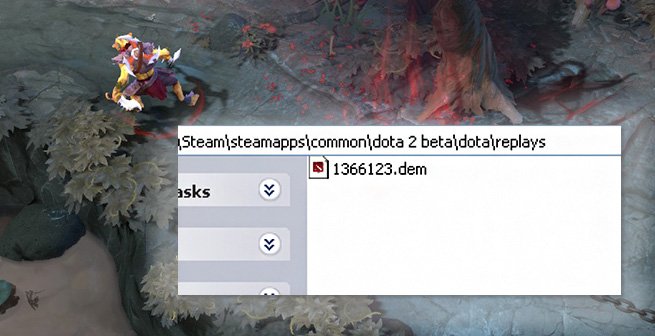
Dota 2 replays are saved as .dem files in a specific folder on your computer. The default location for these files is usually in the 'replays' folder in your Dota 2 installation directory. The path would look something like this: C:\Program Files (x86)\Steam\steamapps\common\dota 2 beta\game\dota\replays.
Step 3: Organizing Your Replays
If you're planning to save and review many replays, it's a good idea to organize them in a way that makes sense to you. You might choose to create separate folders for different types of games (e.g., wins vs. losses, different heroes, solo games vs. team games, etc.). Alternatively, you might prefer to organize them by date, skill level, or any other criteria that are important to you.
Step 4: Backing Up Your Replays
Replays can take up a significant amount of space on your hard drive, especially if you're saving many of them. To ensure that you don't lose your replays if something happens to your computer, consider backing them up. You can do this by copying the .dem files to an external hard drive, a cloud storage service, or any other secure location.
By properly saving and storing your Dota 2 replays, you can create a valuable resource for improving your gameplay. Whether you're studying your own performance, learning from top players, or analyzing your opponents' strategies, having a well-organized library of replays can give you a significant advantage.
How to Watch Dota 2 Replays Effectively
Watching replays is an integral part of improving your Dota 2 gameplay. It's not just about re-watching your games; it's about analyzing them, understanding your mistakes, and learning how to avoid them in the future. Here's a comprehensive guide on how to watch Dota 2 replays effectively.

Step 1: Choosing the Right Perspective
When you start watching a replay, you can choose from several different perspectives. These include the player perspective, which shows you exactly what the player saw during the game, the free camera, which allows you to move the camera freely around the map, and the directed camera, which automatically follows the action. For analysis purposes, the player perspective is often the most useful, as it allows you to see exactly what the player was looking at and doing at any given moment.
Step 2: Using the Replay Controls
The replay system in Dota 2 includes a variety of controls that can help you analyze the game. You can pause and resume the replay, fast forward or rewind, and even change the playback speed. Use these controls to focus on key moments in the game, slow down the action to see exactly what happened, or skip through less important parts.
Step 3: Analyzing Key Moments
When watching a replay, focus on the key moments in the game. These could include team fights, ganks, pushes, and other significant events. Look at these moments in detail and try to understand why they turned out the way they did. What decisions led to that outcome? What could have been done differently? By analyzing these key moments, you can gain a deeper understanding of the game and improve your decision-making.
Step 4: Learning from Mistakes
Replays are a great way to learn from your mistakes. When you watch a replay, try to identify any mistakes you made and think about how you could avoid them in the future. This could include positioning errors, missed opportunities, poor decision-making, or any other mistakes. Remember, everyone makes mistakes, and the key to improving is learning from them.
Step 5: Taking Notes
While watching replays, it can be helpful to take notes. Write down any important observations, insights, or lessons you learn from the replay. These notes can serve as a valuable reference for future games and can help you remember and apply what you've learned.
By watching replays effectively, you can gain a deeper understanding of Dota 2, improve your gameplay, and become a better player. So don't just play games - watch them, analyze them, and learn from them.
Conclusion
In conclusion, replays are a powerful tool for improving your Dota 2 gameplay. They allow you to review your games, learn from your mistakes, and develop new strategies. By finding, downloading, watching, analyzing, and converting your replays, and recording your gameplay, you can gain a deeper understanding of the game and become a better player. So don't wait, start using replays to your advantage today!