Unleash Your Generosity: The Ultimate Guide to Gifting in Dota 2
Author: Hawk Live LLC
Last updated:

Welcome to the ultimate guide about gifting in Dota 2, where we will look into the intricacies of this fun aspect of the game. From experienced players to beginners, this article will provide you with all-round knowledge on how gifting works in Dota 2. Let’s see how Dota 2 community turns out through gifting.
What is Gift in Dota 2
 Credit: Valve Corporation
In Dota 2, a gift forms part of the mechanics that allow items between players. Such gifts may consist of cosmetic things such as skins for heroes, effects for attacks or taunts among many other things. It is therefore not only an opportunity to personalize a hero but also show concern and support towards another player. Gifting has a potential of creating a unique atmosphere of friendship and cooperation in the gaming community.
Dota 2 Gifting Requirements
Before you commence your journey of giving gifts there are some things you should understand first. The first is that the receiver must have been on your Steam friend list for at least one year. However, if you have enabled Steam Guard Mobile Authenticator this condition gets reduced to just thirty days. This was done by Valve as a precautionary measure against possible fraud within its community. Therefore ensure that you don’t delay until when it would be too late before enlisting your friends so as to surprise them with gifts.
How to Gift in Dota 2
 Credit: Valve Corporation
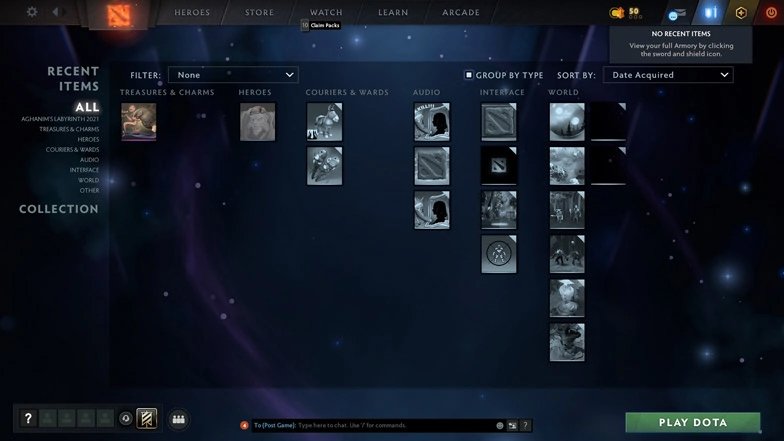
Gifting in Dota 2 is a straightforward process. Here's a step-by-step guide:
Launch Dota 2 and click on the Armory icon, represented by a shield and sword, at the upper-left corner of the screen.
Browse through your collection of items and hover your cursor over the item you wish to gift.
Right-click on the item and select 'GIFT WRAP ITEM' from the drop-down menu.
A list of your friends will pop up. Click on the friend to whom you want to send the gift and click 'OK'.
And there you have it! Your gift is on its way to bring joy to your friend.
How to Gift in Dota 2 through Steam
 Credit: Valve Corporation
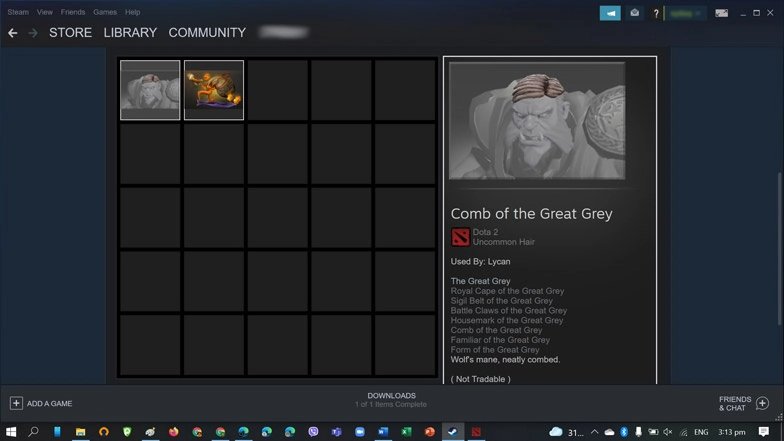
You can also send gifts through the Steam client without launching the game. Here's how:
Open your Steam client and click on the 'Games' menu at the top of the screen.
Navigate to 'Manage Gifts and Guest Passes'.
Select 'Dota 2' from the list of games.
Pick the gift you want to send and press 'SEND'.
You'll be given the option to send the gift via email or directly through Steam. Choose the method that's most convenient for you and your friend.
How to Receive a Gift in Dota 2
Once you receive a gift from a friend, you can use it within a few minutes:
Receive Notification: When your friend sends you a gift, you will receive a notification about it. This usually happens through the Steam or Dota 2 system, depending on how your friend chose to send the gift.
Accept the Gift: Open the notification about the gift and accept it.
Receive the Gift in Inventory: After accepting the gift, it will be automatically added to your inventory in Dota 2. You will be able to see it there the next time you log into the game.
Use the Gift: Once the gift is in your inventory, you can use it as you see fit. If it's a cosmetic item, you can apply it to your hero. Other artifacts can be freely used after receiving them, subject to any established restrictions.
Thank Your Friend: Don't forget to express your gratitude to your friend for the gift.

Credit: Valve Corporation
Gifting Restrictions
While gifting is a wonderful feature, there are certain restrictions you should be aware of:
Gifts cannot be sold on the market.
Items previously received as a gift cannot be wrapped again for one month.
Untradeable items obtained from drops or Treasures can only be gifted once. However, items from Treasures can be gifted again after their trade-restriction period expires.
There's a limit to the number of items you can gift within a certain time (8 items for every 24 hours).
This limit is determined by your Experience Trophy level.
Non-tradeable items can only be gifted by players over level 5.
It's important to keep these restrictions in mind to ensure a smooth and enjoyable gifting experience.
Tips and Tricks for Gifting in Dota 2
Gifting in Dota 2 is notj ust about the act of giving, it's also about understanding the mechanics of the game and the community culture. Here are some tips to enhance your gifting experience:
Be selective: While it's the thought that counts, it's always a good idea to gift items that are likely to be appreciated. Try to gift items that align with the recipient's play style or their favorite characters.
Be timely: Certain items have trade restrictions or expiry dates. Be sure to send your gifts within these time frames to ensure they reach the recipient.
Use the Steam Guard Mobile Authenticator: This not only secures your account but also reduces the friend-list duration requirement for gifting from 365 days to 30 days.
Keep track of your gifting limits: You can gift 8 items every 24 hours. Make sure you're aware of this limit to plan your gifting strategy effectively.
This will help you enhance your Dota experience, create friendships and bring happiness to other gamers. After reading this detailed guide, you should be able to go through Dota 2’s gifting process like an expert. Remember that Dota is not just a game but also a community. Now give some things away and feel yourself as a generous person in Dota 2!