Fixing the сonnected to the Dota 2 game coordinator issue
Author: Hawk Live LLC
Last updated:

Dota 2, an extremely popular multiplayer online game, has its fair share of technical glitches. One of the common issues that players encounter is the "Connected to the Dota 2 Game Coordinator" message that appears when attempting to log into the game. If you are stuck at this screen, don’t worry; we will show you how to get back into the game so that you can start playing games again.
Understanding the Problem
“Connected to the Dota 2 Game Coordinator” message is a common problem while trying to log into the game. It mainly happens when there is an issue with communication between your game client and Dota 2 servers especially through Game Coordinator.
Below are few solutions that have been tested over time for fixing this problem and bringing you back into gaming.
Check Server Status:
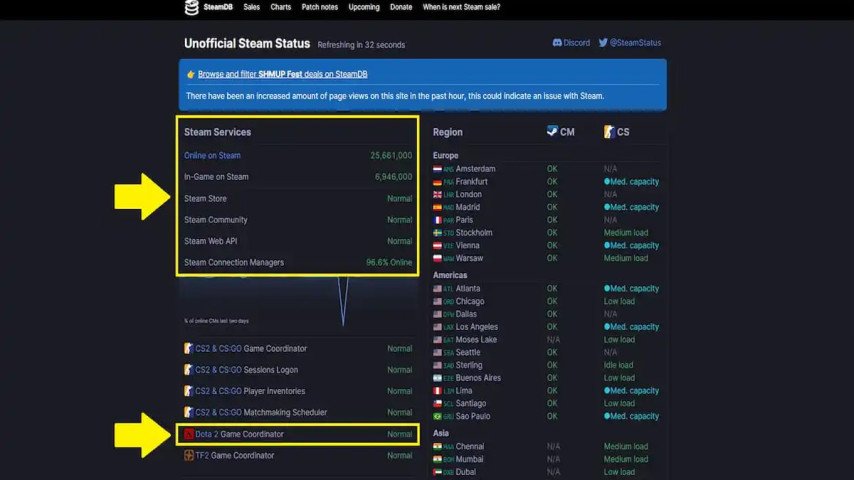
Before troubleshooting, it's important to ensure that the issue is related to the game servers. You can check the server status on the official Dota 2 website or community forums.
If the servers are unavailable or undergoing maintenance, you may need to wait until they are back online.
Restart Dota 2:
Sometimes, a simple restart of the game can resolve the issue. Close Dota 2 and launch it again to check if the problem persists.
Restart Steam:
Since Dota 2 is connected to Steam, issues with the Steam client can affect the game's performance. Close Steam and restart it to establish a fresh connection.
Check Your Internet Connection:
A stable and fast internet connection is crucial for online gaming. Ensure that your internet connection is working correctly and not experiencing interruptions.
Change Your Server Region:
You are free to manually choose your server region on Dota 2. In case you cannot connect try changing your server region from within game settings. Occasionally, switching to another server may fix this hitch.
Disable Firewall and Antivirus:
Sometimes firewall or antivirus might interfere with connection between Dota 2 and Game coordinator as they could be extremely aggressive. Temporarily disable them and check if it works; remember enabling them afterwards as well.
Verify Game Files:
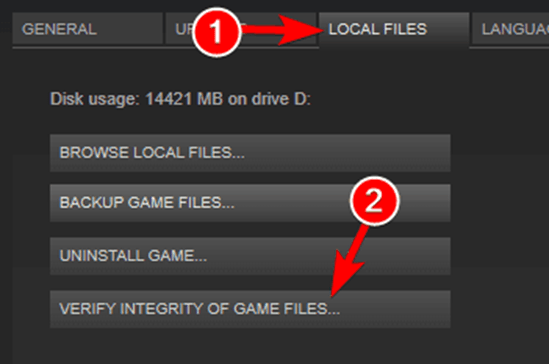
Corrupted files of the game can cause connectivity issues. In your Steam Library, go to Dota 2 > Properties > Local Files > Verify Integrity of Game Files and repair any corrupted ones.
Clear Steam Cache:
At times clearing the steam cache can resolve some connection problems. To do so go to Settings> Downloads> Clear Download Cache in Steam.
Be Patient:
In some cases it may not be on your part but rather with the Dota 2 servers themselves. The game developers usually fix server-related problems with time, hence patience is an important virtue here.
Conclusion
It can be frustrating when you are logging into “Connected to the Dota 2 Game Coordinator”; however these trouble shooting steps should see you back into the game in no time. Just note that for server-related issues there may be a need to wait for Valve Corporation however for most other problems this list will help you play Dota 2 without disruptions.