The Ultimate Guide to Dota 2 Chat Wheel
Author: Hawk Live LLC
Last updated:

The chat wheel in Dota 2 is an important component of effective communication among players. Whether you are an experienced player or a newcomer to the Dota 2 community, understanding and using this mechanic can significantly enhance your gaming experience. A detailed guide to the chat wheel in Dota 2 will help you master it to its fullest potential.
What is a chat wheel?
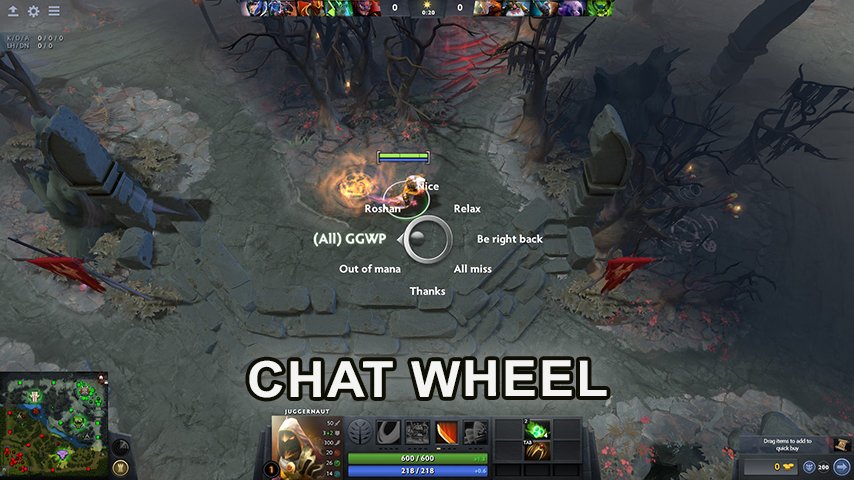
The chat wheel is an in-game interface tool in Dota 2 designed for quick communication with your teammates. By holding down the assigned hotkey and moving the mouse in any of the eight directions, you can send predefined messages to your team.
Customizing the Chat Wheel
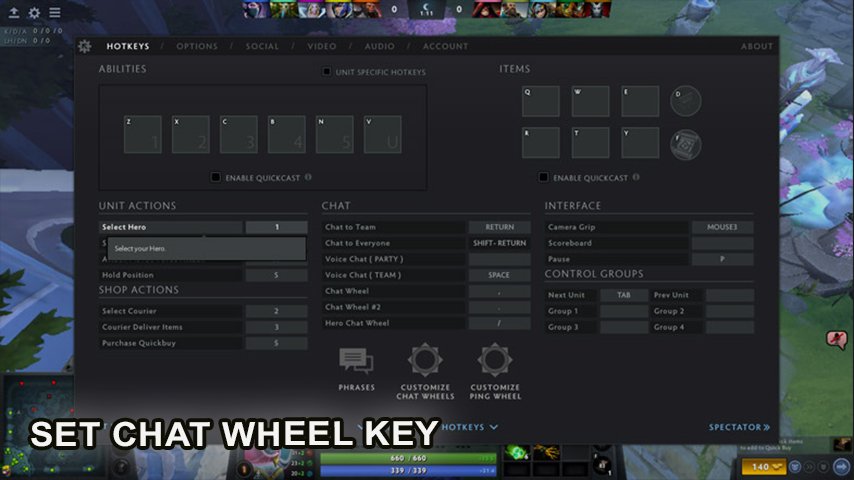
To customize your chat wheel, follow these instructions:
Go to the settings menu in Dota 2.
In the chat options tab, you'll find a section dedicated to configuring the desired option. Here, you can assign a hotkey to bring up the wheel.
Next, you can select phrases that you send in chat most frequently by clicking on the "Customize Chat Wheel" button.
In the game, you can customize two chat wheels that will operate independently of each other.

Dota 2 offers a wide range of templates, from in-game commands to popular phrases among players. Remember that the key to effective communication is not only what you say but also how quickly and clearly you say it. During setup, it's best to choose phrases that you use most frequently in games.
The Hero Chat Wheel
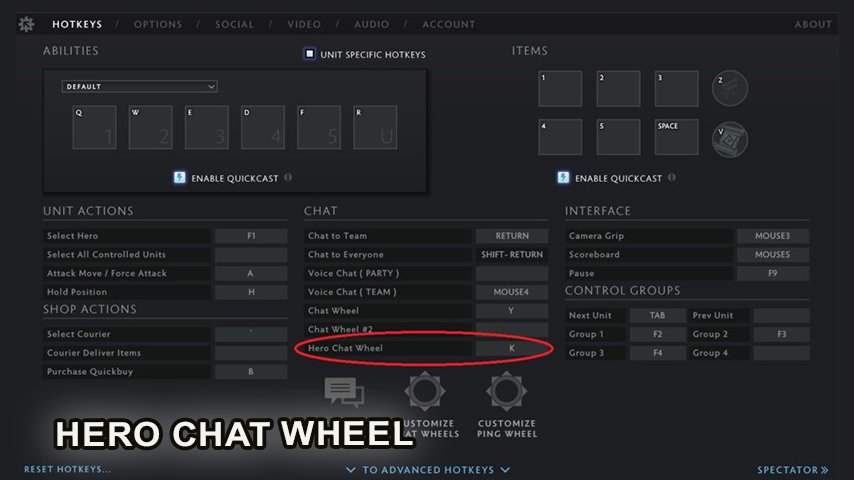
In addition to the standard version, Dota 2 also offers the Hero Chat Wheel. This allows you to use phrases specific to your hero, adding a layer of immersion and personality to the game. The Hero Chat Wheel can be customized in the same way as the standard one, allowing you to choose from various phrases specific to your hero.
How to bind a phrase from the chat wheel
In addition to using the standard chat wheel function, you can also assign any phrase to a separate button, pressing which will automatically activate sending a message to the general or team chat. To activate this option, follow these instructions:
Launch the game.
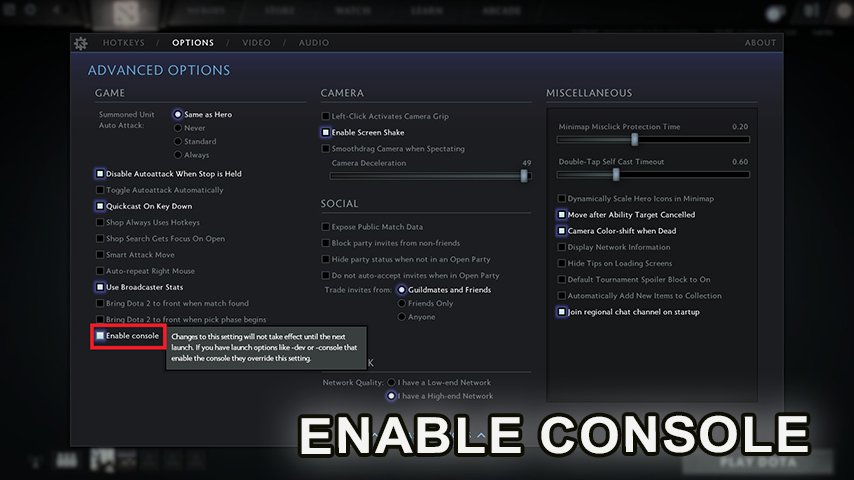
Enable the console in the settings and press the "~" key on the keyboard to call it.
Enter the command "bind «button» say «phrase»" to bind a message to the general chat. To set up messages to allies, use "bind «button» say_team «phrase»".
How to use the Chat Wheel for Effective Communication in Dota 2
Effectively utilizing the chat wheel can help coordinate team actions, inform your team about enemy movements, and even boost team morale. Let's take a closer look at situations where the chat wheel can significantly enhance teamwork effectiveness.
The Role of the Chat Wheel in Professional Dota 2
In professional Dota 2 games, the chat wheel plays an even more significant role. Professional players use it to coordinate complex strategies, inform teammates about enemy movements, and even deceive or mislead their opponents. By studying how professionals utilize the chat wheel, you can gain insight into advanced communication strategies and apply them in your own games.
The Chat Wheel in All Chat
The chat wheel isn't just for team communication; it can also be used in the general chat to interact with all participants of the game. This feature can be utilized to congratulate the opposing team on a good game, exchange humorous moments, or even engage in friendly banter. However, remember to always maintain sportsmanship and respect towards your opponents when using this feature in the general chat.
Conclusion
The Dota 2 Chat Wheel is a powerful tool that can enhance your gaming experience and communication effectiveness. By understanding and using the chat wheel, you can become a more efficient and strategically savvy player. Whether you're a seasoned veteran or a newcomer to the Dota 2 community, mastering the chat wheel can elevate your game to a new level.