CS2 left hand: How to optimally customize the game for left-handed players
Author: Hawk Live LLC
Last updated:

Success in Counter-Strike 2 largely depends on the convenience of settings, which should provide the player with maximum comfort and efficiency on the battlefield. The right CS2 settings for the left hand will help people with appropriate features to customize the game to their preferences. In this article, let's look at what CS2 left hand settings will help optimize the game for left-handed players.
How to change hand in CS2
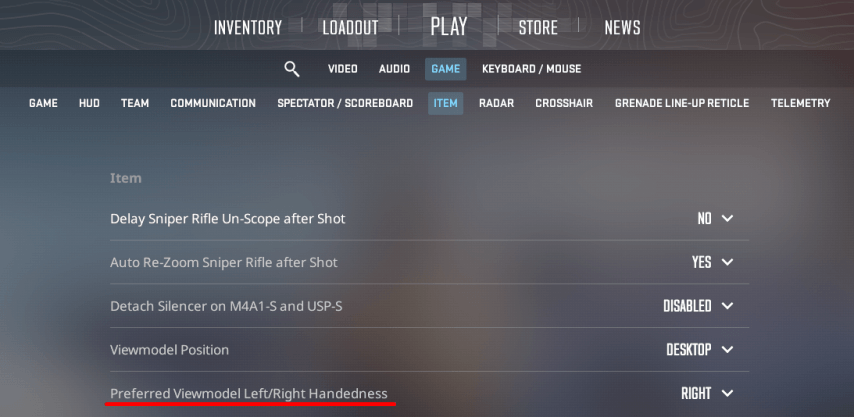
To start every match with a left-handed view, set it as default in the game settings.
Open CS2 settings from the main menu.
Select the “Game” - “Items” section
Select the “Preferred Viewmodel Left/Right ” option and set it to the desired value.
 Credit: CS2
By default, switching the view during a match is set to the “H” button, but often when changing settings, the player may occupy it with another option. The easiest way to quickly switch the view if the standard button is occupied by another function is to enter the command switchhands in the console.
How to bind switchhands in CS2
Switching the view in CS2 is done through the console or by using a special button. By default, the view switching function is set to the “H” button, but at will the user can change the settings both through the game menu and in the console during the match.
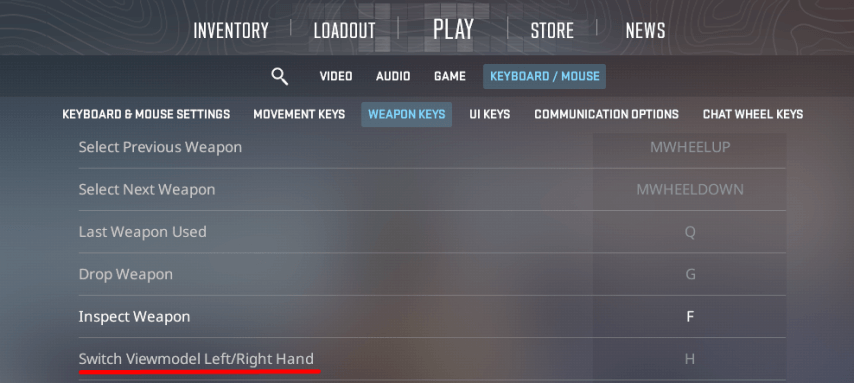
To customize the view switching function in CS2 from the left hand to a specific button you can use the game settings. To do this, follow the instructions:
open settings in the CS2 menu;
select the “Keyboard/Mouse” section;
find the “Switch Viewmodel Left/Right” option and set the button you want to switch view with.
 Credit: CS2
Another way to set the button to switch the view is to use the command in the console:
bind “desired button” switchhands
The second option is ideal if you need to quickly change settings during a match.
CS2 left hand commands
A number of useful commands for the console will allow you to customize the game interface in CS2 for left-handed players optimally taking into account individual preferences.
It is recommended to use certain Viewmodel commands for ease of play and increased efficiency. Here are some of the best commands that can help you in CS2:
Here’s the information you requested in table format:
Command | Description |
|---|---|
viewmodel_offset_x -2.5...2.5 | Changes the horizontal position of the weapon. Parameter to adjust comfort. |
viewmodel_offset_y -2.0...2.0 | Changes the vertical position of the weapon. Suitable for customizing the individual weapon position on the screen. |
viewmodel_offset_z -2.0...2.0 | Changes the weapon position in depth (from the player). |
viewmodel_fov | Set the view angle of the weapon model. |
switchhands | Switching the right/left hand view to maximum values. |
bind “h” switchhands | Assignment of the view switchhands key. Instead of “h” it can be any key. |
How to optimize CS2 for left hand playing
If you are left-handed player, optimizing CS2 settings will greatly increase your productivity in the game. In addition to properly customizing your view, you can also make a number of additional improvements. Here are some tips to help you customize your game to your preferences:
Reassign keys. Customize the controls to your dominant hand by reassigning the keys for movement and other commands to those that are most convenient for you. For example, use the arrows or number pad for movement if that suits your habits.
Customize sensitivity. Adjust mouse sensitivity and DPI to maximize aiming accuracy.
Customize the HUD. Move important interface elements, such as the map and health indicators, to a part of the screen where they won't interfere with your aiming.
Choose the right devices for the game. Use mice and other gaming devices designed specifically for left-handed players.
Conclusion
Proper CS2 customization, taking into account the individual characteristics of the player, allows you to play with maximum comfort. Since a wide variety of view switching settings are available in Counter-Strike 2, each player can customize the game to their preferences as much as possible.