How to Use Text and Voice Chat for Better Communication in Deadlock
Author: Hawk Live LLC
Last updated:

Effective communication is essential in team-based games like Deadlock. Players need to quickly and clearly relay information to their teammates to secure victory. In Deadlock, players are equipped with multiple communication tools, including text chat, voice chat, and a versatile ping system.
How to Use Text Chat in Deadlock
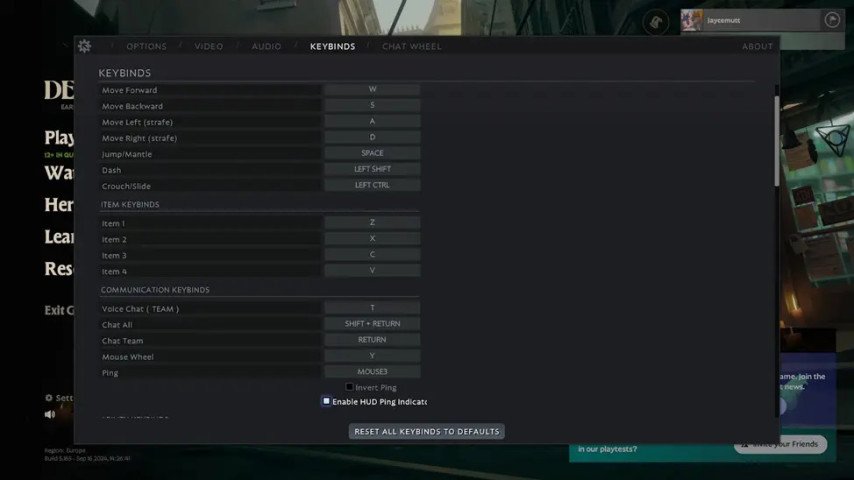
Only teammates would be able to see the messages typed in the team chat while every player can use the all chat to send messages to both teammates and enemies regardless of which team they are on. In Deadlock, there are some controls to adjust and use the text chat feature, here they are:
 Credit: Valve Corporation
Default Keybindings:
Press Enter to bring forward the team chat dialogue.
Press Shift + Enter to use the all chat option.
Writing in Chat: Every time a message needs to be typed, after pressing the designated key, write the message which needs to be send then press Enter again.
Re-Setting The Chat Keys:
Launch Deadlock on your machine and select the Settings option.
Locate the Hotkeys section and click on it to expand the options.
Click on the team chat or all chat options to remap the keys to your preferred options.
Keep in mind that once the chat opens, your character will stay inactive until the conversation window is closed. This makes text communication during close-range battles ineffective as a lot of players instead resort to communicating through faster means such a pings or voice chat.
How to Use Voice Chat in Deadlock
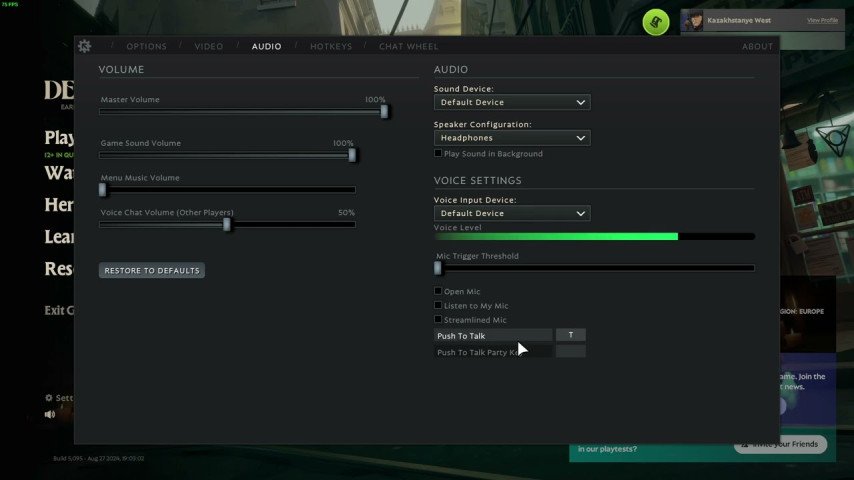
Voice communication can significantly improve your team's coordination, allowing instant information exchange without interrupting gameplay. Here’s how to set up and use voice chat in Deadlock:
 Credit: Valve Corporation
Making Sure Your Microphone is Working:
Click on Sound when you’re in the Settings menu.
From the Voice Chat section, click My primary mic.
Enable the microphone check option to ensure it is working as it should do. At this point, a green volume bar should light up when you are talking whereby the microphone detects your voice.
Using Push to Talk:
The default key assigned for Push to Talk is T for team chat. If you want to change this, go to the Hotkeys section in the settings page and redefine the key.
Voice Activation Without Push-to-Talk:
If would rather stay hands free when communicating, Deadlock allows for use of voice activation. It will automatically turn on the microphone upon speaking. Anyway, this option can emit sounds or conversations that were not intended, hence it is best used alongside Push-to-Talk in most cases.
And of course, as it is a voice chat, it becomes quite essential to have a microphone device that may not appeal to many players who would rather not speak and use text or pings instead.
How to Use Pings in Deadlock
 Credit: Valve Corporation
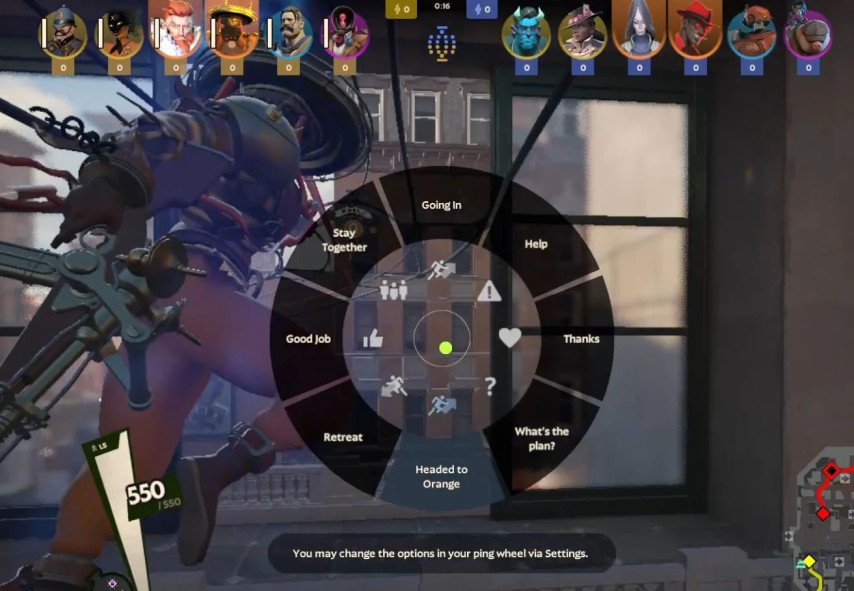
The ping system in Deadlock for example is critical for communication without speaking. This makes it possible for players to share such important information as the location of an enemy, the whereabouts of particular heroes, or the movement of heroes around the map without having to type messages or vocally speak to one another. Here’s what pings you can use and how can you use them in Deadlock:
Map Pinging:
You can also ping directly on the map. Hold Tab to go to map view then click anywhere on the map where you want to place a ping. This is ideal to draw focus on targets or to inform your teammates that a threat is on the way.
Following Abilities and their Cooldowns:
If you wish to display to your allies the cooldown status of your skills, Middle Click (M3) on your icon at the bottom of the screen. It will also ping in the chat saying how long until the ability will be eligible for reuse.
 Credit: Valve Corporation
There are however instances when for lack of better words your time is too short and too much action is going on which prevents you from executing plans in such cases friends falling back on the ping system is a simple yet helpful solution in Deadlock. It does not interfere with the game’s flow, making it even more useful.
Conclusion
If you are a commanding officer type through chat, or using voice chat or just use the ping whenever you need to, Deadlock has other forms of communication that will strengthen team work and co-ordination. There are advantages and disadvantages for every method and situation can depend on them. For maken meta and strategies designed before the match, text chat is awesome. For fast exchanges during the match, voice chat is great. In the field, the ping is very convenient to issue orders. All the three together will increase your chances in communication. And let your team win Deadlock.