How to Mute Players in Counter-Strike 2
Author: Hawk Live LLC
Last updated:
As a result of the launch of Counter-Strike 2 (CS2), the gaming community is filled with thousands of new and returning players. While the game has improved its appearance and gameplay, it has also increased prevalence of in-game communication which exposes players to toxic behaviour.
The Importance of Muting in CS2
For instance, during competitive matches when working together with teammates for victory is essential; communication in CS2 can make all the difference. However, negative exchanges that are common in online gaming ruin the enjoyment of the games. One way to sustain interest is learning how to mute individual players or teams altogether.
How to Mute Players in CS2
To manage in-game communication, there are various options provided by CS2 developers. Whether you want to mute one disturbing player or silence everybody’s voice, there are easy settings available for this purpose.
Muting via the Scoreboard
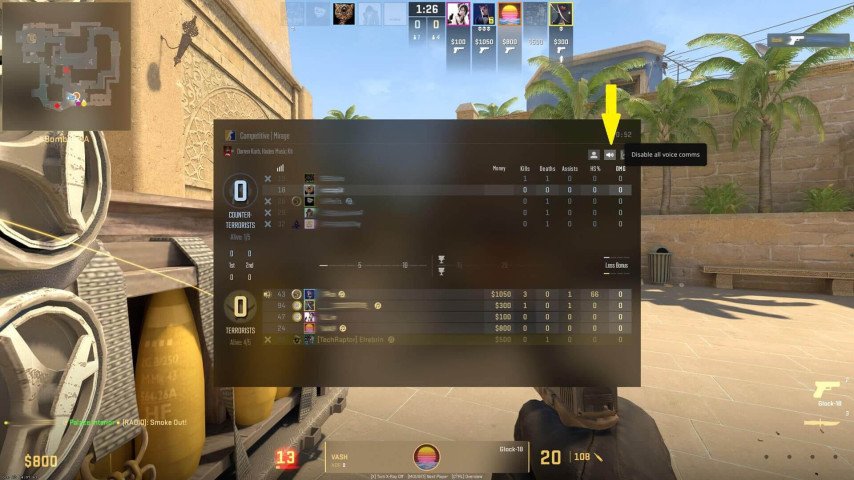 Credit: Valve Corporation
The most straightforward method to mute individual players involves the in-game scoreboard:
Access the Scoreboard: During a match, press and hold the "Tab" key to bring up the scoreboard.
Select the Player: Use your mouse to click on the name of the player you wish to mute.
Mute the Player: Click the volume icon next to their name to mute them.
This method is ideal for quickly silencing a player without navigating away from the gameplay screen.
Muting Through Game Settings
Credit: Valve Corporation
For those who prefer a more preemptive approach, adjusting the game's communication settings can mute all players except friends or the entire enemy team:
Open Settings: Launch CS2 and click on the settings wheel in the top left corner of the main menu.
Navigate to Communication Settings: Click on the "Game" tab, then select the "Communication" tab.
Adjust Mute Settings: Choose "Mute Enemy Team" or "Mute All But Friends" according to your needs.
This method is beneficial for players who frequently encounter toxicity or prefer to play primarily with friends.
Disabling Voice Communication Entirely
If you find voice communication unnecessary or distracting, CS2 allows players to disable it completely:
Access Main Settings: From the main menu, open the settings menu and navigate to the "Audio" tab.
Disable Voice: Find the "Enable Voice" option and set it to "Disabled."
This option completely turns off voice communication, ensuring silence from all players throughout the gameplay.
Conclusion
Counter-Strike 2 is still a community-based game where players’ experiences are greatly shaped by interactions among themselves. To have a good gaming experience on CS2, one must be able to manage and control in-game communication.