How to Enable Voice Chat in Dota 2: A Comprehensive Guide
Author: Hawk Live LLC
Last updated:

Dota 2 is among the most well-known online games that allow players to talk using text or voice chat. Voice chat, in particular, is crucial in this game as it enables fast and efficient team communication; nevertheless, many gamers find it hard to set up.

Credit: Valve Corporation
Setting Up Voice Chat in Dota 2
To configure voice chat in Dota 2:
Launch Dota 2 and access settings: Open the game client and go to the "Options" menu.
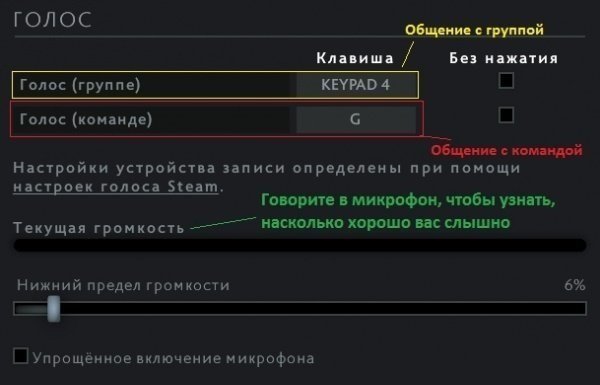
Configure keybindings: Under the "Voice Team" and "Voice Group" sections, assign convenient keys for activating voice chat.
Credit: Valve Corporation
Check your microphone: Navigate to the "Sound" tab and ensure the correct playback device is selected and the microphone volume is set appropriately.
Features of Dota 2 Chat
Dota 2 provides several chat options:
Team Chat: Text chat available only to allies.
All Chat: Text chat visible to all players in the lobby.
Voice (Group): Voice chat for a group of allies.
Voice (Team): Voice chat for the entire team.
Microphone Check
Sometimes microphone issues can stem from incorrect settings in Steam or the operating system:
Check the microphone in Steam: Go to "Friends & Chat," then into settings, where you can select the input device and test its functionality.
Microphone issues in Dota 2: If the microphone works in Steam, check the game settings. Verify the hotkeys for activation and set the optimal microphone volume.
Common Issues and Solutions

Credit: Valve Corporation
If your team cannot hear you:
Verify assigned key for microphone activation.
Make sure that you are using correct hotkey for team, not just group.
If problem continues, think about reconfiguring sound card or testing device on another computer.
Conclusion
Creating appropriate conditions for voice chat use within Dota 2 greatly contributes to successful team gaming experience. Good communication based on reliability and clarity allows an instant response towards any changes during the game and effective coordination of team actions.