How to add friends in Dota 2: step-by-step guide
Author: Hawk Live LLC
Last updated:
Dota 2 is a – sic ‘recess’ and in many multi-player modes those who have been in many quick matches with his buddies using skills and different strategies are quite noticeable. Adding friends or even just communicating with them during the game is a huge advantage in this case. This guide will recommend on how to quickly manage adding new friends on Dota 2 from a Steam platform and from within the game.
How to add friends in Dota 2 through Steam
 Credit: Valve Corporation
For Dota 2, steam works as the backend and they provide a fairly simple way of adding a Friend so lets follow the instructions as provided below:
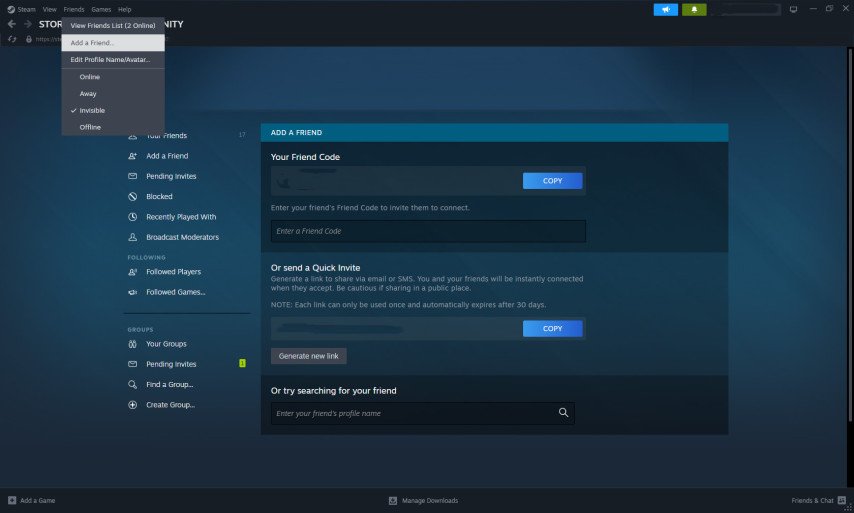
Open Steam Client: Open the Steam application settled on your computer.
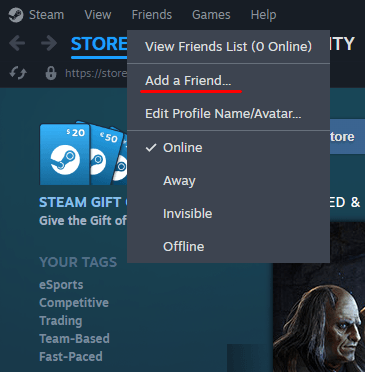
Join Communities/Friends Center: At the top bar, click on the ‘Friends’ subsection followed by ‘Add a Friend’.
Credit: Valve Corporation
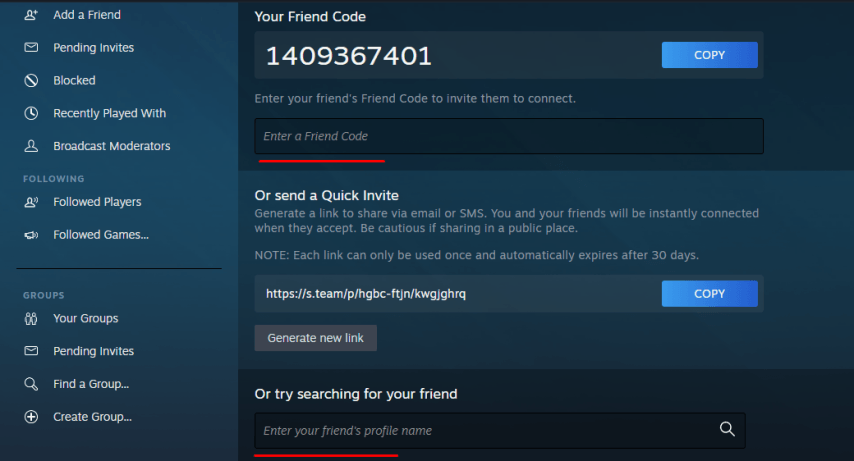
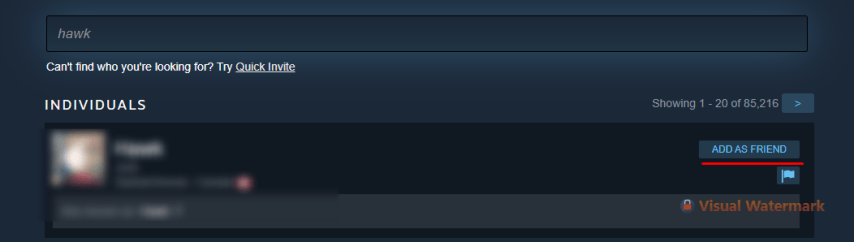
Find Friends: Type in your friends unique Friend Code or even their Steam username in the search box.
 Credit: Valve Corporation
Request a certain friend: When you find them, click on Add a Friend so as to request a friend.
 Credit: Valve Corporation
Accepting the Request: Your friend is going to receive a notification to which his response is required, to accept the request he is to click on it
How to add a friend in Dota 2
Dota 2 itself provides an option to connect with other players. Follow these steps:
Using Friend / Steam ID:
Start your Dota 2 and click on the button with ‘Friends’ sign from the bottom right corner.
Type in the given search bar the Friend / Steam ID.
Proceed to the user’s profile where you will see the option “Add Friend” and click on that.
Through Friends and Match History:
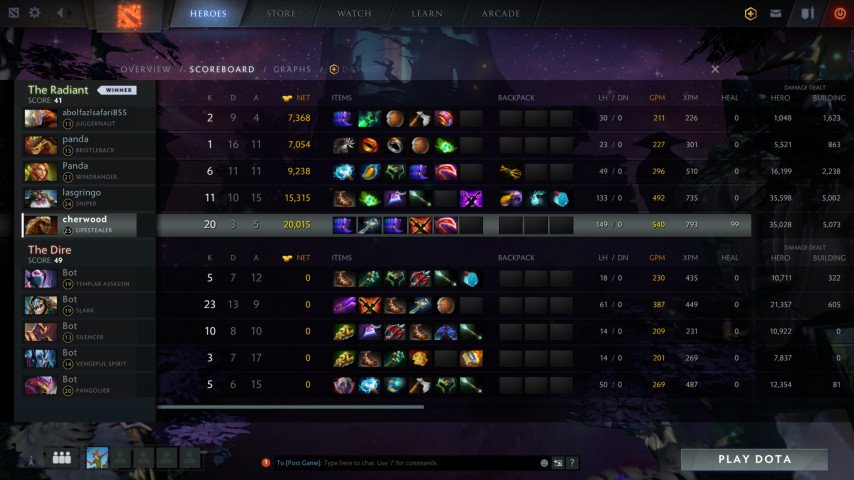
After the match, select ‘Match Summary’ if you want to see all players.
Put the cursor over the players name and hit on ‘Add Friend’
Or, from the list of friends, you can press the right part of your mouse on one of the friends names and press “Invite to Party”, so that you may be able to play matches together.
 Credit: Valve Corporation
Common Issues When Adding Friends in Dota 2 and Their Solutions
Problems: As a Dota 2 player, you may face these issues when attempting to add friends on the platform:
I can’t find my friend – Try to make sure you’re putting in the correct name of the user in order to look them up and for the friend code. Ask your friend for his link of the profile so that you have the link directly.
The friend limit feature is not reached: The free accounts available to the users have a certain limit of friends they can add. Try purchasing a game through the steam account or adding money to the account so that the limit can be increased.
 Credit: Valve Corporation
Are you struggling with challenges while adding your friends and helping your gameplay? Here are a few problems that arise when making friends, along with their resolutions:
Friend Request Was Not Received: The option to block requests could be present due to privacy settings, so check that the both you and your friend have a public profile on Steam.
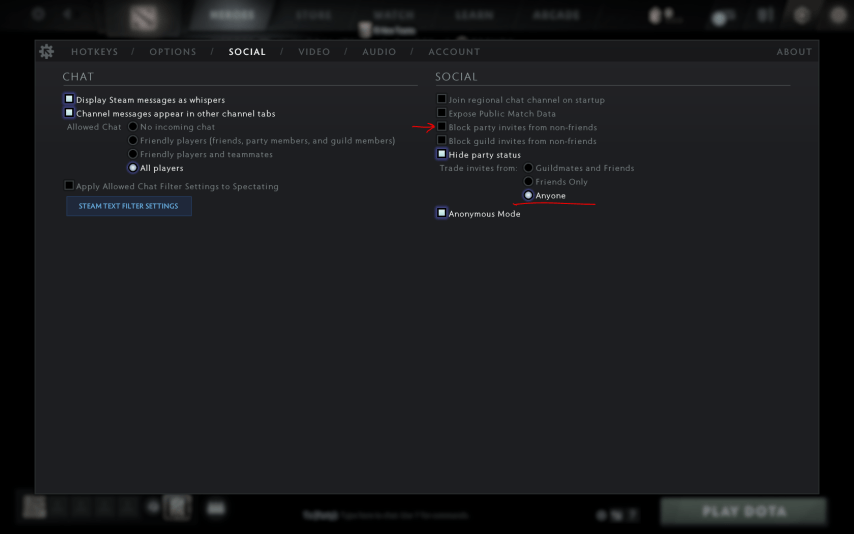
I Cannot Add Friend While In the Game: Review the settings of your Dota 2. There is also an option that says ‘Party Invite Restrictions’ make sure it is set to ‘Anyone’.
Community Insights
The community of Dota 2 is very large, many players go on reddit or Steam forums to post about their experiences and solutions to different problems. Some of the insights are:
Using Friend ID: Especially if usernames tend to be popular or common, many players suggest adding using a Friend ID as that eases the process.
Party Invitations: When you can’t add someone, tell them your ID number and ask them to invite you. A lot of players have been able to work around this issue.
Conclusion
Dota 2 is a community rather than just a game, where friendship and cooperation is increasingly important. Apart from helping in the coordination during matches, adding friends enables you to indeed form long term settings with other players. By reading this short guide then, you will have no difficulty in adding friends in Dota 2 and winning several team games. Remember, every single ally is a step further in the quest for greater accomplishments within the game.