Dota 2 Workshop: how to create your own item for game
Author: Hawk Live LLC
Last updated:
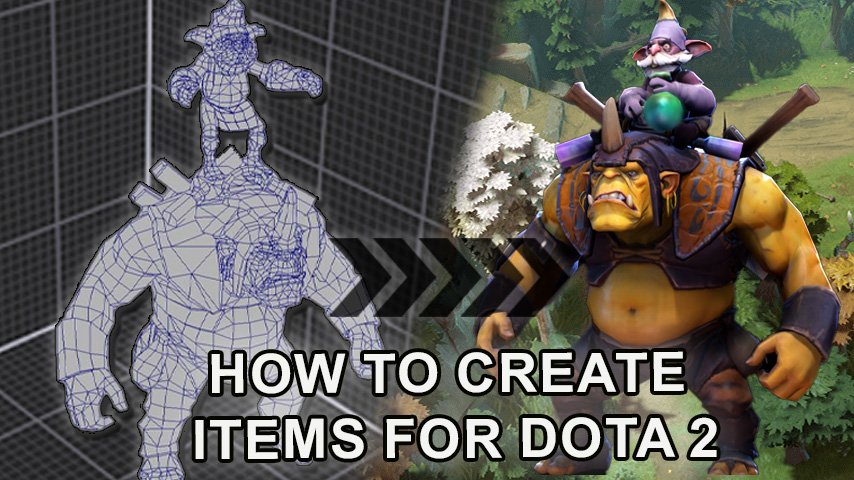
Dota 2, a game synonymous with competitive esports, offers more than just strategic gameplay. At the core of Dota 2 is community participation, and one of the most significant aspects of this process is creating items. These items, ranging from weapons to cosmetics, add depth and individuality to the game. If you've ever been intrigued by the abundance of available items and wondered about their origins, you've come to the right place. In this guide, we'll walk you through the item creation process step by step in the Dota 2 Workshop.
Why create items for Dota 2?
The appeal of creating items for a game as massive as Dota 2 is multifaceted. Firstly, it's an opportunity to leave your personal mark on a game with a global audience. Your creation can be used by players from different parts of the world, adding a sense of accomplishment.
 Credit: Valve Corporation
Additionally, the Dota 2 community is known for its gratitude towards creators, often recognizing and rewarding outstanding designs. Let's not forget the potential financial reward. If your item garners enough attention and gets added to the Dota 2 store, it can become a source of passive income - a percentage of sales will go to the creator.
How to create an item in Dota 2 - step by step
 Credit: Valve Corporation
The Dota 2 Workshop is a unique platform provided by Valve, the developers of Dota 2, which allows artists, designers, and enthusiasts to contribute directly to the game. It serves as a link between the game developers and its extensive community, ensuring a constant flow of fresh content and ideas.
Introducing the Dota 2 Workshop
The Dota 2 Workshop is a unique platform provided by Valve, the developers of Dota 2, that allows artists, designers, and enthusiasts to contribute directly to the game. It serves as a bridge between the game developers and its extensive community, ensuring a constant influx of fresh content and ideas.
How the Dota 2 Workshop Works:
Submission: Artists and creators develop items or skins and submit them to the Workshop. These can range from weapons and armor to character skins and other cosmetics.
Community Voting: After submitting an item, the Dota 2 community can view and vote on it. Items that receive a significant number of positive reviews and votes are more likely to be noticed by developers.
Review and Approval: After community evaluation, the Dota 2 development team reviews the best elements. If they align with the game's aesthetics, lore, and quality standards, they may be added to the game. Creators of these items often receive monetary rewards, earning a percentage of sales.
Benefits for Creators:
Monetary Rewards: As mentioned, creators receive a portion of the profits from the sales of their items in the Dota 2 store.
Recognition: Approval and inclusion of an item in Dota 2 can be a significant boost for aspiring designers and artists. It provides an opportunity for their work to be seen and appreciated by millions worldwide.
Skill Development: The process of creating, refining, and submitting items to the Workshop allows authors to hone their skills, receive feedback, and improve.
The Dota 2 Workshop is more than just a platform for submitting materials; it's a testament to the game's commitment to its community. By allowing players to contribute, Valve ensures that Dota 2 remains player-centric and continually evolves to align with the tastes and preferences of its user base.
Tools for Creating Dota 2 Items
In this chapter, we'll guide you on setting up the necessary software and tools to bring your ideas to life.
3D Modeling Software:
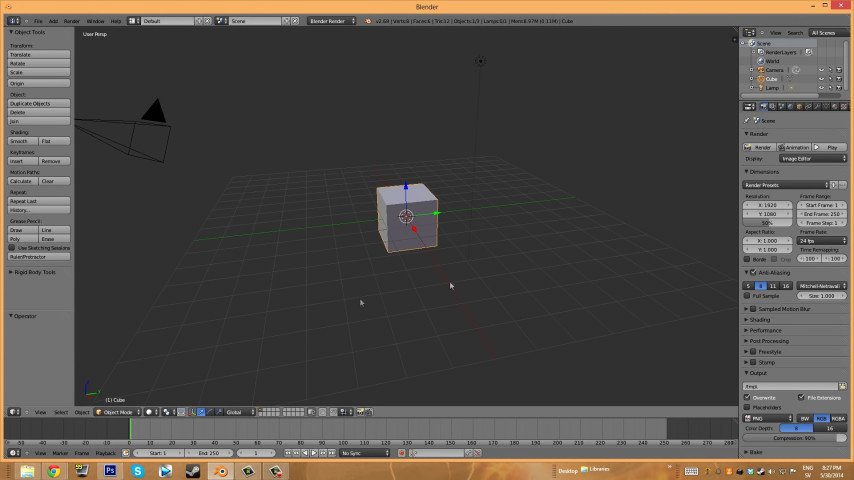
Choice: Depending on your preferences and experience, you can choose programs like Blender, Maya, or ZBrush. Each has its strengths and learning curves.
Installation: Make sure you have the latest version installed for access to the most modern tools and features.
Texture Software:
Choice: Programs like Photoshop or GIMP are essential for creating detailed and vibrant textures for your items.
Installation: Like modeling programs, always use the latest version to leverage new features and tools.
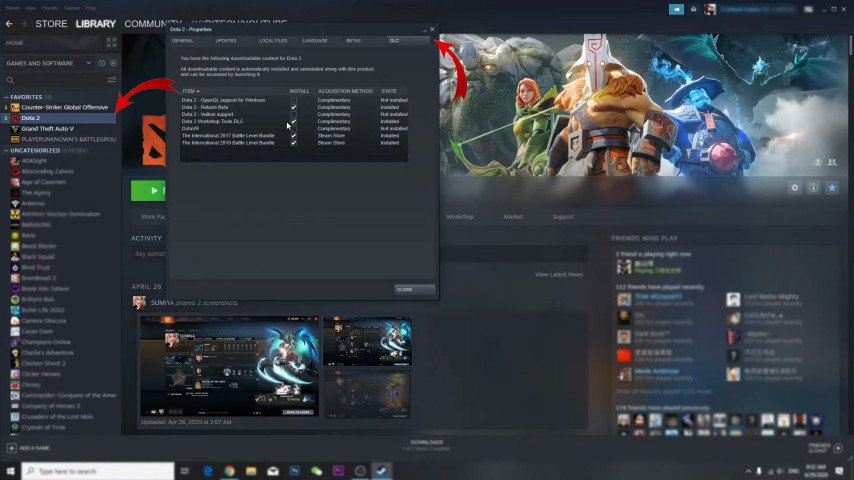
Dota 2 Workshop Tools:
Purpose: These tools, provided by Valve, are specifically designed to help authors test and refine their items for submission to the Dota 2 Workshop.
Installation: The tools are available in the Steam store; for seamless integration, ensure they are installed in the same directory as your Dota 2 game.
 Credit: Valve Corporation
Beginning the Creation of an Item in Dota 2
The concept development stage is the foundation of your journey in creating an item. This is where ideas are born, nurtured, and refined. In this chapter, we'll explore the brainstorming process, sketching, and final refinement of the core concept of your Dota 2 item to ensure its uniqueness and alignment with the game universe.
The Essence of Conceptualization:
Imagination and Strategy: Creative approach is at the core of design, but understanding the mechanics, history, and aesthetics of the game helps ensure your item aligns with the Dota 2 universe.
Filling the Gaps: Successful designs often solve a problem or fill a gap in the game, whether it's a hero lacking diverse items or a theme that hasn't been explored.
Research and Inspiration:
Study Existing Items: Before diving in, familiarize yourself with items already present in Dota 2. This will help you understand the game's design language and what resonates with the community.
Dota 2 Lore: Immerse yourself in the rich lore of Dota 2. Understanding the history of heroes, kingdoms, and conflicts can inspire the creation of unique item concepts that become an integral part of the game.
Brainstorming and Idea Development:
Mind Mapping: Use mind maps to record ideas, themes, and motifs. This visual representation helps connect the dots and create a cohesive concept.
Collaboration: Discussing ideas with fellow designers or Dota 2 enthusiasts can provide a fresh perspective and refine the concept.
Sketching and Visualization:
Rough Sketches: Start with rough sketches of your item. They don't need to be perfect but should capture the essence of your idea.
Iterations: Based on feedback and further reflection, iterate on your sketches. Refine details, proportions, and elements until you're satisfied.
Digital Mock-ups: If you're proficient with digital tools, create a digital mock-up of your project. It provides a clearer visualization and can be easily modified.
 Credit: Unity
Feedback and Refinement:
Community Engagement: Share your sketches and concepts with the Dota 2 community on forums, social media, or specialized platforms. Their feedback can be invaluable.
Self-Critique: Take a step back and critically evaluate your design. Does it fit into the Dota 2 universe? Is it functional, aesthetically appealing, and unique?
Finalizing the Concept:
Narrative Integration: Consider adding backstory to your item. How did it come into existence? Which hero could it belong to? Compelling storytelling can make your item more engaging.
Checklist Review: Before moving to the next stage, ensure your concept meets Dota 2's recommendations, aesthetics, and technical requirements.
Conceptual development is a blend of creativity, research, and strategy. This is where your item's vision takes shape, ready to be transformed into a tangible in-game asset. Remember that a well-thought-out concept not only facilitates subsequent development stages but also increases the chances of acceptance by the Dota 2 community and, ultimately, the game itself.
3D Modeling of an Item in Dota 2
3D modeling is the process of transforming a conceptual project into a three-dimensional digital representation. It is the heart of creating an item, where your sketches and ideas come to life, ready for integration into the Dota 2 universe. In this chapter, we'll delve into the intricacies of 3D modeling to ensure your item is visually stunning and game-ready.
Importance of 3D Modeling:
Bringing Ideas to Life: While sketches allow you to create a blueprint, 3D modeling adds depth, perspective, and realism to the design.
Integration into the Game: Well-modeled items seamlessly integrate into Dota 2, providing players with a realistic and immersive gaming experience.
Choosing the Right Software:
Popular Options: Tools like Blender, Maya, and ZBrush are favorites in the realm of 3D modeling. Your choice may depend on your experience, program capabilities, and specific design needs.
Learning Curve: Each software has its learning curve. Use online tutorials, courses, and community forums to master your chosen tool.
 Credit: Unity
Starting the Modeling Process:
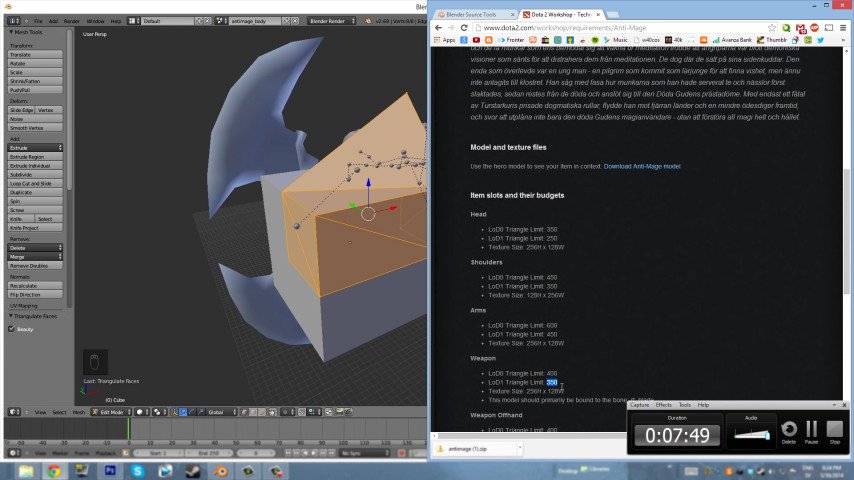
Creating a Base Mesh: Start by creating a basic shape or "mesh" that closely resembles your item's design. This serves as the foundation onto which details will be added.
Refinement: Gradually refine the mesh, adding more vertices, edges, and faces to capture all the intricacies of the design.
Detailing and Sculpting:
High-Poly vs. Low-Poly: Initially, you can create a high-polygon (detailed) model to convey all the details. However, for game integration, a low-polygon version is often required, which consumes fewer resources.
Sculpting: Tools like ZBrush allow you to create digital sculptures, adding complex details, textures, and patterns to make it more realistic.
Optimization for Game Integration:
Polygon Reduction: Too many polygons can impact game performance. Use optimization tools to reduce the polygon count without sacrificing visual quality.
Compatibility Assurance: Ensure your model conforms to Dota 2 character rigs, especially if it's an item intended for a specific hero.
Texture Mapping:
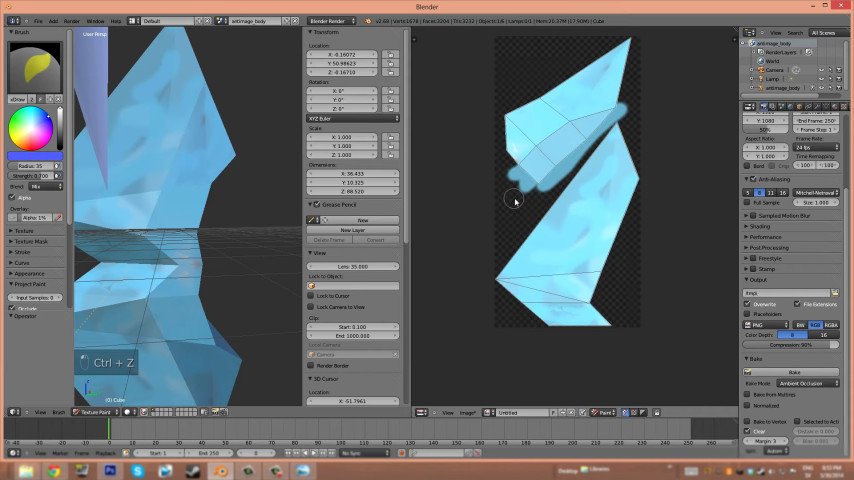
UV Unwrapping: Before applying textures, the model needs to be "unwrapped." This process places the 3D model into a 2D space, ensuring proper texture alignment.
Texture Application: Once unwrapped, apply previously created textures to the model. Ensure they fit snugly without stretching or distorting.
Rigging (if applicable):
Bone Structure: If the model has movable parts or needs to move with a character, it requires a "skeleton" or bone structure. This process, known as rigging, ensures natural movement of the item.
Weight Painting: Assigning "weight" to different parts of the model, determining how each part moves with the assigned bone.
3D modeling is a meticulous and complex stage in the item creation process. It requires both a creative approach and technical expertise. However, the reward is transforming a conceptual project into a tangible three-dimensional object, ready for use in Dota 2. Patience, practice, and attention to detail will help create 3D models that convey the essence of your original idea and resonate with the Dota 2 community.
Texturing a model in Dota 2
Texturing is the art of applying surface details to a 3D model, giving it color, patterns, and a realistic appearance. It's akin to painting a sculpture, adding the final touches that bring it to life. In this chapter, we will delve into the process of texturing in detail so that your Dota 2 item looks as captivating in the game as it does in your imagination.
 Credit: Unity
Role of Texturing:
Beyond color: While the primary role of texturing is to add color, it also helps create depth, realism, and character. Textures can mimic materials (such as metal or fabric), show wear and tear, or even convey a backstory.
Immersing players in the game: Proper texturing contributes to immersing players in the game, allowing items to feel like an integral part of the Dota 2 universe.
Understanding UV Mapping:
What is UV Mapping? Before texturing, a 3D model must be "unfolded" in 2D space. This process, called UV mapping, ensures the correct placement of textures on the model.
Coordinate points: 'U' and 'V' represent the axes of the 2D texture space, similar to 'X' and 'Y' axes in 3D space. Proper mapping ensures no stretching or distortion of textures.
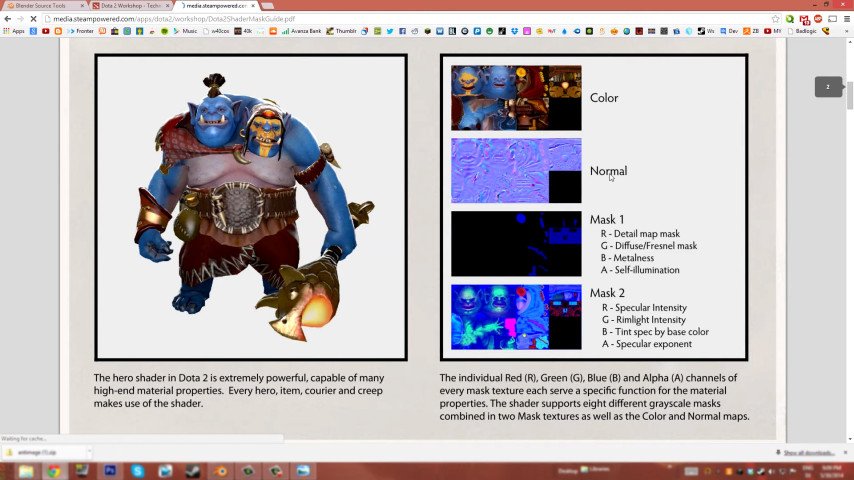 Credit: Valve Corporation
Creating Textures:
Sources: Textures can be hand-painted, derived from photos, or generated using software.
Resolution: Ensure textures have high resolution for clarity but are optimized to avoid overloading game performance.
Details matter: Adding details like scratches, rust, or glow enhances realism and character in textures.
Types of Textures:
Diffuse maps: These are textures of the base color, defining the primary appearance of the item.
Normal/bump maps: Used to simulate surface details like roughness or indentations without adding extra polygons.
Specular maps: Determine how light interacts with the surface, giving parts of the model a shiny or matte look.
Emission maps: For objects with glowing parts, emission maps define which areas emit light.
Applying Textures:
Texture painting: Some 3D software allows direct painting on the model, useful for adding intricate details or blending different textures.
Layering: Like traditional painting, textures can be layered to achieve complex effects. For example, rust or dirt can be added on top of a base metal texture to give the model an aged look.
Testing and Refinement:
In-software preview: Regularly preview the model with textures applied in 3D software to ensure alignment and desired effects.
In-game testing: Using Dota 2 Workshop Tools, integrate the model with textures into the game to check texture display under various lighting conditions and movements.
Optimization:
Creating Mipmaps: These are optimized versions of textures of smaller size used in the game at different player distances, avoiding performance drops.
File formats: Save textures in formats that preserve quality but are optimized for game use, such as .TGA or .PNG.
Texturing truly brings a 3D model to life, transforming it from a monochrome sculpture into a vibrant, detailed item ready for use in the Dota 2 world. It's a blend of artistic and technical skill, requiring patience and attention to detail. With the right approach, textures can elevate your design, making it stand out in the game and eliciting a lively response from players. Whether it's the gleam of a sword, intricate patterns on armor, or the glow of a magical artifact, textures tell a story, adding depth and character to your creation.
Rigging and animating an item in Dota 2
Rigging and animation bring life to your 3D model, allowing it to move, interact, and express itself in the dynamic world of Dota 2. While not all objects require this step, those that do benefit from increased realism and immersion. In this chapter, we will explore all the intricacies of rigging and animating a model to ensure smooth movement and behavior in the game.
The essence of rigging:
What is rigging? Rigging is the process of creating a "skeleton" or bone structure for a 3D model. This skeleton determines how the model moves, providing natural and realistic movements.
Why is rigging necessary? Rigging is necessary for objects that have movable parts or need to adapt to character movements, such as a flowing cape or flexible armor.
The rigging process:
Bone creation: Start by placing "bones" in the model. These bones act as pivot points and joints.
Hierarchy and parenting: Bones are organized into a hierarchy, where one bone (parent) controls the movement of another (child). For example, a shoulder bone may control the movement of the arm bone.
Skinning: After placing bones in their positions, the next step is to bind or "skin" the model to the skeleton. This ensures that when a bone moves, the corresponding part of the model moves with it.
Weight painting: Assigning "weights" to different parts of the model. This determines how much each part deforms or moves with a specific bone. For example, the edge of a cape may have less weight than the center, allowing it to flutter.
Introduction to animation:
Rig animation: Once the rig is created, the model can be animated by moving the bones, creating a series of poses or "keyframes." The program then interpolates between these keyframes, creating smooth motion.
Types of animation: Depending on the object, animations can include idle animations (subtle movements when the character is stationary), action animations (e.g., weapon swings), or special effects animations (e.g., glowing runes).
Best animation practices:
Natural movements: Ensure that animations adhere to real-world physics. For example, heavy weapons should swing slower than light ones.
Looping: For continuous animations, such as a hero's idle animation, ensure smooth transitions between the start and end frames, creating a seamless loop.
Optimization: While detailed animation is visually appealing, it can be resource-intensive. Ensure that animations are optimized for game performance.
Testing and refinement:
In-software preview: Regularly preview animations in 3D software to identify glitches, unnatural movements, or clipping issues.
In-game testing: Use Dota 2 Workshop Tools to test the animated item in the game. This allows you to ensure it interacts correctly with heroes, the environment, and other game elements.
Collaboration with sound and effects:
Synced effects: If the item has special animations, consider coordinating them with sound or visual effects. For example, a sword swing may be accompanied by a corresponding "swoosh" sound or magical glow.
Rigging and animation are the magic that transforms a static model into a dynamic interactive game element.
Testing an item in Dota 2
After the item has been modeled, textured, rigged, and animated, the next important step is testing it in the Dota 2 environment. This stage ensures that your creation not only looks good on its own but also functions seamlessly in the game, enhancing the player experience.
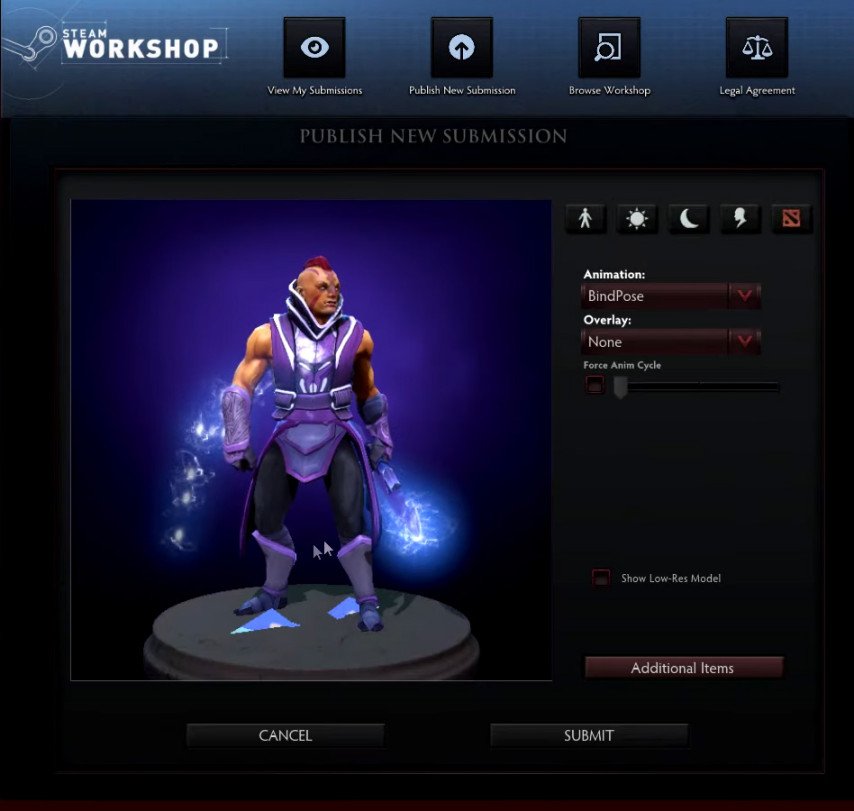 Credit: Valve Corporation
Importance of testing:
Functionality: Testing ensures that your item will work correctly within the game mechanics, without causing any glitches or issues.
Aesthetics: It's crucial to see how the item looks under various lighting conditions, on different terrain, and in combination with other game elements.
Performance: Ensuring that the item doesn't negatively impact game performance is essential for smooth player experience.
Integration with Dota 2 Workshop tools:
Item import: Use Dota 2 Workshop Tools to import the item into the game. This includes loading the 3D model, textures, rigs, and animation.
Setting parameters: Define the item's parameters, such as which hero it's intended for, its rarity, or any special effects.
Game testing:
Equipping the item: After importing, equip the item on the appropriate hero and enter a test match.
Different scenarios: Test your item in various scenarios:
Different terrains: See how it looks on different maps.
Hero interactions: Ensure there are no gaps or visual glitches during hero movements, attacks, or ability uses.
Scaling and angles: View the item from different angles and at different scaling levels to ensure it looks good from all perspectives.
Performance impact: Monitor game performance (e.g., FPS) to ensure your item doesn't cause significant performance drops.
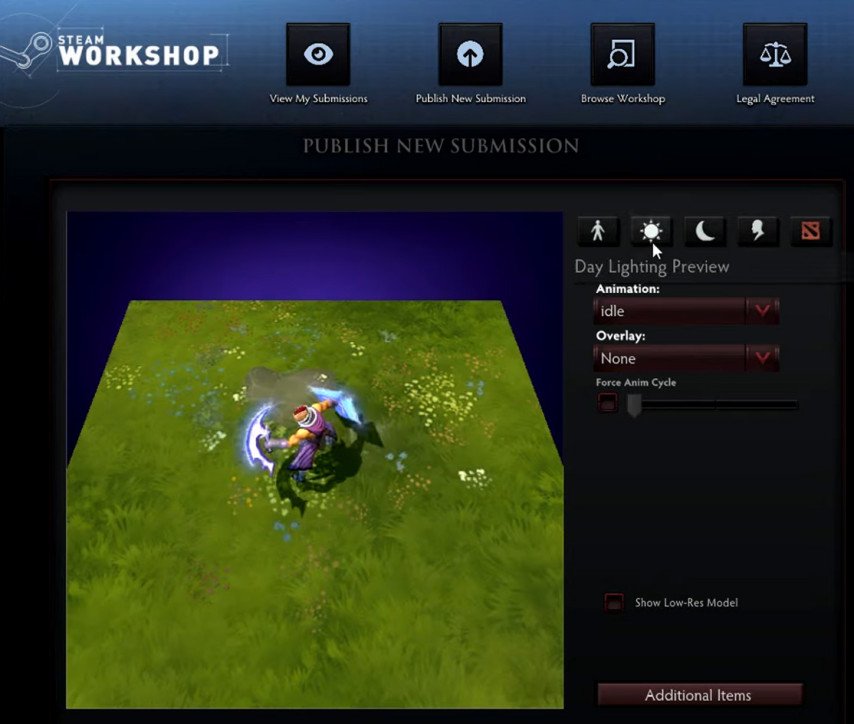 Credit: Valve Corporation
Iterative refinement:
Making adjustments: Based on feedback and observations, go back to design tools and make necessary corrections. This could involve tweaking textures, adjusting animations, or optimizing the model.
Retesting: After making changes, retest the item in the game to ensure the changes were successful and didn't introduce new issues.
Testing an item in Dota 2 is a crucial stage in the item creation process. It bridges the gap between design and gameplay, ensuring that your creation not only looks appealing but also enriches the gaming experience. Through thorough testing, gathering feedback, and iterative refinements, you can be confident that your item is ready for use in the Dota 2 universe, captivating players and seamlessly integrating into the game's rich tapestry.
Preparation for Submission
After development, refinement, and testing of an item, the final step before presenting it to the Dota 2 community is the submission process. In this chapter, we will guide you on how to prepare your item for submission to the Dota 2 Workshop to ensure it meets all necessary criteria and has the best chances of being accepted.
Understanding the Submission Guidelines:
Valve's Criteria: Valve has specific recommendations and criteria for items submitted to the Dota 2 Workshop. Familiarize yourself with these to ensure your item aligns with them.
Technical Requirements: This includes aspects such as file formats, polygon count, texture resolution, etc. Adhering to these requirements ensures your item is optimized for the game.
Aesthetic and Narrative Compliance: Your item should fit within the aesthetics and lore of Dota 2. It should complement the game universe and not appear out of place.
Final Assessment of the Item:
Self-Assessment: Before submission, take a step back and critically evaluate your item. Does it meet the standards you've set? Does it offer something unique to the Dota 2 community?
Expert Assessment: If possible, have colleagues or fellow designers review your project. A fresh perspective can identify issues or areas for improvement that you may have overlooked.
Creating a Presentation Package:
High-Quality Renders: Provide clear, high-resolution renders of the item from various angles. This allows reviewers to get a full understanding of the design.
Background and Description: If your item has a backstory or special significance in Dota 2 lore, mention this in your submission. A compelling description can make your item more appealing.
Technical Details: Specify all necessary technical data, such as polygon count, texture size, and any special features like animation or effects.
Submission Process:
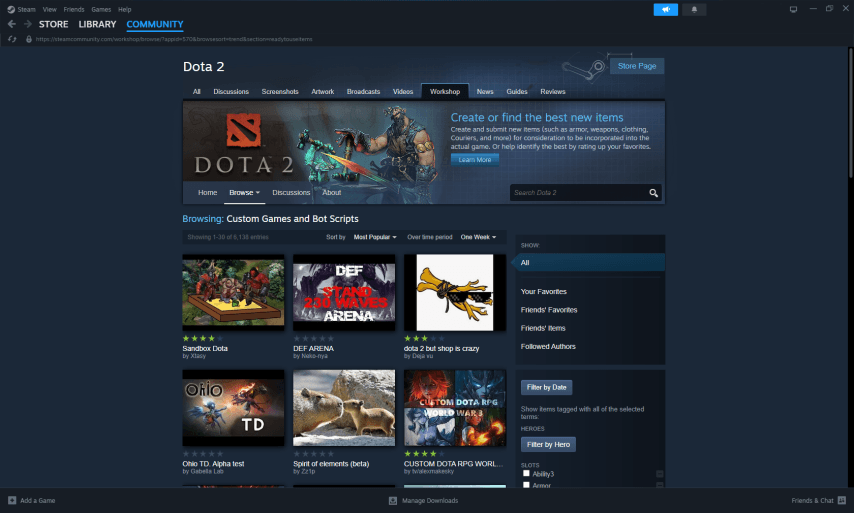
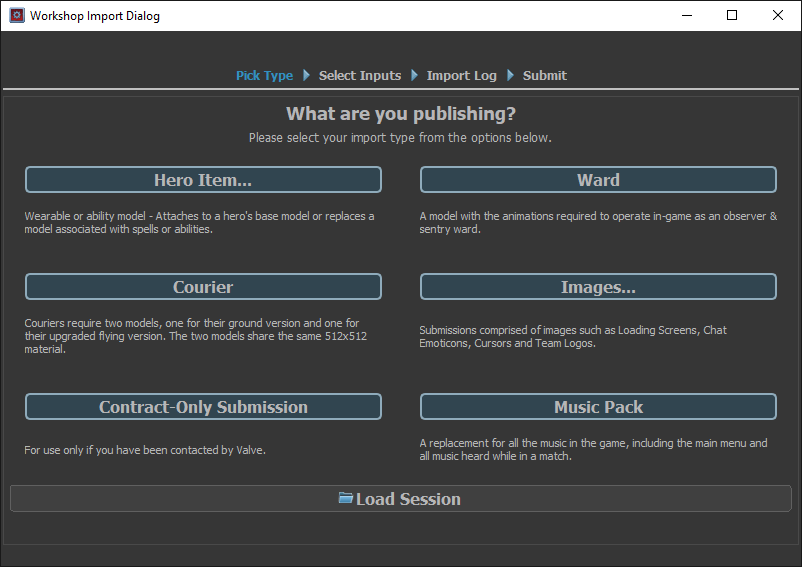
Dota 2 Workshop Portal: Access the Dota 2 Workshop portal on Steam. Here, you will find tools and interfaces for submitting your item.
Data Entry: Provide all required information about the item, including its name, description, intended hero (if applicable), and any other necessary information.
File Upload: Upload all required files, including the 3D model, textures, rigs, animations, and any other assets related to the item.
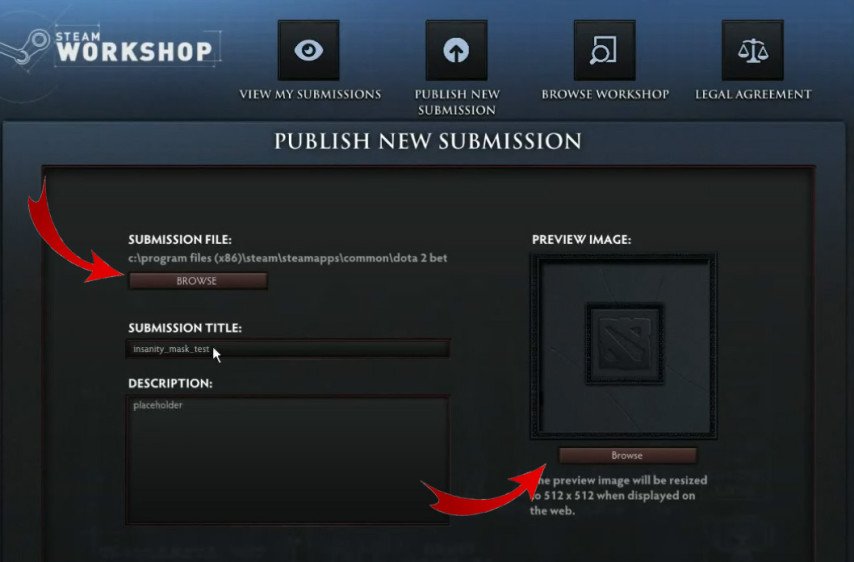 Credit: Valve Corporation
Item Presentation
 Credit: Valve Corporation
The submission stage is a moment of truth for every Dota 2 item creator. It's when your hard work, creative approach, and dedication to the craft will be presented for review by Valve and the Dota 2 community. In this chapter, we will guide you through the intricacies of the submission process so that you can confidently and effectively navigate it.
Understanding the Dota 2 Workshop Platform:
Purpose: Dota 2 Workshop is Valve's official platform where creators can submit their items for potential inclusion in the game.
Community Orientation: One of the unique aspects of the Workshop is community participation. Players can browse, rate, and comment on submitted works, influencing the selection of items.
Submission Stages:
Accessing the Workshop: Log in to Steam and navigate to the Dota 2 Workshop page. Ensure you have a verified Steam account with a purchase history to submit items.
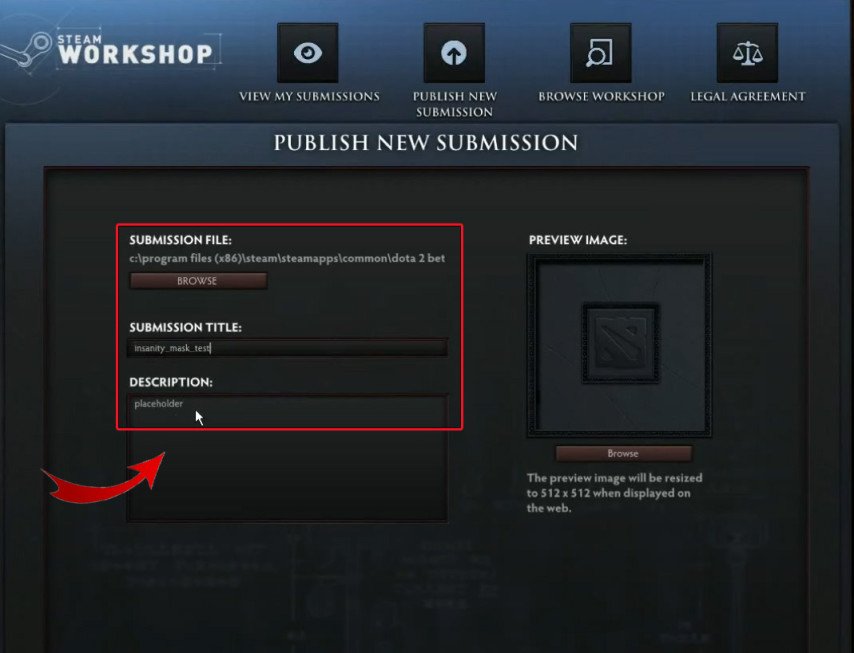
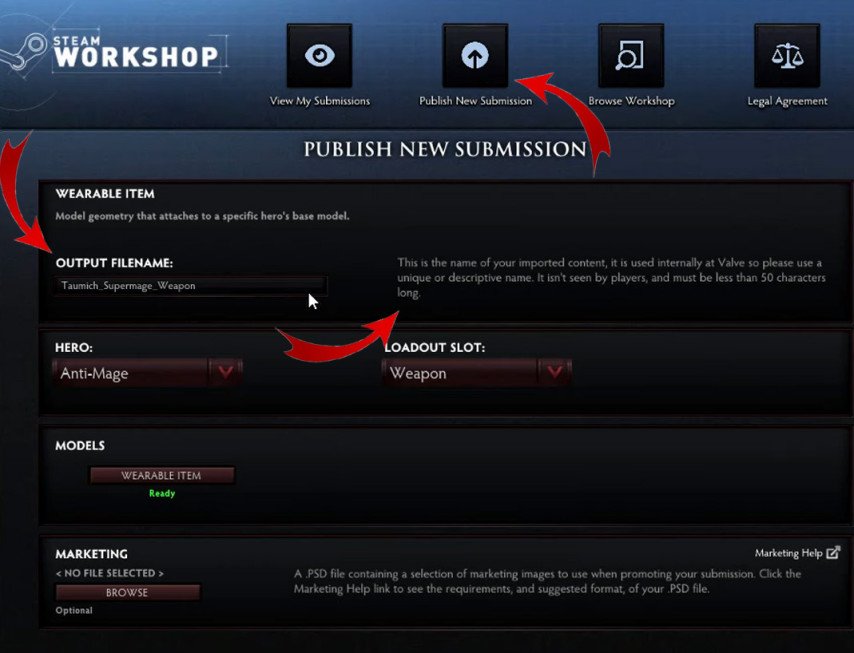
Starting a New Submission: Click on the "Submit New Item" button, which will open the item submission interface.
Item Details:
Name: Provide a unique and memorable name for the item.
Description: Write a brief description, detailing the item's history and features. This is your chance to sell the concept to reviewers and the community.
Category: Choose a suitable category for your item, such as weapon, armor, courier, etc.
 Credit: Valve Corporation
Uploading Assets:
3D Model: Upload the 3D model of your item in the specified format.
Textures: Include all texture maps, ensuring they meet recommended resolutions.
Additional Assets: If the item has animations, rigs, or special effects, upload those as well.
Preview Images: Provide high-quality preview images. These are the first things viewers will see, so make sure they are attention-grabbing and effectively showcase the item.
Tags and Metadata: Add relevant tags that will help classify and describe the item. This makes it easier to search for and appeals to the target audience.
Rights and Agreements: Before finalizing the submission, agree to Valve's rules and terms for Workshop submissions.
Final Check and Submission: Before hitting the submit button, review all provided data and assets one last time.
 Credit: Valve Corporation
Actions After Submission:
Community Interaction: Monitor feedback and ratings on your submission. Engage with comments, answer questions, and be open to constructive criticism.
Updates: Based on feedback, there may be a need to make corrections or updates to your work. The Workshop allows you to upload changes without affecting the ratings and comments of the original material.
Promotion: To garner more visibility and support, promote your work on social media, forums, and other platforms.
 Credit: Valve Corporation
Awaiting Valve Review:
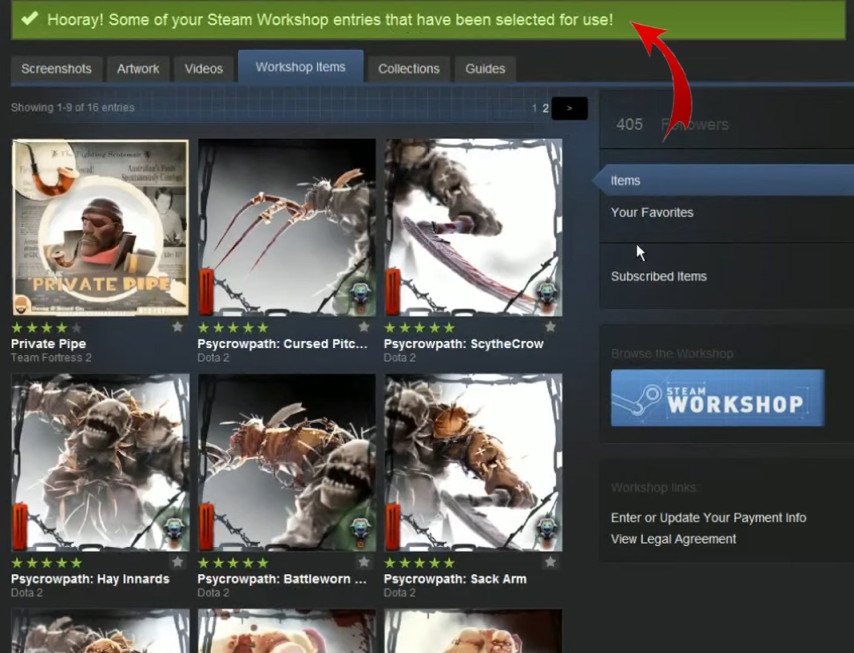
Evaluation Process: Valve's team assesses submitted works based on technical and aesthetic criteria. They also take into account community feedback and ratings.
Notification: If your item is selected for inclusion in Dota 2, you will receive a notification from Valve with detailed instructions on next steps.
Submitting your item to the Dota 2 Workshop is simultaneously exciting and nerve-wracking. It's the culmination of your creative journey, potentially making your item a part of Dota 2's rich universe. Thoroughly preparing your submission, actively engaging with the community, and being open to feedback increase the chances of your item being chosen.