Dota 2 Launch Options: Detailed Guide
Author: Hawk Live LLC
Last updated:
In Dota 2, Launch options can be helpful to a player’s requirements and hence in turn assists in cutting down loading time. In this tutorial, we will explain in detail what Dota 2 launch parameters are used by gamers according to their needs and configuration of the mechanic devices.
What is Dota 2 launch options?
Dota 2 launch options are defined as commands that are set in the configuration of the game Dota 2 which is launched from the Steam application. These commands help in changing the graphics quality and performance of the game as well as other parameters associated with game controls. In many cases, launch parameters assist in overcoming the problems of the game starting without changing all the parameters that the game should normally have to start.
How to configure Dota 2 launch options?
The following is a brief overview of how to configure launch options in Dota 2 using steam, quite banal, as it would seem steps. Select options from your commands and perform as instructed.
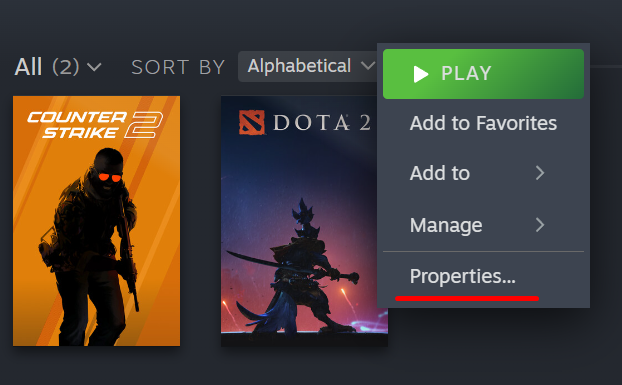
Start the Steam Client and find Dota 2 from your game library. Right click the icon of a game and click “Properties” below it.
Credit: Steam
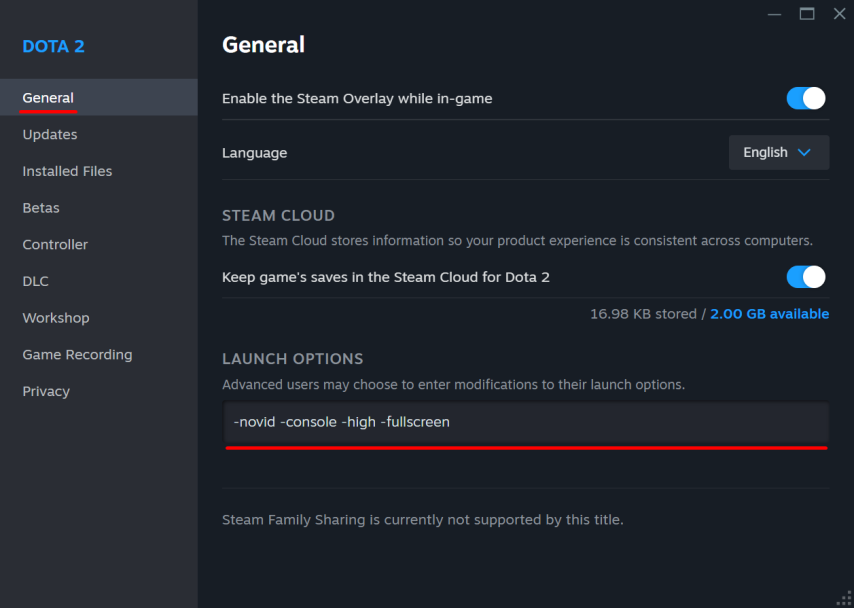
Use “General” selection and look for the “Launch Options” below.
Type good commands which you want to use while playing.
 Credit: Steam
Best Dota 2 launch options
Gamers agree that there exist a set of commands for proper game settings. These commands also activate particular details and speed up the game load. The following commands can be used in different instances according to the user’s liking.
Parameter Description | Launch Option |
|---|---|
Skips introductory videos for faster launch | -novid |
Enables in-game console for command input | -console |
Sets system priority to high for better performance | -high |
Launches the game in DirectX 11 | -dx11 |
Sets display mode to borderless window | -noborder |
Sets display mode to fullscreen | -fullscreen |
Caps the maximum FPS to a specified number | +fps_max # |
Every single gamer who wants to restrict the loading time of Dota 2 should use -novid since it can cut down the whole waiting time. Likewise, since –fullscreen used around where windowed mode becomes the default. The rest of the commands are selected by the gamer as per his known preferences.
Dota 2 Launch Options for Low End PC
Sometimes things break with not weak, or out dated computers. When such a situation arises, then there are parameters that can be set which are in the launcher tab options along with performance ones. This works well for people who are having systems which are not very good at gaming. Below are the parameters and its brief description.
Parameter Description | Launch Option |
|---|---|
Disables font anti-aliasing | -noaafonts |
Disables joystick support | -nojoy |
Disables virtual reality modules | -novr |
Disables portrait rendering on the map | +map_enable_portrait_worlds 0 |
Disables ember effects in the main menu | +dota_embers 0 |
Caps maximum FPS at 0 (unlimited) | +fps_max 0 |
Sets high process priority for the game | -high |
Optimizes texture preloading | -prewarm |
To make the processes much easier, the above parameters can be changed in the mode for it removes bugs as well as FPS enthursiastics. It also decreases the load on a graphic card while increasing the load on other parts of the computer that is dedicated to the game. Even players with low end systems will not have issue with performance impact while using the modified parameters.
Conclusion
The Dota 2 launch options can be used, for instance, to change the graphics or the speed of the game or to exceed certain features that are off by default. It is adviced to modify the launch options accordingly to your PC for better configuration.