Best Dota 2 console commands
Author: Hawk Live LLC
Last updated:

Diving into Dota 2 reveals how to better personalize this game. The power of the game lies in customization enabled by console commands that allow players to modify settings, tinker with mechanics and access features beyond typical user interface reach. In other words, you can make Dota 2 work for you — and around your performance requirements too; thus unlocking refined gameplay.
How to Activate Console Commands in Dota 2
If you want to use commands while playing or any time at all then turning on its console is the first thing that should be done. Here’s how:
Open the Steam client and navigate to your library.
Right-click on Dota 2 and select “Properties.”
In the “General” tab, click on “SET LAUNCH OPTIONS.”
Type in -console and click “OK.”
 Credit: Valve Corporation
Following these steps will make sure whenever starting Dota 2 there would be an active console. You can toggle this console using backslash (\) or tilde (~) key depending upon what keyboard layout is being used.
How to Set Console Commands in Dota 2
Setting console commands in Dota 2 can optimize your game settings, allowing for a tailored gameplay experience. To input a command:
Open the console during a game or at the main menu by pressing the \ or ~ key.
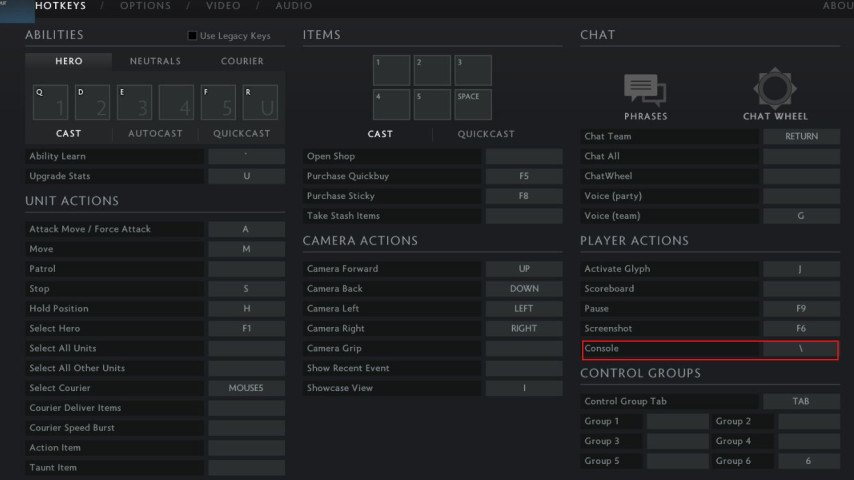 Credit: Valve Corporation
Type your command into the console and press Enter.
Commands can range from graphical adjustments to enabling specific UI elements, among many others. For convenience, you can create a configuration file (.cfg) containing all your preferred console commands and execute it automatically each time the game starts.
Dota 2 Best Console Commands List
We've compiled a list based on popularity and utility to provide you with the most useful console commands. This table outlines the commands and their effects, ensuring you have the tools to enhance your Dota 2 gameplay.
Command | Description |
|---|---|
dota_disable_range_finder 0 | Enables a range finder for abilities and items, showing a line from your hero to the cursor. |
cl_showfps 1 | Displays the current frames per second (FPS) on your screen. |
dota_screen_shake 1 | Enables screen shake effects during certain abilities and events. Can be set to 0 to disable. |
net_graph 1 | Displays network information, including ping, loss, and FPS. Useful for monitoring connection quality. |
fps_max [number] | Limits the maximum FPS. Can be used to stabilize performance on older systems. |
bind "[key]" "[action]" | Binds a specific action to a key. For example, binding a phrase to quickly communicate with your team. |
dota_minimap_hero_size [number] | Adjusts the size of hero icons on the minimap. Useful for clarity. |
rate [number] | Sets the maximum number of bytes per second the host can receive data. Adjusting this can improve connection stability. |
dota_force_right_click_attack 1 | Allows you to deny friendly units with a right-click. |
dota_health_per_vertical_marker [number] | Sets the amount of health that each vertical marker on the hero's health indicator represents. |
dota_ping_display_delay 1 | Enables the display of ping on the screen without needing to open the console. |
dota_show_hero_finder 1 | Enables an indicator on the minimap that helps to find heroes during the game. |
echo "[text]" | Outputs text to the console. Can be used to check that console commands are executed correctly. |
cl_interp [number] | Adjusts interpolation, which affects how the game processes and displays movements and actions of players. |
cl_interp_ratio [number] | Sets the interpolation ratio, which can help smooth gameplay on unstable connections. |
cl_smooth [0/1] | Enables or disables camera movement smoothing. |
Remember, these commands are just the beginning. Experimenting with different console commands can significantly impact your gameplay, from reducing latency to customizing the user interface to suit your needs better.
Conclusion
Console commands in Dota 2 can be used to optimize and personalize your gaming experience. These utilities are indispensable for any player, whether they need to tweak performance or gain an advantage in their next match. The mastery of Dota 2 depends on one’s ability to play skillfully as well as understand this game’s vast customization opportunities through console commands – so don’t be afraid!