CS2 Workshop Maps: How to play custom maps in Counter-Strike 2
Author: Hawk Live LLC
Last updated:

The community of players is actively working on the development of the popular shooter Counter-Strike 2, creating unique custom maps, thanks to the tools of the Steam Workshop. In this article we will look at the main types and features of custom maps, as well as learn how to play on maps from the CS2 Workshop.
What are CS2 Workshop maps?
CS2 Workshop maps are authored by fans of the game, which expand the basic set of maps from the developers. The community offers both finalized versions of standard locations and many non-standard game modes and team scenarios. Moreover, any enthusiast with minimal technical skills can create their own custom map in CS2 Workshop.
CS2 Custom maps: types and features
There are many types of custom maps in CS2, let's consider the most popular formats.
Training maps. This type is suitable for improving weapon handling skills and improving shooting accuracy.
Retake mode maps. These maps are designed specifically for the quick game mode Retake. They are optimal for quick firefight scenarios.
Entertainment modes. In the CS2 workshop users create maps that significantly change the gameplay. Such maps can feature a variety of mini-games, as well as mechanics that change the focus of the game from gunfights to something else.
Realistic maps. On such maps fans try to realistically recreate locations from the real world, and also supplement the standard CS2 maps with various visual effects.
Scenario maps. Such custom maps offer various story missions for team or single player play.
Custom maps greatly expand the capabilities of Counter-Strike 2, offering fans a unique gaming experience.
How to play custom CS2 Workshop maps?
To play custom maps from the CS2 Workshop, just follow the simple instructions:
Open the CS2 Workshop and find the map you are interested in.
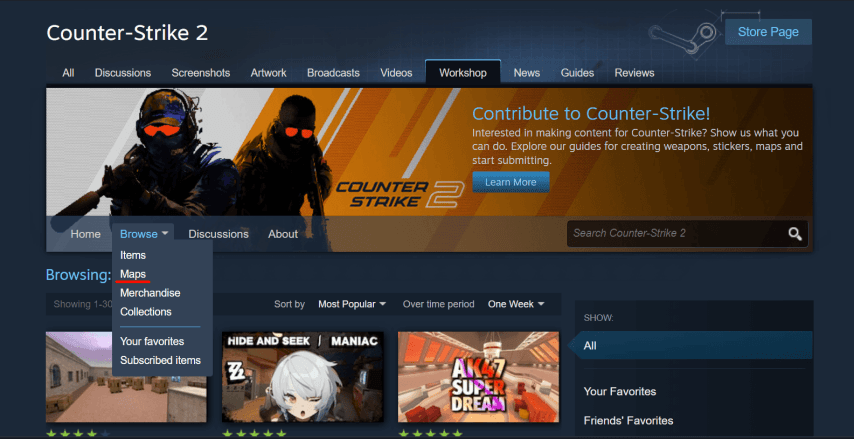 Credit: Steam
Download it by clicking on the “Subscribe” button.
 Credit: Steam
Start CS2 and go to the “Workshop Maps” section.
Select the downloaded map, specify the desired mode and load the map.
After loading, you can start playing with bots or call your friends to the server. We wrote about how to do this in one of the previous articles.
 Credit: CS2
It is worth noting that the available game modes depend on the selected map, because of which the process can be slightly different, depending on the peculiarities of the location.
Best offline workshop maps CS2
The CS2 Workshop is regularly updated with new custom maps, but some of them have already gained high popularity in the community, receiving positive feedback from many players.
Aim Botz. It is one of the most popular training maps for improving aiming accuracy. The player can customize the difficulty and the number of bots to adapt the game conditions to his abilities. The map is ideal for those who want to develop reaction and shooting accuracy.
Nuke After Hours. Presents a reworked classic Nuke map with an impressive nighttime atmosphere. The lighting and textures of the map have been changed, giving it a fresh and darker look. The map is perfect for players who want to try a new interpretation of a familiar location.
Inferno Night. Night version of the famous Inferno map. Dark lighting and a changed color palette give it an unusual atmosphere, making players look at a familiar battlefield in a new way. Familiar locations look completely different here.
Brewery. A map made in the style of an old beer factory. The locations here are characterized by narrow passages, ladders and various shelters, which gives the game dynamics. It is ideal for fast and tense matches where knowledge of the map plays a key role.
Palais. Offers an optimal combination of architectural elements and open spaces with a lot of details. Here players can realize many interesting strategies due to the numerous hiding places. Palais is ideal for players who like to think deeply about map-based tactics.
On all maps, in addition to the training map, you can play both alone against bots to practice your skills and with friends.
CS2 unable to start workshop map: What to do?
If you have problems loading casts from CS2 Workshop, you can try several ways to troubleshoot the problem.
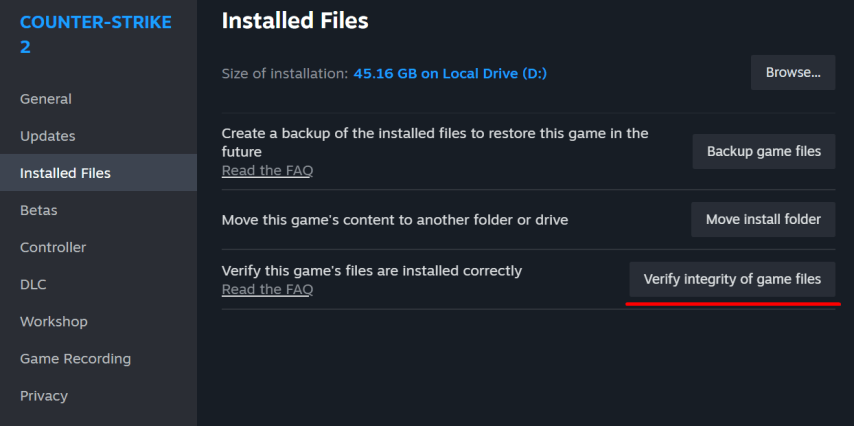
Check the integrity of the game files. To do this, go to Steam and right-click on Counter-Strike 2, then open “Properties”, “Installed Files” and click “Verify integrity of game files”. This method will help if the problem occurred due to corrupted game files.
 Credit: Steam
Update or download the map again. Updating files by the author can be the cause of problems. In this case, it is enough to simply update the map in the workshop. Sometimes, problems with the launch of the map can be solved by a simple uninstallation and then reinstallation.
Return the standard game settings. If the above methods didn't help, it is possible that the problem will be solved after returning the default settings, as the problems with the map launch may be caused by mismatch between the map requirements and user settings.
Conclusion
Maps from CS2 Workshop allow you to significantly diversify the gameplay by utilizing the creative developments of the gaming community. Installing custom maps is just a couple of clicks, but their capabilities allow you to look at your favorite game in a new way.