Shocking CS2 Bug: How to Stop Floating Bullets After Shooting
Author: Hawk Live LLC
Last updated:
There is a mystery for many CS2 players which they know but are confused. After firing, bullets appear to be suspended in the air. With increasing frequency, many people call this issue a problem and it needs fixing. One of the scenarios where such problem is so apparent that it beats all understanding is playing bots in offline mode, why is this happening? So one of the ways to look at it is that, it’s just games in 2023, it can’t be so hard to imagine such flaws. However, not only are they distracting, but it has the potential to influence how the game is played. In this article, we will explain how to deal with cs2 stopping floating bullets and getting things back on track.
Causes of Floating Bullets
Graphics Glitches: Flaws in the graphics engine can cause such artifacts.
Outdated Drivers: Old graphics card drivers may lead to incorrect rendering of objects.
Game Settings: Incorrect or overly high graphics settings can cause problems.
Mods and Plugins: Installed mods might conflict with the game and cause bugs.
Solutions to the Floating Bullets Issue
Update Your Graphics Card Drivers
Installing the latest drivers can resolve many graphical issues.
For NVIDIA: Visit the official NVIDIA website and download the latest drivers.
 Credit: Nvidia Corporation
For AMD: Go to the AMD website to download the current drivers.
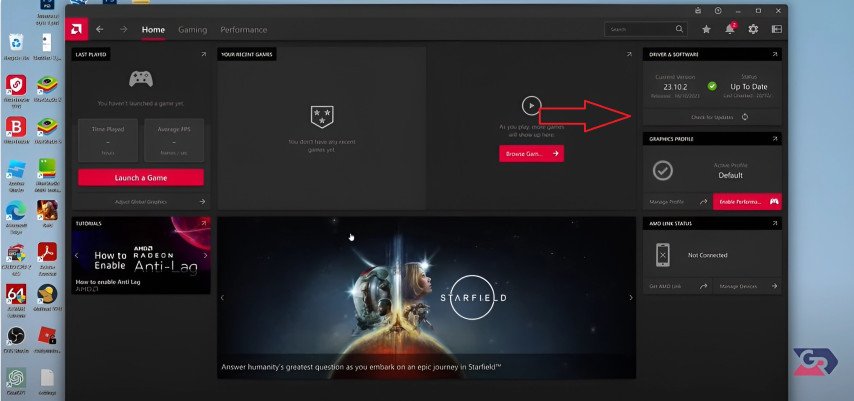 Credit: AMD Corporation
Verify the Integrity of Game Files
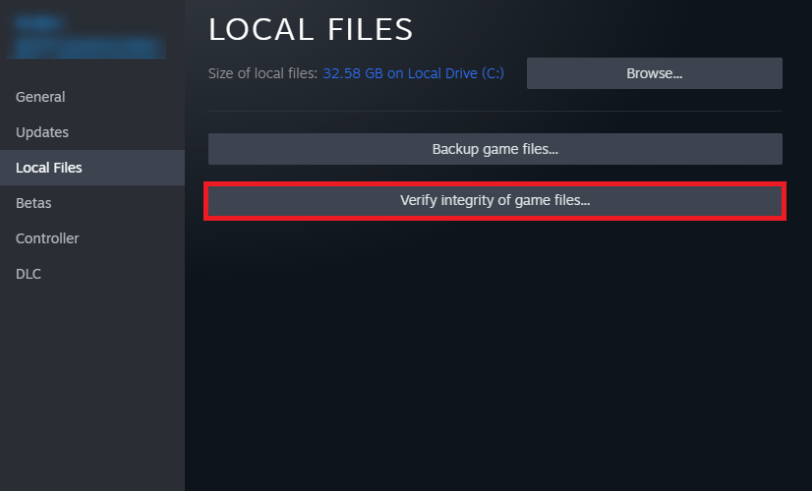 Credit: Valve Corporation
Errors can occur due to corrupted game files.
Open Steam and navigate to your library.
Find CS2, right-click it, and select "Properties."
Go to the "Local Files" tab and click "Verify Integrity of Game Files."
Reset Graphics Settings
Sometimes high settings can overload your system.
Launch the game and access graphics settings by launching CS2.
For each of the parameters, set the values to medium or low.
Exit the game and check if the error has been removed.
Disable Mods and Plugins
In case you enable any extra mods, the bugs would be caused by them.
Eliminate all modifications either completely or on a temporary basis.
Visit the directory in which the mod installations are supported.
Launch the game if additional plugins were used.
Play in Online Mode
The problem usually arises when bots are used when a player is in offline mode.
Why not try playing in online mode instead?
If the problem is resolved, then the bug should be that CS2 offline bots bullets are floating around in air What appears to be: Bullets in air
Conclusion
Shooting any bullets in CS2 offline can destroy the entire shooting experience. However, solutions are given for resolving the given problem. In case none of the approaches provide any consolation, do not hesitate in reaching the technical support of the game for help.